;}.cls-2{fill:url(%23Unbenannter_Verlauf_5-2);}.cls-3{fill:url(%23Unbenannter_Verlauf_5-5);}.cls-4{fill:url(%23Unbenannter_Verlauf_5-6);}.cls-5{fill:url(%23Unbenannter_Verlauf_5-3);}.cls-6{fill:url(%23Unbenannter_Verlauf_5-4);}%3c/style%3e%3clinearGradient%20id='Unbenannter_Verlauf_5'%20x1='1075.02'%20y1='943.06'%20x2='1201.78'%20y2='943.06'%20gradientUnits='userSpaceOnUse'%3e%3cstop%20offset='0'%20stop-color='%2322b88a'/%3e%3cstop%20offset='1'%20stop-color='%231a9e78'/%3e%3c/linearGradient%3e%3clinearGradient%20id='Unbenannter_Verlauf_5-2'%20x1='234.11'%20y1='663.43'%20x2='1058.29'%20y2='663.43'%20xlink:href='%23Unbenannter_Verlauf_5'/%3e%3clinearGradient%20id='Unbenannter_Verlauf_5-3'%20x1='843.79'%20y1='1064.84'%20x2='1096.04'%20y2='1064.84'%20xlink:href='%23Unbenannter_Verlauf_5'/%3e%3clinearGradient%20id='Unbenannter_Verlauf_5-4'%20x1='1120.37'%20y1='662.1'%20x2='1253'%20y2='662.1'%20xlink:href='%23Unbenannter_Verlauf_5'/%3e%3clinearGradient%20id='Unbenannter_Verlauf_5-5'%20x1='97.45'%20y1='265.53'%20x2='385.89'%20y2='265.53'%20xlink:href='%23Unbenannter_Verlauf_5'/%3e%3clinearGradient%20id='Unbenannter_Verlauf_5-6'%20x1='295.45'%20y1='255.64'%20x2='1213.95'%20y2='255.64'%20xlink:href='%23Unbenannter_Verlauf_5'/%3e%3c/defs%3e%3cpath%20class='cls-1'%20d='M1201.78,871c-.61,1.55-1.23,3.1-1.86,4.66-20.33,50.18-47.14,96.85-80.02,139.45-7.56-13.82-21.78-22.31-37.69-22.31h-7.19c29.82-37.26,54.46-78.02,73.61-121.8h53.15Z'/%3e%3cpath%20class='cls-2'%20d='M665.24,264.59l69.02,186.52c21.3,57.57,66.69,102.96,124.26,124.26l186.52,69.02c17.67,6.54,17.67,31.54,0,38.08l-186.52,69.02c-57.57,21.3-102.96,66.69-124.26,124.26l-69.02,186.52c-6.54,17.67-31.54,17.67-38.08,0l-69.02-186.52c-21.3-57.57-66.69-102.96-124.26-124.26l-186.52-69.02c-17.67-6.54-17.67-31.54,0-38.08l186.52-69.02c57.57-21.3,102.96-66.69,124.26-124.26l69.02-186.52c6.54-17.67,31.54-17.67,38.08,0Z'/%3e%3cpath%20class='cls-5'%20d='M1082.21,1021.98h-79.13c-1.7,0-2.97-1.56-2.62-3.23l22.72-109.35c2.94-14.16-15.11-22.74-24.23-11.51l-152.04,187.31c-7.32,9.02-.9,22.5,10.72,22.5h79.13c1.7,0,2.97,1.56,2.62,3.23l-22.72,109.35c-2.94,14.16,15.11,22.74,24.23,11.51l152.04-187.31c7.32-9.02.9-22.5-10.72-22.5Z'/%3e%3crect%20class='cls-6'%20x='1120.37'%20y='486.36'%20width='132.63'%20height='351.48'%20rx='19.58'%20ry='19.58'/%3e%3cpath%20class='cls-3'%20d='M250.58,128.27l13.88,55.81c7.19,28.91,29.76,51.47,58.66,58.66l55.81,13.88c9.29,2.31,9.29,15.51,0,17.82l-55.81,13.88c-28.91,7.19-51.47,29.76-58.66,58.66l-13.88,55.81c-2.31,9.29-15.51,9.29-17.82,0l-13.88-55.81c-7.19-28.91-29.76-51.47-58.66-58.66l-55.81-13.88c-9.29-2.31-9.29-15.51,0-17.82l55.81-13.88c28.91-7.19,51.47-29.76,58.66-58.66l13.88-55.81c2.31-9.29,15.51-9.29,17.82,0Z'/%3e%3cpath%20class='cls-4'%20d='M1213.95,453.21h-67.62c-1.23,0-2.47.04-3.67.12-27.03-63.89-65.84-121.36-115.42-170.94-51.54-51.54-111.61-91.44-178.55-118.59-64.67-26.22-133.03-39.52-203.16-39.52s-138.48,13.3-203.16,39.52c-33.73,13.67-65.72,30.61-95.75,50.63l-.19-.05c-23.62-5.88-42.51-22.85-51-45.24,37.87-26.86,78.65-49.21,122.01-66.79,72.63-29.44,149.37-44.38,228.08-44.38s155.45,14.93,228.08,44.38c75.2,30.51,142.67,75.31,200.53,133.15,57.84,57.85,102.65,125.33,133.15,200.53,2.31,5.7,4.54,11.43,6.66,17.19Z'/%3e%3c/svg%3e)
Why SuperSupport Does Not Change Firewall Rules
Open a port or change the VPN via AI chat? SuperSupport deliberately stays out of firewalls and routers. Why, and what the agent does from the workstation.

A firewall rule by chat is set quickly. And just as quickly it is a hole.
“Can you please open the port for remote support?” “Open up the guest Wi-Fi.” “Set the VPN so it is always connected.” Requests like these land in support. An AI agent with access to the firewall could grant them straight away. SuperSupport deliberately does not, just as with password resets and user management.
Where the agent works, and where it does not
The SuperSupport agent runs on the workstation, Windows or Mac. There it checks what is going on with the device.
Firewalls, routers, switches, Wi-Fi controllers and the VPN gateway are infrastructure. They apply to all devices in the company. Changes to them are administration, not first level.
Reason 1: A rule applies to everyone
A mistake on a workstation affects one employee. A mistake on the firewall affects the whole company, up to a total outage of internet, VPN or telephony. Whoever changes a rule has to know the consequences for all devices and services.
Reason 2: Port forwards are entry points
Openly reachable services are among the most common ways in for attackers, above all Remote Desktop. See Remote Desktop will not connect and Ransomware: recognizing it and first steps. A port forward “just for the technician” often stays open for years, in our experience.
Reason 3: No credentials to the infrastructure in the support tool
A tool that can change firewall rules needs the firewall's admin credentials. Whoever compromises the tool then holds the key to the network. SuperSupport does not need these credentials for first level, so it does not get them.
Reason 4: Changes to the infrastructure should be documented
What was changed, when and why? For firewall and network changes, that is the basis for troubleshooting, audits and insurance. See IT documentation for small businesses and Cyber insurance.
What SuperSupport does instead
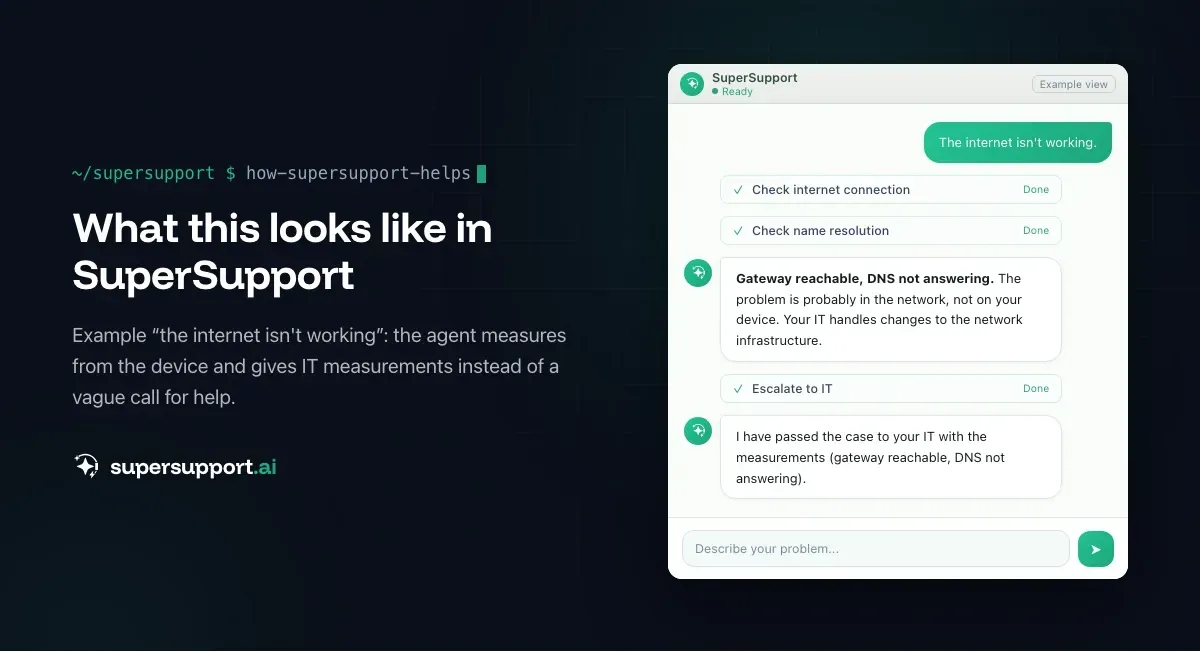
Network problems almost always begin with a sentence like “The internet is not working”. That is exactly where the agent helps, from the affected device:
- Adapter, IP address, gateway – Is the device on the right network at all?
- DNS – Is the name resolved?
- Reachability – Does the server, the printer, the NAS respond? Is the port open?
- Wi-Fi – Signal, frequency band, dropouts
- VPN – Is the client running, is it connected?
- Proxy, time, certificates – Is something on the device preventing the connection?

Beta
IT support that fixes itself.
supersupport.ai handles your 1st-level support fully automatically. Secure your spot on the waitlist now.
Join the Waitlist- If it is the device, it solves it: flush the DNS cache, restart an adapter, reconnect a Wi-Fi profile, remove saved old credentials. See Internet connection unstable and Network drive disconnected.
- If it is the network, it hands IT a case with measurements: “Gateway reachable, DNS not responding, affects three devices on the second floor” instead of “The internet is not working”.
- Sensitive changes on the device (fixed IP, turning off adapters) it submits for approval.
That turns a vague cry for help into a precise report, and the change to the infrastructure is made by whoever can take responsibility for it.
Who is this the right choice for?
- Small and midsize businesses that have an MSP look after their firewall and do not want additional access points there.
- MSPs that manage customer networks centrally: the agent helps with narrowing things down, and the change stays with the technician. See MSPs.
- Companies with security requirements that have to keep changes to the infrastructure traceable.
What does SuperSupport offer?
SuperSupport takes over first-level IT support via chat, directly on the Windows or Mac device: the agent handles harmless things itself, submits sensitive ones to IT for approval, every step is logged, and every chat is also the case record. How this looks for internal IT teams and MSPs is described on the respective pages.
Frequently asked questions
Can SuperSupport change firewall rules or router settings?
No, deliberately not. The SuperSupport agent runs on Windows and Mac workstations, not on firewalls, routers, switches or Wi-Fi controllers. Changes to the network infrastructure stay with IT or the MSP.
Why should an AI not create firewall rules?
Because a firewall rule applies to all devices, can open security holes and is often not reversed. Opening a port on request, for example for Remote Desktop, is one of the most common ways attackers get into company networks.
What does SuperSupport do about network problems?
The agent diagnoses from the affected device: connection, IP address, gateway, DNS, VPN, Wi-Fi signal, whether servers and ports are reachable. If the problem is on the device, it solves it; if it is on the network, it hands IT a case with measurements instead of “The internet is not working”.
Does the agent change network settings on the PC?
Only on the device itself and only if it is harmless or has been approved, such as flushing the DNS cache, restarting an adapter or reconnecting a Wi-Fi profile. Turning off network adapters or changing fixed IP addresses it submits to IT for approval.
Who changes the firewall and router then?
IT or the MSP, with access to the management interface, documentation of the change and ideally a four-eyes principle for security-relevant rules.
Beta
IT support that fixes itself.
supersupport.ai handles your 1st-level support fully automatically. Secure your spot on the waitlist now.
Join the WaitlistTimo Haslberger is Co-Founder & CPO of SuperSupport.ai. He owns the entire product experience: from first user interaction to automated problem resolution. Before co-founding SuperSupport.ai, he saw firsthand how IT teams drown in repetitive tickets. Today he's building the product that changes exactly that.
This article was created with AI assistance and editorially reviewed.
Related Articles
Why SuperSupport Doesn't Deploy Software to All Devices
New version on all 50 PCs by chat with an AI? SuperSupport is deliberately not a tool for fleet-wide software deployment. Rollouts belong in RMM or Intune.

Why SuperSupport Doesn't Restart Servers
Restart servers, reconfigure services, install updates by chat with an AI? SuperSupport deliberately stays out of servers. Why that isn't 1st-level work.
Why SuperSupport Does Not Take Over Your Screen
Some AI agents click through the screen like a human. SuperSupport does not take over mouse and keyboard but runs targeted, logged checks. Why it is safer.