;}.cls-2{fill:url(%23Unbenannter_Verlauf_5-2);}.cls-3{fill:url(%23Unbenannter_Verlauf_5-5);}.cls-4{fill:url(%23Unbenannter_Verlauf_5-6);}.cls-5{fill:url(%23Unbenannter_Verlauf_5-3);}.cls-6{fill:url(%23Unbenannter_Verlauf_5-4);}%3c/style%3e%3clinearGradient%20id='Unbenannter_Verlauf_5'%20x1='1075.02'%20y1='943.06'%20x2='1201.78'%20y2='943.06'%20gradientUnits='userSpaceOnUse'%3e%3cstop%20offset='0'%20stop-color='%2322b88a'/%3e%3cstop%20offset='1'%20stop-color='%231a9e78'/%3e%3c/linearGradient%3e%3clinearGradient%20id='Unbenannter_Verlauf_5-2'%20x1='234.11'%20y1='663.43'%20x2='1058.29'%20y2='663.43'%20xlink:href='%23Unbenannter_Verlauf_5'/%3e%3clinearGradient%20id='Unbenannter_Verlauf_5-3'%20x1='843.79'%20y1='1064.84'%20x2='1096.04'%20y2='1064.84'%20xlink:href='%23Unbenannter_Verlauf_5'/%3e%3clinearGradient%20id='Unbenannter_Verlauf_5-4'%20x1='1120.37'%20y1='662.1'%20x2='1253'%20y2='662.1'%20xlink:href='%23Unbenannter_Verlauf_5'/%3e%3clinearGradient%20id='Unbenannter_Verlauf_5-5'%20x1='97.45'%20y1='265.53'%20x2='385.89'%20y2='265.53'%20xlink:href='%23Unbenannter_Verlauf_5'/%3e%3clinearGradient%20id='Unbenannter_Verlauf_5-6'%20x1='295.45'%20y1='255.64'%20x2='1213.95'%20y2='255.64'%20xlink:href='%23Unbenannter_Verlauf_5'/%3e%3c/defs%3e%3cpath%20class='cls-1'%20d='M1201.78,871c-.61,1.55-1.23,3.1-1.86,4.66-20.33,50.18-47.14,96.85-80.02,139.45-7.56-13.82-21.78-22.31-37.69-22.31h-7.19c29.82-37.26,54.46-78.02,73.61-121.8h53.15Z'/%3e%3cpath%20class='cls-2'%20d='M665.24,264.59l69.02,186.52c21.3,57.57,66.69,102.96,124.26,124.26l186.52,69.02c17.67,6.54,17.67,31.54,0,38.08l-186.52,69.02c-57.57,21.3-102.96,66.69-124.26,124.26l-69.02,186.52c-6.54,17.67-31.54,17.67-38.08,0l-69.02-186.52c-21.3-57.57-66.69-102.96-124.26-124.26l-186.52-69.02c-17.67-6.54-17.67-31.54,0-38.08l186.52-69.02c57.57-21.3,102.96-66.69,124.26-124.26l69.02-186.52c6.54-17.67,31.54-17.67,38.08,0Z'/%3e%3cpath%20class='cls-5'%20d='M1082.21,1021.98h-79.13c-1.7,0-2.97-1.56-2.62-3.23l22.72-109.35c2.94-14.16-15.11-22.74-24.23-11.51l-152.04,187.31c-7.32,9.02-.9,22.5,10.72,22.5h79.13c1.7,0,2.97,1.56,2.62,3.23l-22.72,109.35c-2.94,14.16,15.11,22.74,24.23,11.51l152.04-187.31c7.32-9.02.9-22.5-10.72-22.5Z'/%3e%3crect%20class='cls-6'%20x='1120.37'%20y='486.36'%20width='132.63'%20height='351.48'%20rx='19.58'%20ry='19.58'/%3e%3cpath%20class='cls-3'%20d='M250.58,128.27l13.88,55.81c7.19,28.91,29.76,51.47,58.66,58.66l55.81,13.88c9.29,2.31,9.29,15.51,0,17.82l-55.81,13.88c-28.91,7.19-51.47,29.76-58.66,58.66l-13.88,55.81c-2.31,9.29-15.51,9.29-17.82,0l-13.88-55.81c-7.19-28.91-29.76-51.47-58.66-58.66l-55.81-13.88c-9.29-2.31-9.29-15.51,0-17.82l55.81-13.88c28.91-7.19,51.47-29.76,58.66-58.66l13.88-55.81c2.31-9.29,15.51-9.29,17.82,0Z'/%3e%3cpath%20class='cls-4'%20d='M1213.95,453.21h-67.62c-1.23,0-2.47.04-3.67.12-27.03-63.89-65.84-121.36-115.42-170.94-51.54-51.54-111.61-91.44-178.55-118.59-64.67-26.22-133.03-39.52-203.16-39.52s-138.48,13.3-203.16,39.52c-33.73,13.67-65.72,30.61-95.75,50.63l-.19-.05c-23.62-5.88-42.51-22.85-51-45.24,37.87-26.86,78.65-49.21,122.01-66.79,72.63-29.44,149.37-44.38,228.08-44.38s155.45,14.93,228.08,44.38c75.2,30.51,142.67,75.31,200.53,133.15,57.84,57.85,102.65,125.33,133.15,200.53,2.31,5.7,4.54,11.43,6.66,17.19Z'/%3e%3c/svg%3e)
Windows Update Fails: Error Codes and Fixes
Windows Update fails with 0x800f0922, 0x80073712 or 0x80070070? What the common error codes mean and how to get updates running again.


The Windows Update error code looks cryptic. But it tells you exactly where things get stuck.
“An error occurred during installation – 0x800f0922.” Windows tries, downloads, restarts, rolls everything back – and the next day it's the same thing again. In our support cases, stuck updates are among the classics, often combined with full storage or old drivers. See also Checking that all updates are installed.
Here is how to solve the most common errors one after another.
First: note the error code
Settings › Windows Update › Update history. For failed updates, you'll find the KB number and the error code.
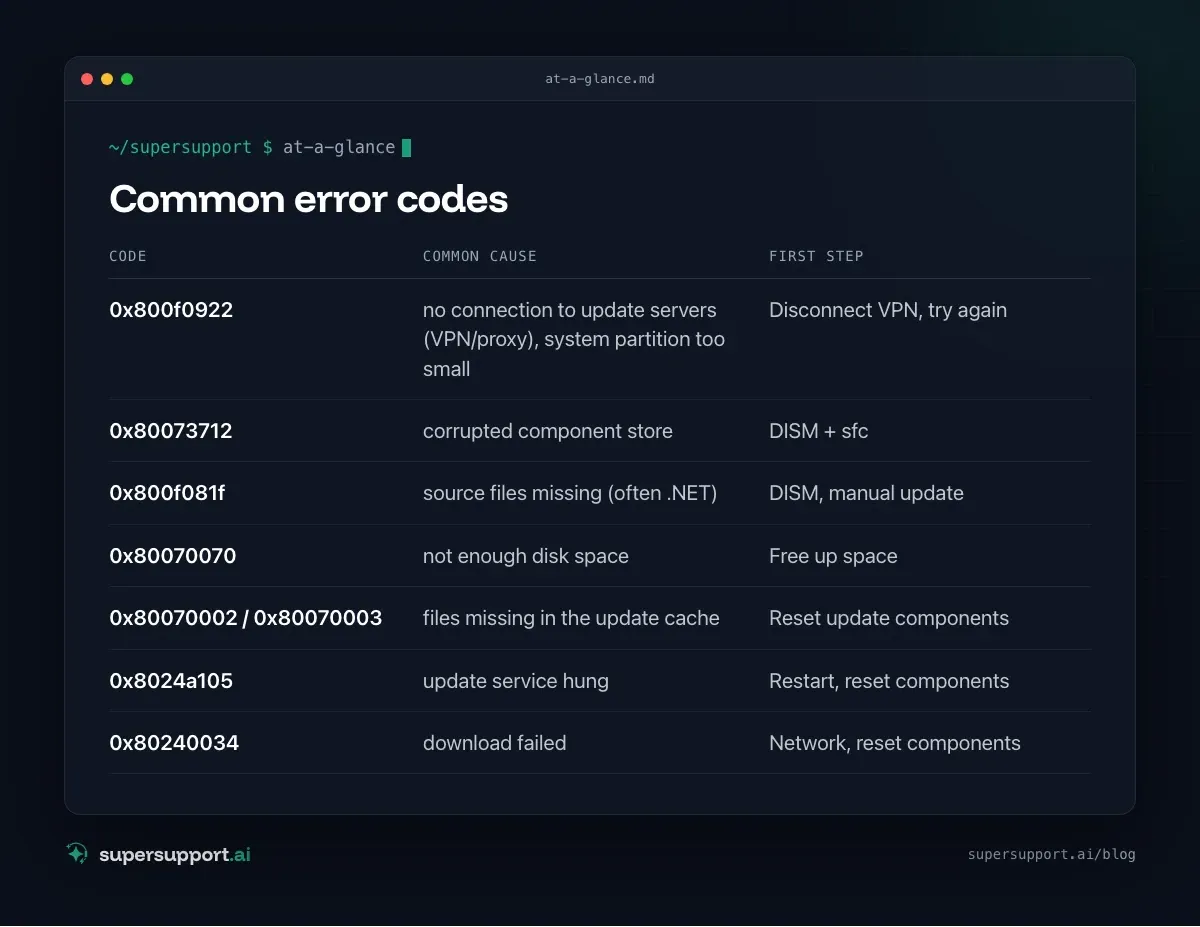
Common error codes
- Code:
0x800f0922– Common cause: no connection to update servers (VPN/proxy), system partition too small; First step: Disconnect VPN, try again - Code:
0x80073712– Common cause: corrupted component store; First step: DISM + sfc - Code:
0x800f081f– Common cause: source files missing (often .NET); First step: DISM, manual update - Code:
0x80070070– Common cause: not enough disk space; First step: Free up space - Code:
0x80070002/0x80070003– Common cause: files missing in the update cache; First step: Reset update components - Code:
0x8024a105– Common cause: update service hung; First step: Restart, reset components - Code:
0x80240034– Common cause: download failed; First step: Network, reset components
Step 1: The simple things
- Restart – a real restart, not shutting down.
- Disk space – at least 20 GB free for larger updates. See Disk full: what can go?.
- Disconnect VPN and connect directly to the internet.
- External devices (USB sticks, card readers): unplug them.
- Troubleshooter for Windows Update via the Get Help app or under Settings › System › Troubleshoot.

Step 2: Repair system files
In a Command Prompt as administrator:
DISM /Online /Cleanup-Image /RestoreHealth
sfc /scannow
Then restart and try the update again. Often helps with 0x80073712 and 0x800f081f.
Step 3: Reset update components
If updates keep failing during download or preparation: Recreate the update cache (Command Prompt as administrator):
net stop wuauserv
net stop bits
net stop cryptsvc
ren C:\Windows\SoftwareDistribution SoftwareDistribution.old
ren C:\Windows\System32\catroot2 catroot2.old
net start cryptsvc
net start bits
net start wuauserv
Then, in Windows Update, click Check for updates again. The download starts from scratch.
Step 4: Install the update manually

14 days free
IT support that fixes itself.
SuperSupport fixes IT problems right on the device, before they turn into tickets. Try it free for 14 days.
Start free trialIn the Microsoft Update Catalog (catalog.update.microsoft.com), search for the KB number, download the version for your own Windows version and architecture (usually x64) and install it by double-clicking.
Step 5: When the partition is the problem
For some updates (especially for the Recovery Environment), the space on the recovery partition isn't enough. This often shows up with 0x80070643 or 0x800f0922. Enlarging the partition is a job for IT – don't try it yourself.
When IT has to step in
- Updates are managed centrally (Intune, WSUS, RMM) – then it's often down to policies or rings. See Patch management for SMBs.
- Partitions have to be adjusted.
- Many devices have the same error.
- Windows won't start after the update – see Blue screen on Windows.

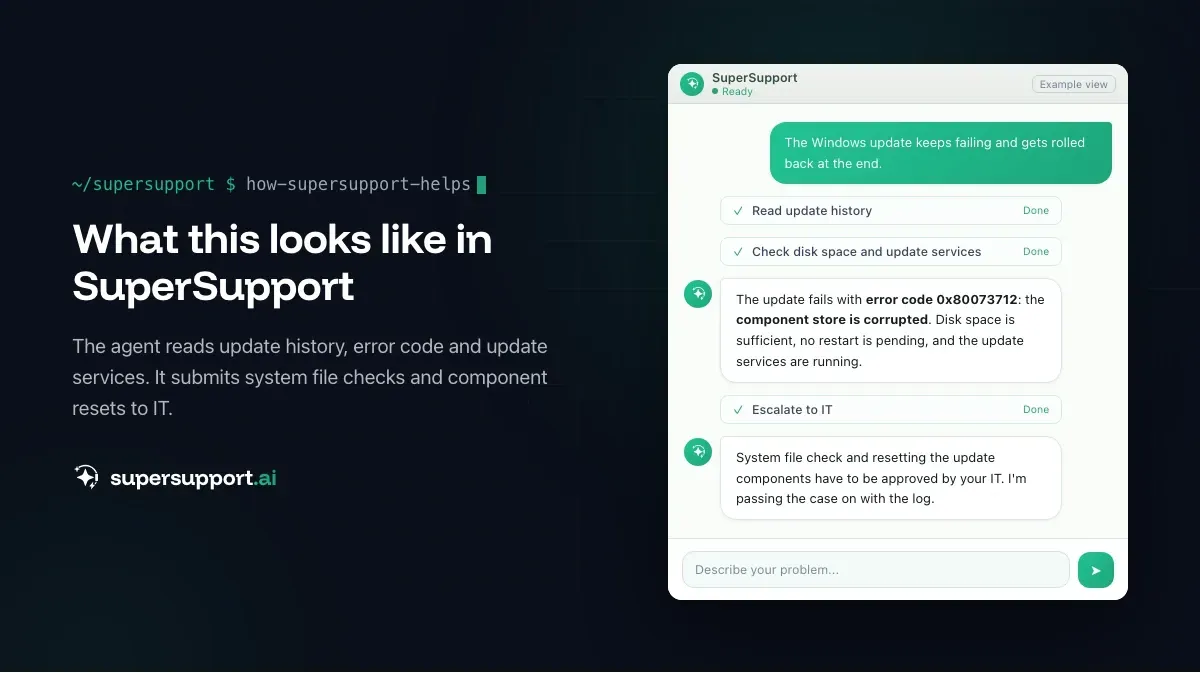
How does SuperSupport help with update errors?
On the Windows device, the SuperSupport agent reads out the update history with KB number and error code, checks disk space, pending restarts and the state of the update services, and classifies the error. System file checks or resetting the update components it submits to IT for approval – with a log of every step. What this looks like for internal IT teams and MSPs is described on their respective pages.
Frequently asked questions
Why can't a Windows update be installed?
Common causes are too little free disk space, corrupted system files or a corrupted component store, a hung update cache, a system partition that is too small, interfering software such as VPN clients or antivirus, and network problems during the download.
What does error 0x800f0922 mean?
Often Windows can't connect to the update servers (for example because of VPN or proxy), or the system partition or recovery partition doesn't have enough space. Missing .NET components can also be behind it.
What does error 0x80073712 mean?
A file that Windows Update needs is missing or corrupted – usually in the component store. DISM /Online /Cleanup-Image /RestoreHealth followed by sfc /scannow helps.
How do I reset Windows Update?
In a Command Prompt as administrator, stop the services wuauserv, bits and cryptsvc, rename the folders SoftwareDistribution and catroot2, and start the services again. Windows recreates the folders and downloads updates again.
Can I install an update manually?
Yes. In the Microsoft Update Catalog (catalog.update.microsoft.com), search for the KB number, download the version matching your Windows version and architecture, and install it by double-clicking. This bypasses problems with downloading through Windows Update.
14 days free
IT support that fixes itself.
SuperSupport fixes IT problems right on the device, before they turn into tickets. Try it free for 14 days.
Start free trialNico Haslberger is Co-Founder & CEO of SuperSupport.ai. With years of experience as an IT technician, he knows the problems in IT support first-hand: from overloaded help desks to recurring tickets that slow teams down. That knowledge is built into every feature of the platform today. He makes sure SuperSupport.ai solves exactly the problems he experienced himself for years.
This article was created with AI assistance and editorially reviewed.
Related Articles
Recover a Deleted File: All the Ways at Work
File deleted, overwritten or unsaved? Recover it via Recycle Bin, OneDrive and SharePoint, version history, AutoRecover, Previous Versions or Time Machine.

Find Your BitLocker Recovery Key: All the Ways
Windows asks for the BitLocker recovery key? Where to find the 48-digit key (Microsoft account, Entra ID, Intune, AD) and why it is requested.
Windows Server Shuts Down Every Hour? Check the License
Server shuts itself down after about an hour – taking VMs and printers with it? Usually the evaluation license has expired. How to spot and fix it.