;}.cls-2{fill:url(%23Unbenannter_Verlauf_5-2);}.cls-3{fill:url(%23Unbenannter_Verlauf_5-5);}.cls-4{fill:url(%23Unbenannter_Verlauf_5-6);}.cls-5{fill:url(%23Unbenannter_Verlauf_5-3);}.cls-6{fill:url(%23Unbenannter_Verlauf_5-4);}%3c/style%3e%3clinearGradient%20id='Unbenannter_Verlauf_5'%20x1='1075.02'%20y1='943.06'%20x2='1201.78'%20y2='943.06'%20gradientUnits='userSpaceOnUse'%3e%3cstop%20offset='0'%20stop-color='%2322b88a'/%3e%3cstop%20offset='1'%20stop-color='%231a9e78'/%3e%3c/linearGradient%3e%3clinearGradient%20id='Unbenannter_Verlauf_5-2'%20x1='234.11'%20y1='663.43'%20x2='1058.29'%20y2='663.43'%20xlink:href='%23Unbenannter_Verlauf_5'/%3e%3clinearGradient%20id='Unbenannter_Verlauf_5-3'%20x1='843.79'%20y1='1064.84'%20x2='1096.04'%20y2='1064.84'%20xlink:href='%23Unbenannter_Verlauf_5'/%3e%3clinearGradient%20id='Unbenannter_Verlauf_5-4'%20x1='1120.37'%20y1='662.1'%20x2='1253'%20y2='662.1'%20xlink:href='%23Unbenannter_Verlauf_5'/%3e%3clinearGradient%20id='Unbenannter_Verlauf_5-5'%20x1='97.45'%20y1='265.53'%20x2='385.89'%20y2='265.53'%20xlink:href='%23Unbenannter_Verlauf_5'/%3e%3clinearGradient%20id='Unbenannter_Verlauf_5-6'%20x1='295.45'%20y1='255.64'%20x2='1213.95'%20y2='255.64'%20xlink:href='%23Unbenannter_Verlauf_5'/%3e%3c/defs%3e%3cpath%20class='cls-1'%20d='M1201.78,871c-.61,1.55-1.23,3.1-1.86,4.66-20.33,50.18-47.14,96.85-80.02,139.45-7.56-13.82-21.78-22.31-37.69-22.31h-7.19c29.82-37.26,54.46-78.02,73.61-121.8h53.15Z'/%3e%3cpath%20class='cls-2'%20d='M665.24,264.59l69.02,186.52c21.3,57.57,66.69,102.96,124.26,124.26l186.52,69.02c17.67,6.54,17.67,31.54,0,38.08l-186.52,69.02c-57.57,21.3-102.96,66.69-124.26,124.26l-69.02,186.52c-6.54,17.67-31.54,17.67-38.08,0l-69.02-186.52c-21.3-57.57-66.69-102.96-124.26-124.26l-186.52-69.02c-17.67-6.54-17.67-31.54,0-38.08l186.52-69.02c57.57-21.3,102.96-66.69,124.26-124.26l69.02-186.52c6.54-17.67,31.54-17.67,38.08,0Z'/%3e%3cpath%20class='cls-5'%20d='M1082.21,1021.98h-79.13c-1.7,0-2.97-1.56-2.62-3.23l22.72-109.35c2.94-14.16-15.11-22.74-24.23-11.51l-152.04,187.31c-7.32,9.02-.9,22.5,10.72,22.5h79.13c1.7,0,2.97,1.56,2.62,3.23l-22.72,109.35c-2.94,14.16,15.11,22.74,24.23,11.51l152.04-187.31c7.32-9.02.9-22.5-10.72-22.5Z'/%3e%3crect%20class='cls-6'%20x='1120.37'%20y='486.36'%20width='132.63'%20height='351.48'%20rx='19.58'%20ry='19.58'/%3e%3cpath%20class='cls-3'%20d='M250.58,128.27l13.88,55.81c7.19,28.91,29.76,51.47,58.66,58.66l55.81,13.88c9.29,2.31,9.29,15.51,0,17.82l-55.81,13.88c-28.91,7.19-51.47,29.76-58.66,58.66l-13.88,55.81c-2.31,9.29-15.51,9.29-17.82,0l-13.88-55.81c-7.19-28.91-29.76-51.47-58.66-58.66l-55.81-13.88c-9.29-2.31-9.29-15.51,0-17.82l55.81-13.88c28.91-7.19,51.47-29.76,58.66-58.66l13.88-55.81c2.31-9.29,15.51-9.29,17.82,0Z'/%3e%3cpath%20class='cls-4'%20d='M1213.95,453.21h-67.62c-1.23,0-2.47.04-3.67.12-27.03-63.89-65.84-121.36-115.42-170.94-51.54-51.54-111.61-91.44-178.55-118.59-64.67-26.22-133.03-39.52-203.16-39.52s-138.48,13.3-203.16,39.52c-33.73,13.67-65.72,30.61-95.75,50.63l-.19-.05c-23.62-5.88-42.51-22.85-51-45.24,37.87-26.86,78.65-49.21,122.01-66.79,72.63-29.44,149.37-44.38,228.08-44.38s155.45,14.93,228.08,44.38c75.2,30.51,142.67,75.31,200.53,133.15,57.84,57.85,102.65,125.33,133.15,200.53,2.31,5.7,4.54,11.43,6.66,17.19Z'/%3e%3c/svg%3e)
Hard Drive Full: What Can You Delete? Windows and Mac
Storage almost full? Find the biggest space hogs and see what you can safely delete on Windows and Mac, and what you should leave alone.


Your drive isn't full because you save too much. It's full because Windows never throws anything away.
“Could the hard drive be full? It feels that way to me.” The computer gets sluggish, updates fail, programs report that there is no space left. The first reaction is often to delete files at random – and in doing so overlook what is really taking up the space.
Two support cases show how different the cause can be: On a Windows laptop at a trades business, a single forgotten file of over 55 GB in a temp folder took up almost a third of the drive. On a MacBook at an agency, storage was 93% full – from 19 GB of app caches, a full Downloads folder and local Time Machine copies. Here's how you find the space hogs and what you can safely delete.
How much storage should stay free?
At least 10 to 15 percent. Below that, there is not enough room for updates, the paging file and temporary files that programs need while running. The computer gets slow, updates abort.
In the Windows case, of around 220 GB only just under 35 GB were still free – after deleting the one file, over 90 GB.
Windows: How do I find the biggest space hogs?
Start with the built-in overview: Settings › System › Storage. There, Windows shows by category what takes up how much – apps, temporary files, documents, other.
For a precise look at folders, PowerShell helps. Largest folders on C: (takes a moment, depending on the drive):
Get-ChildItem C:\ -Directory -Force -ErrorAction SilentlyContinue | ForEach-Object {
  [pscustomobject]@{ Ordner = $_.FullName; GB = [math]::Round((Get-ChildItem $_.FullName -Recurse -File -Force -ErrorAction SilentlyContinue | Measure-Object Length -Sum).Sum / 1GB, 1) }
} | Sort-Object GB -Descending | Select-Object -First 10
And the largest individual files in the user profile:
Get-ChildItem $env:USERPROFILE -Recurse -File -ErrorAction SilentlyContinue |
  Sort-Object Length -Descending | Select-Object -First 15 FullName, @{n='GB';e={[math]::Round($_.Length/1GB,2)}}
If you prefer a graphical tool, use WinDirStat or TreeSize Free – both show at a glance where the space is going.
In the real case, the folder list led straight to the culprit: a folder C:\Temp of almost 56 GB, containing a single file that had been created for a test and never deleted.
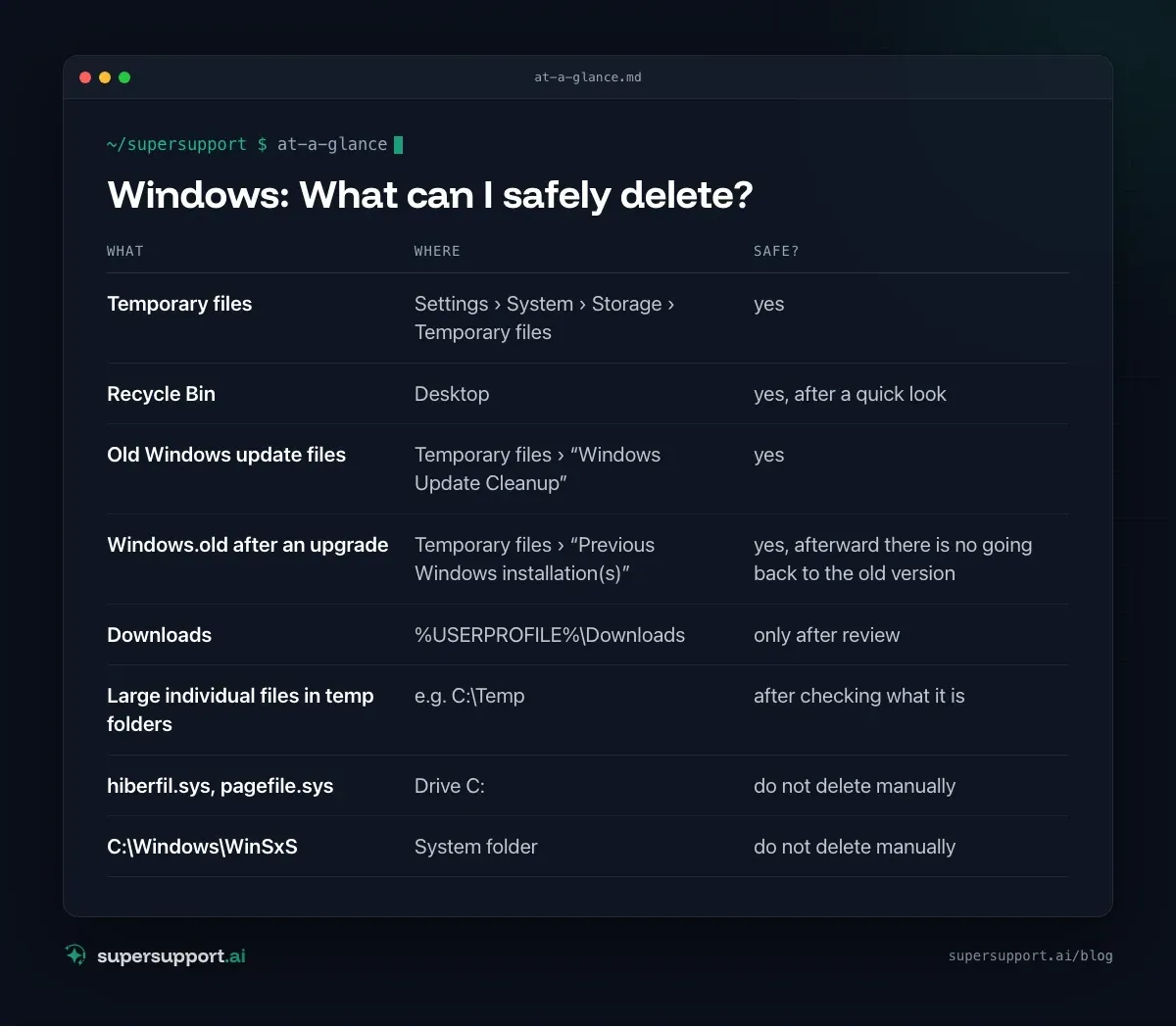
Windows: What can I safely delete?
- What: Temporary files – Where: Settings › System › Storage › Temporary files; Safe?: yes
- What: Recycle Bin – Where: Desktop; Safe?: yes, after a quick look
- What: Old Windows update files – Where: Temporary files › “Windows Update Cleanup”; Safe?: yes
- What:
Windows.oldafter an upgrade – Where: Temporary files › “Previous Windows installation(s)”; Safe?: yes, afterward there is no going back to the old version - What: Downloads – Where:
%USERPROFILE%\Downloads; Safe?: only after review - What: Large individual files in temp folders – Where: e.g.
C:\Temp; Safe?: after checking what it is - What:
hiberfil.sys,pagefile.sys– Where: Drive C:; Safe?: do not delete manually - What:
C:\Windows\WinSxS– Where: System folder; Safe?: do not delete manually
The cleanest option is the built-in Disk Cleanup: Start menu › “Disk Cleanup” › Drive C: › Clean up system files. Leftover updates and old installations also appear there.
Tip: Under Settings › System › Storage › Storage Sense, Windows will clean up temporary files and the Recycle Bin automatically from now on.
Mac: How do I find the biggest space hogs?
Start with the overview: System Settings › General › Storage. There you see the usage by category and recommendations from macOS.
In Terminal, this command shows the largest folders in your user directory:
du -sh ~/* ~/Library/* 2>/dev/null | sort -h | tail -15
14 days free
IT support that fixes itself.
SuperSupport fixes IT problems right on the device, before they turn into tickets. Try it free for 14 days.
Start free trialIn the real case, ~/Library/Caches was at the very top with 19 GB, followed by ~/Downloads with almost 5 GB.
Mac: What can I safely delete?
- What: App caches – Where:
~/Library/Caches/<App>; Safe?: yes, close the app first – it recreates the cache - What: Downloads – Where:
~/Downloads; Safe?: only after review - What: Trash – Where: Dock; Safe?: yes
- What: Local Time Machine snapshots – Where: see below; Safe?: yes, as long as the backup drive is connected regularly
- What: Old iOS backups – Where: Finder › iPhone › Manage Backups; Safe?: yes, if no longer needed
- What:
~/Libraryitself, system folders – Where: –; Safe?: do not delete
Local Time Machine snapshots are created when the backup drive isn't connected. macOS cleans them up itself when space runs short, but not always in time. To show and delete them:
tmutil listlocalsnapshots /
sudo tmutil deletelocalsnapshots 2026-06-18-172130
The date comes from the output of the first command. In the real case, there were four such snapshots on the drive.
And if the space fills up again quickly?
Then a program is continuously writing large files – you should find it instead of cleaning up again and again. Typical suspects: log files that are never rotated, cloud sync set to “always keep local,” mailboxes in offline mode, virtual machines, video recordings and test or export files that programs create and forget.
If you repeat the size check after a week, you'll see which folder has grown. If the computer gets slow even though there is enough space, High CPU and RAM usage and PC starts slowly will help further.

How does SuperSupport help when storage is full?
In both cases, the SuperSupport agent first measured the actual usage and listed the largest folders and files. On Windows, when asked, it showed what was in the suspicious folder, deleted the file after the user confirmed, and re-measured the free space. On the Mac, it offered caches, Downloads and Time Machine snapshots for selection instead of cleaning up unasked. What that looks like for internal IT teams and IT service providers is described on the respective pages.

Frequently asked questions
How much free storage should stay on the hard drive?
As a rule of thumb, at least 10 to 15 percent. Below that, updates, the paging file and temporary files get tight, and the computer becomes noticeably slower.
Which files can I safely delete on Windows?
Temporary files, the Recycle Bin, old Windows update files, the Windows.old folder after an upgrade and thumbnails. The safest way is through Settings › System › Storage › Temporary files.
Can I delete the Library/Caches folder on a Mac?
The contents of ~/Library/Caches are recreated by apps and can in principle be removed. It's better to close apps first and only empty the subfolders of large apps. Don't delete the folder itself.
What are local Time Machine snapshots?
Copies that macOS creates on the internal drive while the backup drive isn't connected. macOS frees the space itself when needed, but they can also be deleted manually with tmutil.
How do I find the largest files on my computer?
On Windows with Settings › System › Storage or tools like WinDirStat and TreeSize. On a Mac under System Settings › General › Storage or in Terminal with du -sh ~/* | sort -h.
14 days free
IT support that fixes itself.
SuperSupport fixes IT problems right on the device, before they turn into tickets. Try it free for 14 days.
Start free trialNico Haslberger is Co-Founder & CEO of SuperSupport.ai. With years of experience as an IT technician, he knows the problems in IT support first-hand: from overloaded help desks to recurring tickets that slow teams down. That knowledge is built into every feature of the platform today. He makes sure SuperSupport.ai solves exactly the problems he experienced himself for years.
This article was created with AI assistance and editorially reviewed.
Related Articles

Recover a Deleted File: All the Ways at Work
File deleted, overwritten or unsaved? Recover it via Recycle Bin, OneDrive and SharePoint, version history, AutoRecover, Previous Versions or Time Machine.


Find Your BitLocker Recovery Key: All the Ways
Windows asks for the BitLocker recovery key? Where to find the 48-digit key (Microsoft account, Entra ID, Intune, AD) and why it is requested.

Windows Server Shuts Down Every Hour? Check the License
Server shuts itself down after about an hour – taking VMs and printers with it? Usually the evaluation license has expired. How to spot and fix it.