;}.cls-2{fill:url(%23Unbenannter_Verlauf_5-2);}.cls-3{fill:url(%23Unbenannter_Verlauf_5-5);}.cls-4{fill:url(%23Unbenannter_Verlauf_5-6);}.cls-5{fill:url(%23Unbenannter_Verlauf_5-3);}.cls-6{fill:url(%23Unbenannter_Verlauf_5-4);}%3c/style%3e%3clinearGradient%20id='Unbenannter_Verlauf_5'%20x1='1075.02'%20y1='943.06'%20x2='1201.78'%20y2='943.06'%20gradientUnits='userSpaceOnUse'%3e%3cstop%20offset='0'%20stop-color='%2322b88a'/%3e%3cstop%20offset='1'%20stop-color='%231a9e78'/%3e%3c/linearGradient%3e%3clinearGradient%20id='Unbenannter_Verlauf_5-2'%20x1='234.11'%20y1='663.43'%20x2='1058.29'%20y2='663.43'%20xlink:href='%23Unbenannter_Verlauf_5'/%3e%3clinearGradient%20id='Unbenannter_Verlauf_5-3'%20x1='843.79'%20y1='1064.84'%20x2='1096.04'%20y2='1064.84'%20xlink:href='%23Unbenannter_Verlauf_5'/%3e%3clinearGradient%20id='Unbenannter_Verlauf_5-4'%20x1='1120.37'%20y1='662.1'%20x2='1253'%20y2='662.1'%20xlink:href='%23Unbenannter_Verlauf_5'/%3e%3clinearGradient%20id='Unbenannter_Verlauf_5-5'%20x1='97.45'%20y1='265.53'%20x2='385.89'%20y2='265.53'%20xlink:href='%23Unbenannter_Verlauf_5'/%3e%3clinearGradient%20id='Unbenannter_Verlauf_5-6'%20x1='295.45'%20y1='255.64'%20x2='1213.95'%20y2='255.64'%20xlink:href='%23Unbenannter_Verlauf_5'/%3e%3c/defs%3e%3cpath%20class='cls-1'%20d='M1201.78,871c-.61,1.55-1.23,3.1-1.86,4.66-20.33,50.18-47.14,96.85-80.02,139.45-7.56-13.82-21.78-22.31-37.69-22.31h-7.19c29.82-37.26,54.46-78.02,73.61-121.8h53.15Z'/%3e%3cpath%20class='cls-2'%20d='M665.24,264.59l69.02,186.52c21.3,57.57,66.69,102.96,124.26,124.26l186.52,69.02c17.67,6.54,17.67,31.54,0,38.08l-186.52,69.02c-57.57,21.3-102.96,66.69-124.26,124.26l-69.02,186.52c-6.54,17.67-31.54,17.67-38.08,0l-69.02-186.52c-21.3-57.57-66.69-102.96-124.26-124.26l-186.52-69.02c-17.67-6.54-17.67-31.54,0-38.08l186.52-69.02c57.57-21.3,102.96-66.69,124.26-124.26l69.02-186.52c6.54-17.67,31.54-17.67,38.08,0Z'/%3e%3cpath%20class='cls-5'%20d='M1082.21,1021.98h-79.13c-1.7,0-2.97-1.56-2.62-3.23l22.72-109.35c2.94-14.16-15.11-22.74-24.23-11.51l-152.04,187.31c-7.32,9.02-.9,22.5,10.72,22.5h79.13c1.7,0,2.97,1.56,2.62,3.23l-22.72,109.35c-2.94,14.16,15.11,22.74,24.23,11.51l152.04-187.31c7.32-9.02.9-22.5-10.72-22.5Z'/%3e%3crect%20class='cls-6'%20x='1120.37'%20y='486.36'%20width='132.63'%20height='351.48'%20rx='19.58'%20ry='19.58'/%3e%3cpath%20class='cls-3'%20d='M250.58,128.27l13.88,55.81c7.19,28.91,29.76,51.47,58.66,58.66l55.81,13.88c9.29,2.31,9.29,15.51,0,17.82l-55.81,13.88c-28.91,7.19-51.47,29.76-58.66,58.66l-13.88,55.81c-2.31,9.29-15.51,9.29-17.82,0l-13.88-55.81c-7.19-28.91-29.76-51.47-58.66-58.66l-55.81-13.88c-9.29-2.31-9.29-15.51,0-17.82l55.81-13.88c28.91-7.19,51.47-29.76,58.66-58.66l13.88-55.81c2.31-9.29,15.51-9.29,17.82,0Z'/%3e%3cpath%20class='cls-4'%20d='M1213.95,453.21h-67.62c-1.23,0-2.47.04-3.67.12-27.03-63.89-65.84-121.36-115.42-170.94-51.54-51.54-111.61-91.44-178.55-118.59-64.67-26.22-133.03-39.52-203.16-39.52s-138.48,13.3-203.16,39.52c-33.73,13.67-65.72,30.61-95.75,50.63l-.19-.05c-23.62-5.88-42.51-22.85-51-45.24,37.87-26.86,78.65-49.21,122.01-66.79,72.63-29.44,149.37-44.38,228.08-44.38s155.45,14.93,228.08,44.38c75.2,30.51,142.67,75.31,200.53,133.15,57.84,57.85,102.65,125.33,133.15,200.53,2.31,5.7,4.54,11.43,6.66,17.19Z'/%3e%3c/svg%3e)
What Employees Really Ask IT Support
We reviewed our AI agent's chats. The top topics are unspectacular, and almost all the answers are on the computer, not in the wiki.

Most IT questions are unspectacular. Still, only someone who looks at the computer can answer them.
We went through our AI agent's chats from the last few months: what do employees write when they can just type instead of filling in a ticket form? And what does the agent do with it? The answer is not very glamorous, and that is exactly why it is instructive for anyone planning their 1st level. Companies, people and devices stay anonymous; internal tests are included in the chats, so we name topics and examples, not absolute numbers.
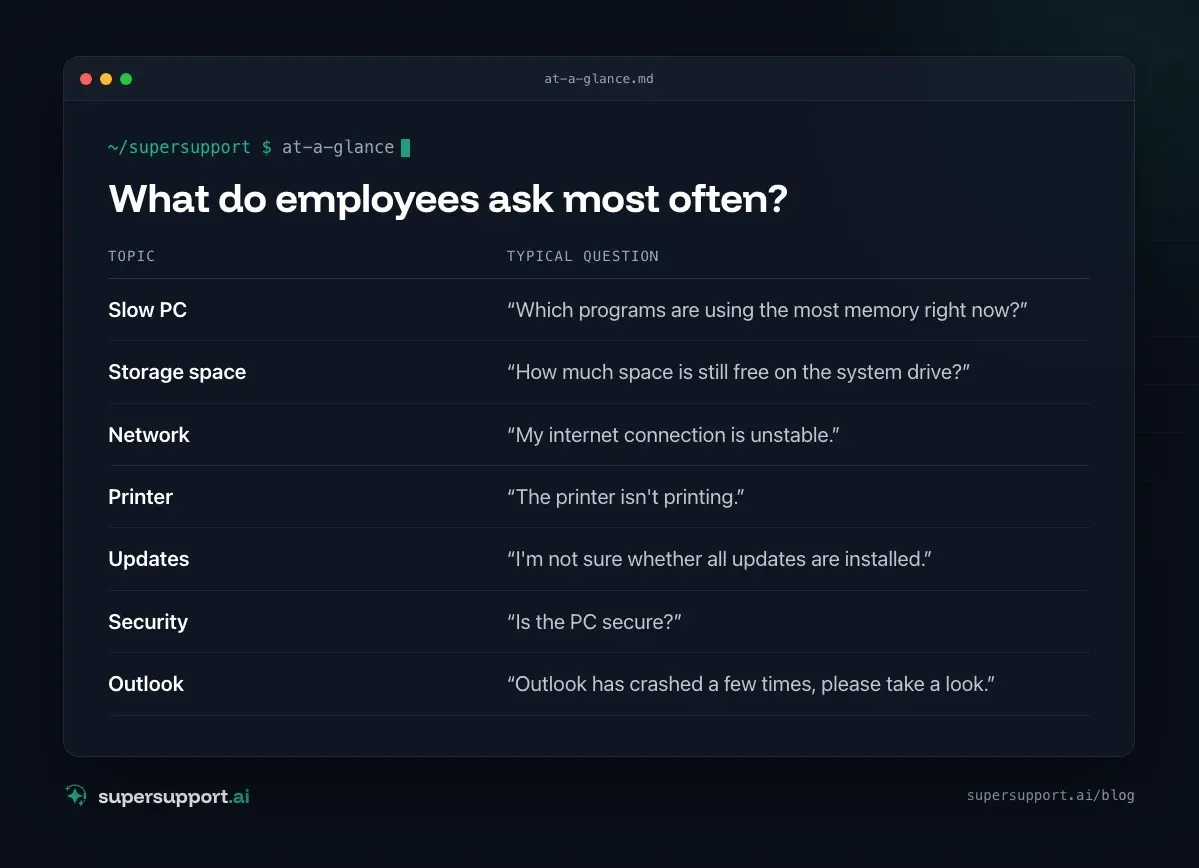
What do employees ask most often?
Seven topics come up again and again:
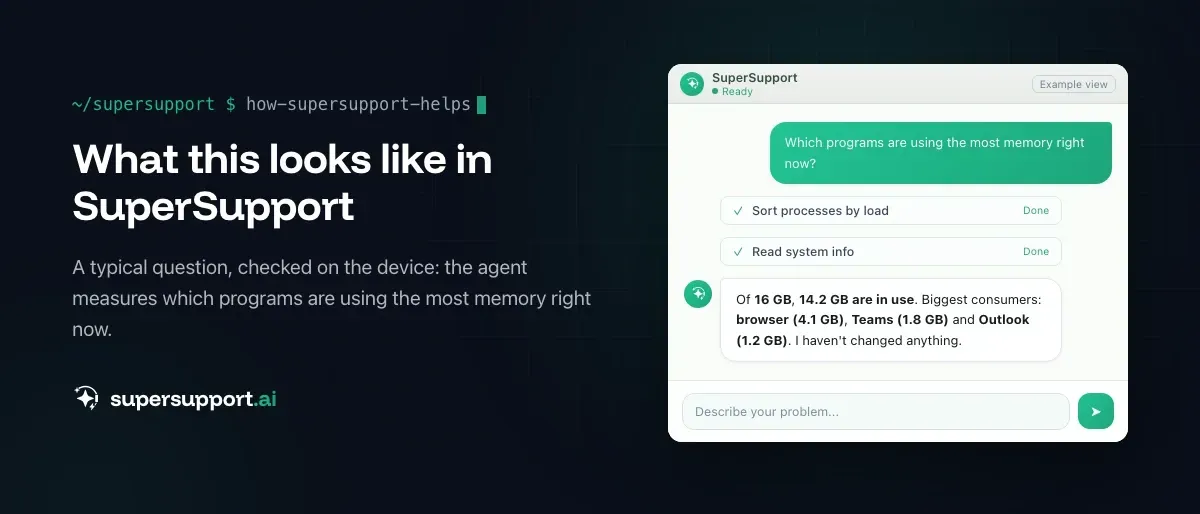
- Slow PC – “Which programs are using the most memory right now?”
- Storage space – “How much space is still free on the system drive?”
- Network – “My internet connection is unstable.”
- Printer – “The printer isn't printing.”
- Updates – “I'm not sure whether all updates are installed.”
- Security – “Is the PC secure?”
- Outlook – “Outlook has crashed a few times, please take a look.”
On top of that come perennials like “When was this computer last restarted?” See When was the PC last restarted?.
What do they almost never ask?
Password resets. In our agent's chats they practically don't occur. The questions are about the device, not about the account. That fits with the agent deliberately not touching passwords and user accounts; see Why no password reset by AI.
Why does a knowledge base barely help here?
Because the answer is on the computer, not in the wiki. “Which programs are using the most memory right now?” can't be answered by a knowledge article. It can only explain how to open Task Manager. The same applies to full drives, unstable connections and stuck print jobs.
That is why our agent's most frequent step isn't a search in the knowledge base but a check on the device. This is exactly where the classic ticket bot fails; see AI chatbot in IT support: why ticket bots fail.
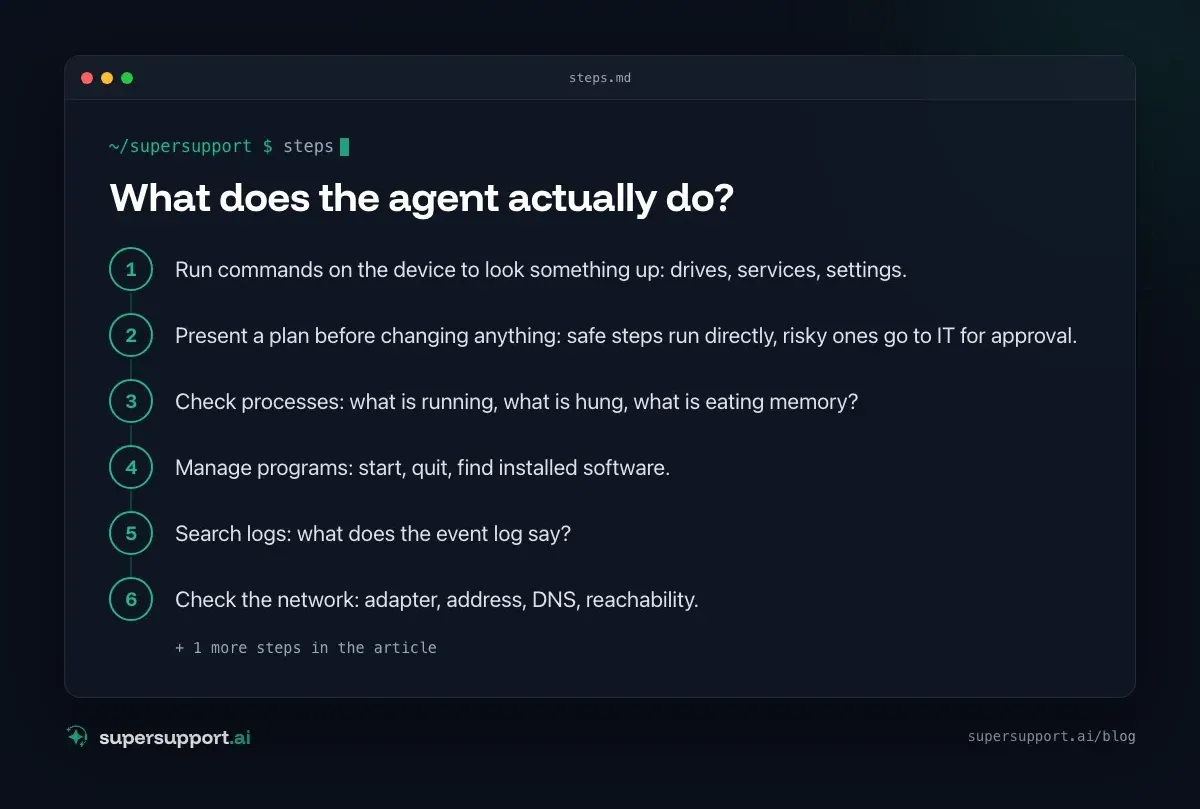
What does the agent actually do?
In this order, its steps appear most often:
- Run commands on the device to look something up: drives, services, settings.
- Present a plan before changing anything: safe steps run directly, risky ones go to IT for approval.
- Check processes: what is running, what is hung, what is eating memory?
- Manage programs: start, quit, find installed software.
- Search logs: what does the event log say?
- Check the network: adapter, address, DNS, reachability.
- Printers: installed printers, queue, test page.
For a printer it looks like this: it lists the printers, looks at the queue, restarts the print service if needed and sends a test page. Only if that doesn't come out does the case go to IT, with findings. See Printer won't print: print queue.
And when someone asks for something dangerous?

14 days free
IT support that fixes itself.
SuperSupport fixes IT problems right on the device, before they turn into tickets. Try it free for 14 days.
Start free trialThen the agent says no and explains why. In one chat, someone asked it to run vssadmin delete shadows, which deletes all shadow copies and with them the Windows restore points. That is exactly what attackers do before an encryption. The agent's answer began with: “STOP. This is a high-risk command.”
Such requests are part of everyday life: some are tests, some curiosity, some mistakes. An AI that can act on a device is only as good as its limits; see 1st-level AI support: what it can and can't do.
What does this mean for your own 1st level?
- Plan for the device, not for the account. Most questions concern performance, storage, network and printers.
- Give 1st level a view of the device. Without one, all that is left is guessing or passing on, and every handoff costs money; see What does an IT ticket cost?.
- Set limits before someone tries them out. What may happen without approval, and what never?
- Document automatically. If every chat is the case, these insights arise on their own; see IT tickets poorly documented.
Try it yourself
What do your employees ask? You can test SuperSupport for free and without a credit card, for internal IT teams and MSPs.
Frequently asked questions
What do employees ask IT support most often?
In our agent's chats these dominate: why is the PC slow and which programs use so much memory, why is the disk full, why is the internet unstable, why isn't the printer printing, are all updates installed, is the PC secure, and problems with Outlook.
Do employees often ask for password resets?
Practically never in our agent's chats. The requests are about the device itself. The agent deliberately doesn't touch passwords and user accounts anyway.
Why isn't a knowledge base enough for these questions?
Because the answer is on the computer: which processes are running, how full the drives are, what the network connection is doing, what is stuck in the print queue. A knowledge article can't know that.
What does the agent do with such questions?
Most often it checks directly on the device: processes, drives, network, logs, printers. It proposes changes as a plan that is executed immediately or only after approval by IT, depending on the risk.
What happens when someone asks for something dangerous?
Then the agent declines and explains why. One example from the chats: when asked to delete all shadow copies, it answered “STOP. This is a high-risk command.”
14 days free
IT support that fixes itself.
SuperSupport fixes IT problems right on the device, before they turn into tickets. Try it free for 14 days.
Start free trialNico Haslberger is Co-Founder & CEO of SuperSupport.ai. With years of experience as an IT technician, he knows the problems in IT support first-hand: from overloaded help desks to recurring tickets that slow teams down. That knowledge is built into every feature of the platform today. He makes sure SuperSupport.ai solves exactly the problems he experienced himself for years.
This article was created with AI assistance and editorially reviewed.
Related Articles
Splashtop Alternative or Complement? Remote Support vs. AI
Splashtop is low-cost remote support with SOS for spontaneous help and AEM for endpoint management. When an alternative fits and when AI complements it.

Zammad Alternative or Add-On? Ticket System vs. AI
Zammad is an affordable open-source ticket system from Germany, from €7 per agent. When an alternative fits and when AI support on the device adds to it.
How Much Does an IT Ticket Cost? 1st Level to On-Site
Cost per ticket by support tier, the hidden waiting time of employees and a worked example you can recalculate, with sources instead of gut feeling.