;}.cls-2{fill:url(%23Unbenannter_Verlauf_5-2);}.cls-3{fill:url(%23Unbenannter_Verlauf_5-5);}.cls-4{fill:url(%23Unbenannter_Verlauf_5-6);}.cls-5{fill:url(%23Unbenannter_Verlauf_5-3);}.cls-6{fill:url(%23Unbenannter_Verlauf_5-4);}%3c/style%3e%3clinearGradient%20id='Unbenannter_Verlauf_5'%20x1='1075.02'%20y1='943.06'%20x2='1201.78'%20y2='943.06'%20gradientUnits='userSpaceOnUse'%3e%3cstop%20offset='0'%20stop-color='%2322b88a'/%3e%3cstop%20offset='1'%20stop-color='%231a9e78'/%3e%3c/linearGradient%3e%3clinearGradient%20id='Unbenannter_Verlauf_5-2'%20x1='234.11'%20y1='663.43'%20x2='1058.29'%20y2='663.43'%20xlink:href='%23Unbenannter_Verlauf_5'/%3e%3clinearGradient%20id='Unbenannter_Verlauf_5-3'%20x1='843.79'%20y1='1064.84'%20x2='1096.04'%20y2='1064.84'%20xlink:href='%23Unbenannter_Verlauf_5'/%3e%3clinearGradient%20id='Unbenannter_Verlauf_5-4'%20x1='1120.37'%20y1='662.1'%20x2='1253'%20y2='662.1'%20xlink:href='%23Unbenannter_Verlauf_5'/%3e%3clinearGradient%20id='Unbenannter_Verlauf_5-5'%20x1='97.45'%20y1='265.53'%20x2='385.89'%20y2='265.53'%20xlink:href='%23Unbenannter_Verlauf_5'/%3e%3clinearGradient%20id='Unbenannter_Verlauf_5-6'%20x1='295.45'%20y1='255.64'%20x2='1213.95'%20y2='255.64'%20xlink:href='%23Unbenannter_Verlauf_5'/%3e%3c/defs%3e%3cpath%20class='cls-1'%20d='M1201.78,871c-.61,1.55-1.23,3.1-1.86,4.66-20.33,50.18-47.14,96.85-80.02,139.45-7.56-13.82-21.78-22.31-37.69-22.31h-7.19c29.82-37.26,54.46-78.02,73.61-121.8h53.15Z'/%3e%3cpath%20class='cls-2'%20d='M665.24,264.59l69.02,186.52c21.3,57.57,66.69,102.96,124.26,124.26l186.52,69.02c17.67,6.54,17.67,31.54,0,38.08l-186.52,69.02c-57.57,21.3-102.96,66.69-124.26,124.26l-69.02,186.52c-6.54,17.67-31.54,17.67-38.08,0l-69.02-186.52c-21.3-57.57-66.69-102.96-124.26-124.26l-186.52-69.02c-17.67-6.54-17.67-31.54,0-38.08l186.52-69.02c57.57-21.3,102.96-66.69,124.26-124.26l69.02-186.52c6.54-17.67,31.54-17.67,38.08,0Z'/%3e%3cpath%20class='cls-5'%20d='M1082.21,1021.98h-79.13c-1.7,0-2.97-1.56-2.62-3.23l22.72-109.35c2.94-14.16-15.11-22.74-24.23-11.51l-152.04,187.31c-7.32,9.02-.9,22.5,10.72,22.5h79.13c1.7,0,2.97,1.56,2.62,3.23l-22.72,109.35c-2.94,14.16,15.11,22.74,24.23,11.51l152.04-187.31c7.32-9.02.9-22.5-10.72-22.5Z'/%3e%3crect%20class='cls-6'%20x='1120.37'%20y='486.36'%20width='132.63'%20height='351.48'%20rx='19.58'%20ry='19.58'/%3e%3cpath%20class='cls-3'%20d='M250.58,128.27l13.88,55.81c7.19,28.91,29.76,51.47,58.66,58.66l55.81,13.88c9.29,2.31,9.29,15.51,0,17.82l-55.81,13.88c-28.91,7.19-51.47,29.76-58.66,58.66l-13.88,55.81c-2.31,9.29-15.51,9.29-17.82,0l-13.88-55.81c-7.19-28.91-29.76-51.47-58.66-58.66l-55.81-13.88c-9.29-2.31-9.29-15.51,0-17.82l55.81-13.88c28.91-7.19,51.47-29.76,58.66-58.66l13.88-55.81c2.31-9.29,15.51-9.29,17.82,0Z'/%3e%3cpath%20class='cls-4'%20d='M1213.95,453.21h-67.62c-1.23,0-2.47.04-3.67.12-27.03-63.89-65.84-121.36-115.42-170.94-51.54-51.54-111.61-91.44-178.55-118.59-64.67-26.22-133.03-39.52-203.16-39.52s-138.48,13.3-203.16,39.52c-33.73,13.67-65.72,30.61-95.75,50.63l-.19-.05c-23.62-5.88-42.51-22.85-51-45.24,37.87-26.86,78.65-49.21,122.01-66.79,72.63-29.44,149.37-44.38,228.08-44.38s155.45,14.93,228.08,44.38c75.2,30.51,142.67,75.31,200.53,133.15,57.84,57.85,102.65,125.33,133.15,200.53,2.31,5.7,4.54,11.43,6.66,17.19Z'/%3e%3c/svg%3e)
IT Ticket Documentation: Why It's Poor and What Helps
“Done” is not documentation. Why tickets rarely show what was going on, what that costs, and how every case gets documented cleanly and automatically.

“Done” is not documentation. It's a shrug with a timestamp.
Open any ticketing system and search for “printer”. You'll find hundreds of tickets. How many of them tell you what was really going on back then? Mostly it says “done”, “restart helped” or “talked to the customer on the phone”. That's not a criticism of the technicians – it's a design flaw: documentation comes after the fix, and by then the next case is already waiting.
Why are tickets documented so poorly?
Because documenting is a second job that nobody sees.
- The problem is solved over the phone or by remote access. The ticket is filled in afterwards.
- The next call is waiting. Five minutes of findings turn into three words.
- Many cases are not recorded at all: hallway chats, Teams messages, “can you quickly…”.
- Nobody reads old tickets – so it feels like it isn't worth writing them well.
What does that cost?
Every recurring case is investigated from scratch. If nowhere does it say that the printer on the 2nd floor loses its driver after every Windows update, the next technician spends half an hour searching again.
On top of that:
- No knowledge building: Poor tickets don't turn into usable knowledge articles.
- Slow onboarding: New colleagues can't read up on how their predecessor solved it.
- Useless for AI: A bot that is trained or fed with these tickets mostly learns “restart helped” – see AI chatbots in IT support: why ticket bots fail.
- No metrics: If you don't know what was going on, you can neither count causes nor spot repeats – see Helpdesk metrics.
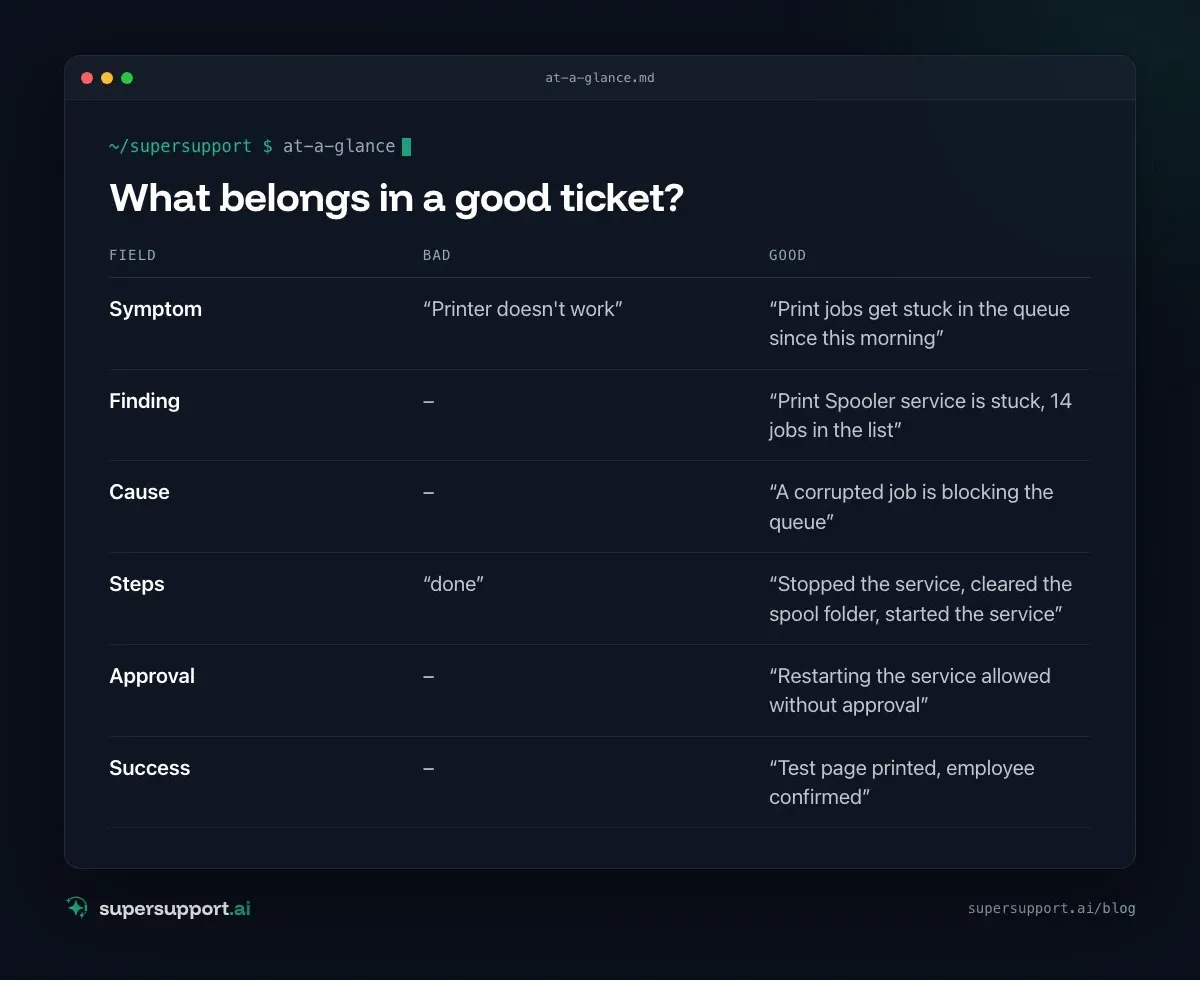
What belongs in a good ticket?
Six things – no more, but no fewer either:
- Field: Symptom – Bad: “Printer doesn't work”; Good: “Print jobs get stuck in the queue since this morning”
- Field: Finding – Bad: –; Good: “Print Spooler service is stuck, 14 jobs in the list”
- Field: Cause – Bad: –; Good: “A corrupted job is blocking the queue”
- Field: Steps – Bad: “done”; Good: “Stopped the service, cleared the spool folder, started the service”
- Field: Approval – Bad: –; Good: “Restarting the service allowed without approval”
- Field: Success – Bad: –; Good: “Test page printed, employee confirmed”
The example comes from Printer doesn't print – print queue.
How does documentation become automatic?
By not happening afterwards, but on the side. That only works if the work itself is logged.
With SuperSupport, every chat is also the case:
- The employee describes the problem in their own words – that is the symptom.
- The agent checks on the Windows or Mac device – every check is in the case with its result.
- What it changes is recorded there, as is what IT approved.
- At the end it says whether it is resolved.

14 days free
IT support that fixes itself.
SuperSupport fixes IT problems right on the device, before they turn into tickets. Try it free for 14 days.
Start free trialNobody has to type anything in afterwards. And because the findings are real, the case later works as a basis for a knowledge article or a runbook – see Runbooks in IT support.
And if the case goes on?
Then it arrives with findings, not with “doesn't work”. If IT has to take over, it sees what has already been checked and tried. That saves exactly the half hour that otherwise goes on “Have you restarted yet?”. The same applies when an existing bot passes the case on – see AI agents in IT support.
What remains IT's job?
Good documentation doesn't replace a decision. Which fixes are allowed without approval, which software is supported by runbook, and which cases go straight to a human is set by IT. The agent doesn't touch passwords, user accounts, firewalls or servers anyway – see First-level AI: what it can do – and what it can't.
Try it yourself
Take the last 20 tickets from your system and count in how many of them the cause is stated. Then look at what a case looks like that documents itself: you can test SuperSupport for free and without a credit card – for in-house IT teams and MSPs.
Frequently asked questions
Why are IT tickets so often poorly documented?
Because documenting comes after the fix, and nobody has time. The technician solved the problem over the phone or by remote access, and the next one is already waiting. So the ticket says “done” or “restart helped” – but not what was going on and what exactly was done.
What does poor ticket documentation cost?
Every recurring case is investigated from scratch instead of reusing the fix from last time. Knowledge articles don't get written, new colleagues learn more slowly, and AI bots that work with these tickets mostly learn “restart helped”.
What belongs in a well-documented ticket?
The symptom in the employee's own words, the finding (what was checked, what stood out), the cause, the steps taken, who approved what, and how you can tell it is resolved.
How does SuperSupport document a case?
With SuperSupport, every chat is also the case. What the employee describes, what the agent checks on the device, what it changes and what IT approves is logged automatically along the way – without anyone having to type anything in afterwards.
Does this also help with existing ticketing systems?
Yes. If a case goes on to IT or to an existing bot, it arrives with the findings and the steps taken so far instead of “doesn't work”.
14 days free
IT support that fixes itself.
SuperSupport fixes IT problems right on the device, before they turn into tickets. Try it free for 14 days.
Start free trialNico Haslberger is Co-Founder & CEO of SuperSupport.ai. With years of experience as an IT technician, he knows the problems in IT support first-hand: from overloaded help desks to recurring tickets that slow teams down. That knowledge is built into every feature of the platform today. He makes sure SuperSupport.ai solves exactly the problems he experienced himself for years.
This article was created with AI assistance and editorially reviewed.
Related Articles
OTRS Alternative: Znuny, OTOBO, KIX or AI Support?
With the OTRS Community Edition discontinued, many seek an alternative. The forks at a glance – and when AI support on the device complements them better.

Shadow AI in the Workplace: Detect, Govern, Replace
Employees use AI tools IT doesn't know about, with customer data, contracts and code. How to detect shadow AI, set sensible rules and offer alternatives.

AI Agent in IT Support: Guardrails That Actually Hold
An AI agent on the computer needs limits outside the prompt: protected list, blocked actions, approvals that expire. This is how it looks in practice.