;}.cls-2{fill:url(%23Unbenannter_Verlauf_5-2);}.cls-3{fill:url(%23Unbenannter_Verlauf_5-5);}.cls-4{fill:url(%23Unbenannter_Verlauf_5-6);}.cls-5{fill:url(%23Unbenannter_Verlauf_5-3);}.cls-6{fill:url(%23Unbenannter_Verlauf_5-4);}%3c/style%3e%3clinearGradient%20id='Unbenannter_Verlauf_5'%20x1='1075.02'%20y1='943.06'%20x2='1201.78'%20y2='943.06'%20gradientUnits='userSpaceOnUse'%3e%3cstop%20offset='0'%20stop-color='%2322b88a'/%3e%3cstop%20offset='1'%20stop-color='%231a9e78'/%3e%3c/linearGradient%3e%3clinearGradient%20id='Unbenannter_Verlauf_5-2'%20x1='234.11'%20y1='663.43'%20x2='1058.29'%20y2='663.43'%20xlink:href='%23Unbenannter_Verlauf_5'/%3e%3clinearGradient%20id='Unbenannter_Verlauf_5-3'%20x1='843.79'%20y1='1064.84'%20x2='1096.04'%20y2='1064.84'%20xlink:href='%23Unbenannter_Verlauf_5'/%3e%3clinearGradient%20id='Unbenannter_Verlauf_5-4'%20x1='1120.37'%20y1='662.1'%20x2='1253'%20y2='662.1'%20xlink:href='%23Unbenannter_Verlauf_5'/%3e%3clinearGradient%20id='Unbenannter_Verlauf_5-5'%20x1='97.45'%20y1='265.53'%20x2='385.89'%20y2='265.53'%20xlink:href='%23Unbenannter_Verlauf_5'/%3e%3clinearGradient%20id='Unbenannter_Verlauf_5-6'%20x1='295.45'%20y1='255.64'%20x2='1213.95'%20y2='255.64'%20xlink:href='%23Unbenannter_Verlauf_5'/%3e%3c/defs%3e%3cpath%20class='cls-1'%20d='M1201.78,871c-.61,1.55-1.23,3.1-1.86,4.66-20.33,50.18-47.14,96.85-80.02,139.45-7.56-13.82-21.78-22.31-37.69-22.31h-7.19c29.82-37.26,54.46-78.02,73.61-121.8h53.15Z'/%3e%3cpath%20class='cls-2'%20d='M665.24,264.59l69.02,186.52c21.3,57.57,66.69,102.96,124.26,124.26l186.52,69.02c17.67,6.54,17.67,31.54,0,38.08l-186.52,69.02c-57.57,21.3-102.96,66.69-124.26,124.26l-69.02,186.52c-6.54,17.67-31.54,17.67-38.08,0l-69.02-186.52c-21.3-57.57-66.69-102.96-124.26-124.26l-186.52-69.02c-17.67-6.54-17.67-31.54,0-38.08l186.52-69.02c57.57-21.3,102.96-66.69,124.26-124.26l69.02-186.52c6.54-17.67,31.54-17.67,38.08,0Z'/%3e%3cpath%20class='cls-5'%20d='M1082.21,1021.98h-79.13c-1.7,0-2.97-1.56-2.62-3.23l22.72-109.35c2.94-14.16-15.11-22.74-24.23-11.51l-152.04,187.31c-7.32,9.02-.9,22.5,10.72,22.5h79.13c1.7,0,2.97,1.56,2.62,3.23l-22.72,109.35c-2.94,14.16,15.11,22.74,24.23,11.51l152.04-187.31c7.32-9.02.9-22.5-10.72-22.5Z'/%3e%3crect%20class='cls-6'%20x='1120.37'%20y='486.36'%20width='132.63'%20height='351.48'%20rx='19.58'%20ry='19.58'/%3e%3cpath%20class='cls-3'%20d='M250.58,128.27l13.88,55.81c7.19,28.91,29.76,51.47,58.66,58.66l55.81,13.88c9.29,2.31,9.29,15.51,0,17.82l-55.81,13.88c-28.91,7.19-51.47,29.76-58.66,58.66l-13.88,55.81c-2.31,9.29-15.51,9.29-17.82,0l-13.88-55.81c-7.19-28.91-29.76-51.47-58.66-58.66l-55.81-13.88c-9.29-2.31-9.29-15.51,0-17.82l55.81-13.88c28.91-7.19,51.47-29.76,58.66-58.66l13.88-55.81c2.31-9.29,15.51-9.29,17.82,0Z'/%3e%3cpath%20class='cls-4'%20d='M1213.95,453.21h-67.62c-1.23,0-2.47.04-3.67.12-27.03-63.89-65.84-121.36-115.42-170.94-51.54-51.54-111.61-91.44-178.55-118.59-64.67-26.22-133.03-39.52-203.16-39.52s-138.48,13.3-203.16,39.52c-33.73,13.67-65.72,30.61-95.75,50.63l-.19-.05c-23.62-5.88-42.51-22.85-51-45.24,37.87-26.86,78.65-49.21,122.01-66.79,72.63-29.44,149.37-44.38,228.08-44.38s155.45,14.93,228.08,44.38c75.2,30.51,142.67,75.31,200.53,133.15,57.84,57.85,102.65,125.33,133.15,200.53,2.31,5.7,4.54,11.43,6.66,17.19Z'/%3e%3c/svg%3e)
Runbooks in IT Support: Help for Line-of-Business Software
There is no vendor chatbot for your own merchandise management system. How IT captures its knowledge as a runbook and the agent applies it on the device.

The vendor chatbot says: “Ask your admin.” You are the admin.
Every company has that one program. The merchandise management system, the practice software, the CAD with the license server in the basement, or the tool a student worker built in 2019. When it hangs, no knowledge article from the internet and no ticket bot helps. Only your own IT knows the solution. Runbooks make sure this knowledge doesn’t stay with two colleagues.
Why doesn’t standard support help with line-of-business software?
Because nobody but you knows the environment. An AI chatbot with general knowledge knows Outlook and Windows, but not:
- which service has to be running for your merchandise management system,
- which server the database is on,
- where the program writes its log,
- which restart is safe and which one costs data.
The vendor’s hotline often helps only at fixed hours, and it doesn’t know your installation either. So every case ends up with the technician who knows the program. If he is on vacation, accounting waits.
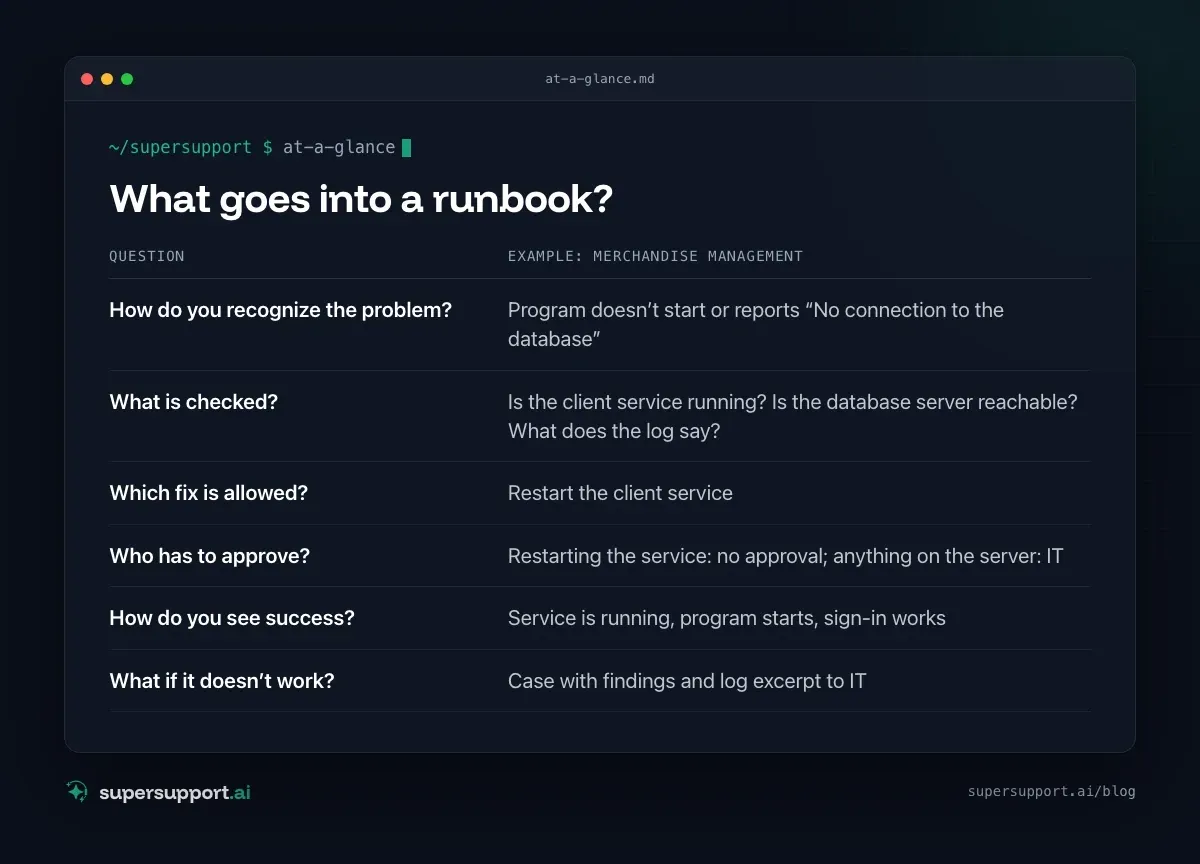
What goes into a runbook?
Everything the best technician has in their head for this problem. A usable runbook answers six questions:
- How do you recognize the problem? – Program doesn’t start or reports “No connection to the database”
- What is checked? – Is the client service running? Is the database server reachable? What does the log say?
- Which fix is allowed? – Restart the client service
- Who has to approve? – Restarting the service: no approval; anything on the server: IT
- How do you see success? – Service is running, program starts, sign-in works
- What if it doesn’t work? – Case with findings and log excerpt to IT
The last row is important: a runbook doesn’t end with “didn’t work” but with a case that states what was checked.
How does this work in SuperSupport?
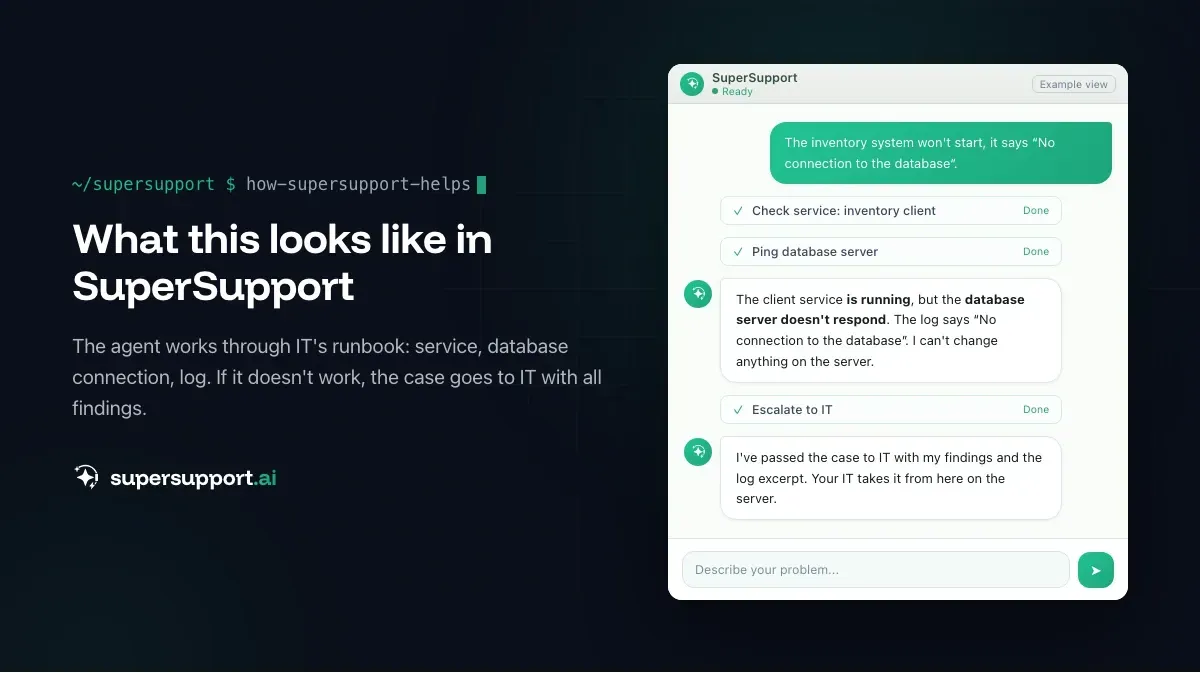
IT writes the procedure down once, the agent applies it.
- An employee writes in the chat: “The merchandise management system won’t start.”
- The SuperSupport agent recognizes the matching runbook and checks on the device: Is the program installed, is the service running, is the database server reachable, what does the log say?
- If the service is stopped and the restart is approved, the agent restarts it. If a step needs approval, it submits it to IT.
- Afterwards it checks whether the program starts again.
- If it doesn’t work, the case goes to IT with all findings – not with “doesn’t work”.
Every run is documented in the case: which version of the runbook, which checks, which result. The agent does not change the procedure on its own; it belongs to IT.
Which programs are suitable?
Anything that can be checked on the device and regularly acts up. Typical candidates:
- Merchandise management and ERP clients: service, database connection, tenant selection.
- Practice and law firm software: connection to the server, updates, card readers.
- CAD with a license server: Is the license server reachable, is the license in use?
- In-house built tools: runtime environment present, configuration file in the right place?
Less suitable are procedures on the server itself, permission changes or anything that modifies data. That stays with IT – see Why no server maintenance by AI.

Beta
IT support that fixes itself.
supersupport.ai handles your 1st-level support fully automatically. Secure your spot on the waitlist now.
Join the WaitlistWhat does this mean in numbers?
Every case that doesn’t end up with the specialist is cheaper. MetricNet puts the fully loaded cost per ticket in North America at about $22 at first level, $70 at second level and $100 at third level (MetricNet, “Metrics Unleashed: Shift-Left”, 2020). With line-of-business software, almost every case ends up at the very top today, because only the specialist knows it.
The effect can be measured with three numbers: how many cases for a piece of software are resolved without escalation, how often they reopen and how long the employee couldn’t work. More in Helpdesk metrics.
For MSPs: one runbook, many customers
MSPs often support the same line-of-business software at dozens of customers. The knowledge of how to get it running again usually sits with one technician. With runbooks per customer, it is available to every case, and the technician only gets the cases that really need them. What this looks like: MSPs.
What if a bot is already in use?
Then it doesn’t have to go. SuperSupport works together with other agents: an existing bot in the service desk or on the hotline can ask the SuperSupport agent on the affected PC what is going on and have it trigger the runbook there. More on this in AI chatbot in IT support: why ticket bots fail.
Try it yourself
Take the program where your IT most often has to “take a quick look” and write down the procedure once. You can try SuperSupport for free and without a credit card – for internal IT teams and MSPs.
Frequently asked questions
What is a runbook in IT support?
A runbook is a defined procedure for a recurring problem: how to recognize it, which checks are needed, which fixes are allowed, who has to approve what and how you can tell it is resolved.
Why does line-of-business software need its own runbooks?
Because there is no public knowledge base for merchandise management systems, practice software, CAD with a license server or in-house built programs. The knowledge sits with your own IT or the MSP. A runbook makes it usable for first level.
How does SuperSupport work with runbooks?
IT defines in SuperSupport how the software is checked and repaired. When an employee reports a problem, the agent goes through these steps on the Windows or Mac device, obtains the necessary approvals and finally checks whether the program runs again. Every run is documented in the case.
Can the agent change a runbook on its own?
No. The procedure belongs to IT. The agent sticks to the approved steps and submits corrections that need approval to IT.
Is this worthwhile for MSPs too?
Yes, especially there. An MSP often supports the same line-of-business software at many customers. With runbooks per customer, the knowledge of the best technician becomes usable for every case.
Beta
IT support that fixes itself.
supersupport.ai handles your 1st-level support fully automatically. Secure your spot on the waitlist now.
Join the WaitlistTimo Haslberger is Co-Founder & CPO of SuperSupport.ai. He owns the entire product experience: from first user interaction to automated problem resolution. Before co-founding SuperSupport.ai, he saw firsthand how IT teams drown in repetitive tickets. Today he's building the product that changes exactly that.
This article was created with AI assistance and editorially reviewed.
Related Articles

HaloITSM & HaloPSA Alternative or Add-On?
Halo is popular with IT teams and MSPs as a ticketing and PSA system. When an alternative fits and when AI support on the device is the add-on.

Moveworks Alternative for Mid-Sized Companies and MSPs
Moveworks now belongs to ServiceNow and only pays off at thousands of employees. What smaller companies and MSPs can use instead.
Intune Alternative or Add-On? Device Management vs. AI
Microsoft Intune manages devices, policies and apps, often already in Microsoft 365. When an Intune alternative makes sense and when AI support helps.