;}.cls-2{fill:url(%23Unbenannter_Verlauf_5-2);}.cls-3{fill:url(%23Unbenannter_Verlauf_5-5);}.cls-4{fill:url(%23Unbenannter_Verlauf_5-6);}.cls-5{fill:url(%23Unbenannter_Verlauf_5-3);}.cls-6{fill:url(%23Unbenannter_Verlauf_5-4);}%3c/style%3e%3clinearGradient%20id='Unbenannter_Verlauf_5'%20x1='1075.02'%20y1='943.06'%20x2='1201.78'%20y2='943.06'%20gradientUnits='userSpaceOnUse'%3e%3cstop%20offset='0'%20stop-color='%2322b88a'/%3e%3cstop%20offset='1'%20stop-color='%231a9e78'/%3e%3c/linearGradient%3e%3clinearGradient%20id='Unbenannter_Verlauf_5-2'%20x1='234.11'%20y1='663.43'%20x2='1058.29'%20y2='663.43'%20xlink:href='%23Unbenannter_Verlauf_5'/%3e%3clinearGradient%20id='Unbenannter_Verlauf_5-3'%20x1='843.79'%20y1='1064.84'%20x2='1096.04'%20y2='1064.84'%20xlink:href='%23Unbenannter_Verlauf_5'/%3e%3clinearGradient%20id='Unbenannter_Verlauf_5-4'%20x1='1120.37'%20y1='662.1'%20x2='1253'%20y2='662.1'%20xlink:href='%23Unbenannter_Verlauf_5'/%3e%3clinearGradient%20id='Unbenannter_Verlauf_5-5'%20x1='97.45'%20y1='265.53'%20x2='385.89'%20y2='265.53'%20xlink:href='%23Unbenannter_Verlauf_5'/%3e%3clinearGradient%20id='Unbenannter_Verlauf_5-6'%20x1='295.45'%20y1='255.64'%20x2='1213.95'%20y2='255.64'%20xlink:href='%23Unbenannter_Verlauf_5'/%3e%3c/defs%3e%3cpath%20class='cls-1'%20d='M1201.78,871c-.61,1.55-1.23,3.1-1.86,4.66-20.33,50.18-47.14,96.85-80.02,139.45-7.56-13.82-21.78-22.31-37.69-22.31h-7.19c29.82-37.26,54.46-78.02,73.61-121.8h53.15Z'/%3e%3cpath%20class='cls-2'%20d='M665.24,264.59l69.02,186.52c21.3,57.57,66.69,102.96,124.26,124.26l186.52,69.02c17.67,6.54,17.67,31.54,0,38.08l-186.52,69.02c-57.57,21.3-102.96,66.69-124.26,124.26l-69.02,186.52c-6.54,17.67-31.54,17.67-38.08,0l-69.02-186.52c-21.3-57.57-66.69-102.96-124.26-124.26l-186.52-69.02c-17.67-6.54-17.67-31.54,0-38.08l186.52-69.02c57.57-21.3,102.96-66.69,124.26-124.26l69.02-186.52c6.54-17.67,31.54-17.67,38.08,0Z'/%3e%3cpath%20class='cls-5'%20d='M1082.21,1021.98h-79.13c-1.7,0-2.97-1.56-2.62-3.23l22.72-109.35c2.94-14.16-15.11-22.74-24.23-11.51l-152.04,187.31c-7.32,9.02-.9,22.5,10.72,22.5h79.13c1.7,0,2.97,1.56,2.62,3.23l-22.72,109.35c-2.94,14.16,15.11,22.74,24.23,11.51l152.04-187.31c7.32-9.02.9-22.5-10.72-22.5Z'/%3e%3crect%20class='cls-6'%20x='1120.37'%20y='486.36'%20width='132.63'%20height='351.48'%20rx='19.58'%20ry='19.58'/%3e%3cpath%20class='cls-3'%20d='M250.58,128.27l13.88,55.81c7.19,28.91,29.76,51.47,58.66,58.66l55.81,13.88c9.29,2.31,9.29,15.51,0,17.82l-55.81,13.88c-28.91,7.19-51.47,29.76-58.66,58.66l-13.88,55.81c-2.31,9.29-15.51,9.29-17.82,0l-13.88-55.81c-7.19-28.91-29.76-51.47-58.66-58.66l-55.81-13.88c-9.29-2.31-9.29-15.51,0-17.82l55.81-13.88c28.91-7.19,51.47-29.76,58.66-58.66l13.88-55.81c2.31-9.29,15.51-9.29,17.82,0Z'/%3e%3cpath%20class='cls-4'%20d='M1213.95,453.21h-67.62c-1.23,0-2.47.04-3.67.12-27.03-63.89-65.84-121.36-115.42-170.94-51.54-51.54-111.61-91.44-178.55-118.59-64.67-26.22-133.03-39.52-203.16-39.52s-138.48,13.3-203.16,39.52c-33.73,13.67-65.72,30.61-95.75,50.63l-.19-.05c-23.62-5.88-42.51-22.85-51-45.24,37.87-26.86,78.65-49.21,122.01-66.79,72.63-29.44,149.37-44.38,228.08-44.38s155.45,14.93,228.08,44.38c75.2,30.51,142.67,75.31,200.53,133.15,57.84,57.85,102.65,125.33,133.15,200.53,2.31,5.7,4.54,11.43,6.66,17.19Z'/%3e%3c/svg%3e)
Shadow AI in the Workplace: Detect, Govern, Replace
Employees use AI tools IT doesn't know about, with customer data, contracts and code. How to detect shadow AI, set sensible rules and offer alternatives.

Your employees have been using AI for a while now. The only question is whether you know which ones.
An employee has a chatbot “quickly polish” a contract draft. A colleague installs a browser extension that summarizes emails. In sales, someone connects an AI meeting assistant to the calendar – and the administrator consent request lands as a ticket at the MSP, reason given: “Yes”. That is how it went at one of our customers, described in Admin consent request in Microsoft 365.
That is shadow AI: AI tools used in the company without IT knowing about them or having approved them. Almost every company has it. The question is not whether – but how to deal with it.
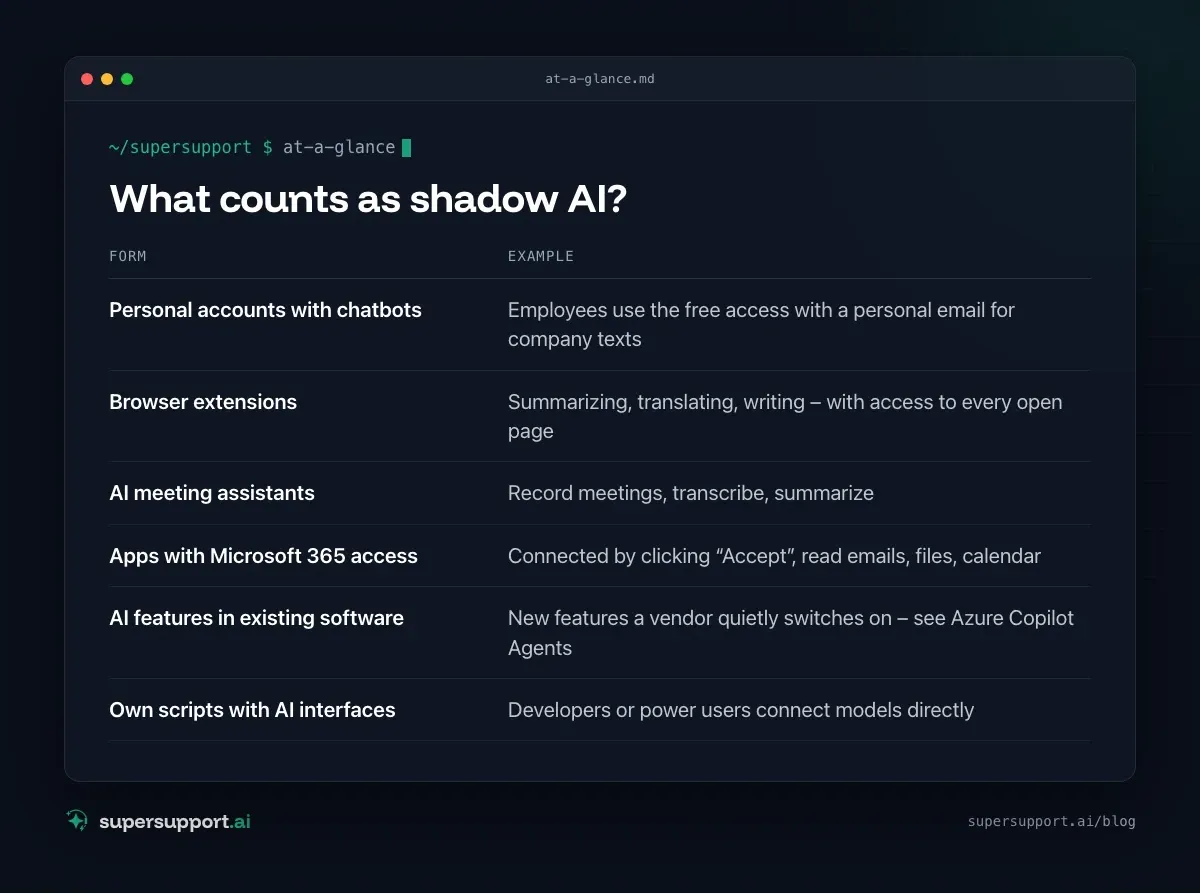
What counts as shadow AI?
- Personal accounts with chatbots – Employees use the free access with a personal email for company texts
- Browser extensions – Summarizing, translating, writing – with access to every open page
- AI meeting assistants – Record meetings, transcribe, summarize
- Apps with Microsoft 365 access – Connected by clicking “Accept”, read emails, files, calendar
- AI features in existing software – New features a vendor quietly switches on – see Azure Copilot Agents
- Own scripts with AI interfaces – Developers or power users connect models directly
Why is this a problem?
- Confidential data leaves the company – to providers without a contract, often outside the EU.
- Training and storage: Depending on the service and account type, inputs may be stored or used for training.
- Data protection: Personal data without a legal basis and without a data processing agreement (DPA) – see GDPR for AI support.
- Access rights: Apps and extensions with full access to mailboxes are an entry point.
- Wrong results: AI texts, formulas or code that nobody checks.
- Proof obligations: Customers and auditors increasingly ask which AI is in use – for example in the context of NIS2.
Step 1: Make it visible
Without an overview there are no rules. Possible sources:
- Firewall, proxy and DNS logs: Which AI services are being accessed, by whom, how often?
- Cloud app discovery: Microsoft Defender for Cloud Apps and similar tools list the cloud services in use along with a risk rating.
- Microsoft 365 / Entra ID: Check enterprise applications and granted permissions – which apps have access to email and files?
- Browser extensions: Read out and control them via Group Policy or Intune.
- RMM and security tools: Some now offer their own reports on AI usage.
- Asking: A short, anonymous survey “Which AI tools do you use for what?” often brings more than any technology.
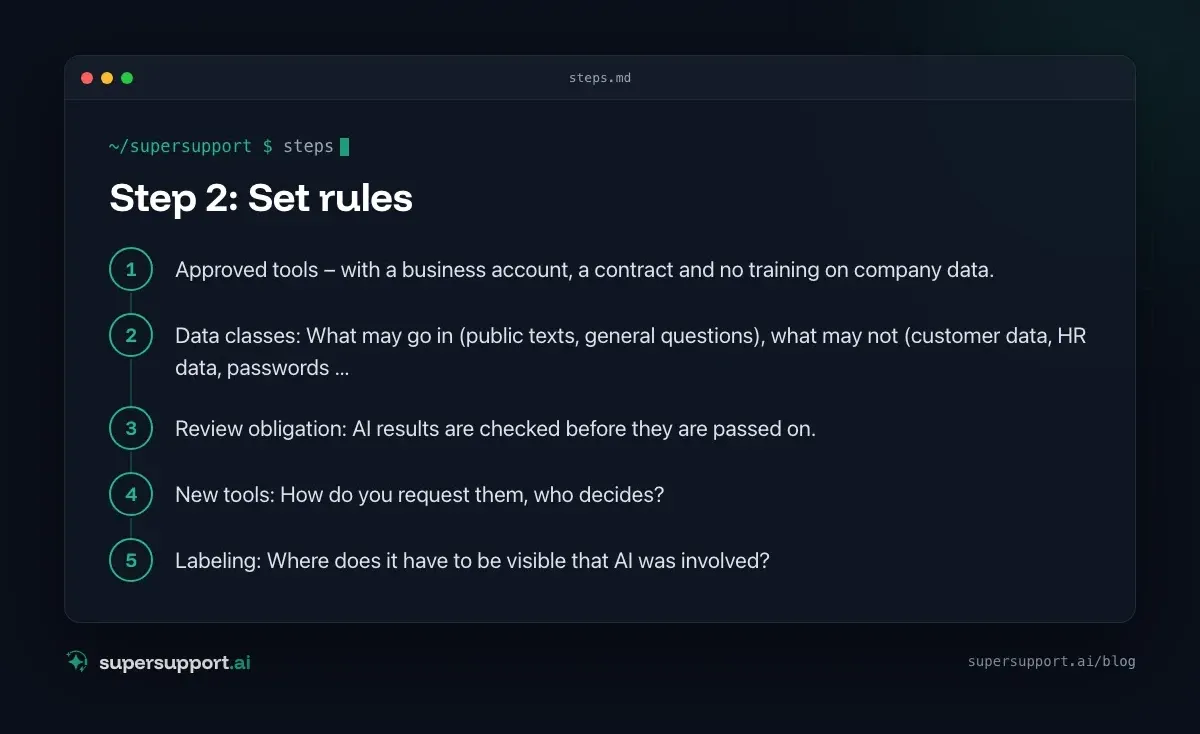
Step 2: Set rules
An AI policy does not have to be long. One page is enough to start:
- Approved tools – with a business account, a contract and no training on company data.
- Data classes: What may go in (public texts, general questions), what may not (customer data, HR data, passwords, contracts, source code – depending on the tool)?
- Review obligation: AI results are checked before they are passed on.
- New tools: How do you request them, who decides?
- Labeling: Where does it have to be visible that AI was involved?
Step 3: Offer good alternatives
Shadow AI arises because employees want to solve a real problem. A ban without an alternative just shifts usage to personal devices. Better:
- Provide approved AI tools with a business account – with a contract, EU processing and no training.
- Offer AI where it is needed: in the Office suite, in support, in documentation.
- Block risky services selectively instead of blocking everything.
Step 4: Secure it technically

14 days free
IT support that fixes itself.
SuperSupport fixes IT problems right on the device, before they turn into tickets. Try it free for 14 days.
Start free trial- Restrict user consent for apps and route requests through the admin workflow.
- Browser extensions: limit them to an allowlist via policy.
- Use data loss prevention (DLP) for especially sensitive data, where available.
- Log the use of approved tools.
Step 5: Train
Since February 2025, the EU AI Act requires companies to ensure sufficient AI literacy. A short training on opportunities, limits, data rules and the review obligation covers that and at the same time lowers the risk of shadow AI. Details: EU AI Act for MSPs and IT teams.
What MSPs can offer their customers
- AI inventory at the customer: Which services, which apps, which extensions?
- Policy and training as a package.
- Technical safeguards in Microsoft 365 and in the browser.
- Introduce and support approved alternatives.
How does SuperSupport fit in?
IT support is also an entry point for shadow AI: people who have to wait a long time for IT ask a chatbot and copy error messages, including paths and user names, into it. SuperSupport is an approved AI support: every step logged, sensitive things after IT's approval. What this looks like for internal IT teams and MSPs is explained on the respective pages.
Frequently asked questions
What is shadow AI?
Shadow AI refers to AI tools that employees use without IT's knowledge or approval – for example personal accounts with chatbots, browser extensions, AI meeting assistants or AI features in apps that someone connected themselves.
Why is shadow AI a risk?
Because confidential data – customer data, contracts, source code, HR data – ends up with providers you have no contract with. Depending on the service, inputs may be stored or used for training. On top of that come data protection violations, wrong results nobody checks, and apps with far-reaching access to mailboxes.
How do I detect shadow AI?
Through firewall and proxy logs, cloud app discovery (such as Microsoft Defender for Cloud Apps), the list of apps with access to Microsoft 365, inventories of browser extensions – and by asking your employees. Some RMM and security tools now offer their own reports on AI usage.
Should I just ban AI tools?
A blanket ban usually just shifts usage to personal devices and accounts. Better: offer approved tools with a business account, set clear rules for data, block risky services selectively and train people.
What does shadow AI have to do with the EU AI Act?
Since February 2025, companies that use AI have to ensure their employees have sufficient AI literacy. That requires knowing which AI is being used at all – another reason to make shadow AI visible.
14 days free
IT support that fixes itself.
SuperSupport fixes IT problems right on the device, before they turn into tickets. Try it free for 14 days.
Start free trialTimo Haslberger is Co-Founder & CPO of SuperSupport.ai. He owns the entire product experience: from first user interaction to automated problem resolution. Before co-founding SuperSupport.ai, he saw firsthand how IT teams drown in repetitive tickets. Today he's building the product that changes exactly that.
This article was created with AI assistance and editorially reviewed.
Related Articles
OTRS Alternative: Znuny, OTOBO, KIX or AI Support?
With the OTRS Community Edition discontinued, many seek an alternative. The forks at a glance – and when AI support on the device complements them better.

AI Agent in IT Support: Guardrails That Actually Hold
An AI agent on the computer needs limits outside the prompt: protected list, blocked actions, approvals that expire. This is how it looks in practice.

Microsoft SMS MFA Retirement: Passkeys by February 2027
Microsoft ends SMS and voice call sign-in in Entra ID on February 1, 2027. What changes, who is affected, and how to move your users to passkeys in time.