;}.cls-2{fill:url(%23Unbenannter_Verlauf_5-2);}.cls-3{fill:url(%23Unbenannter_Verlauf_5-5);}.cls-4{fill:url(%23Unbenannter_Verlauf_5-6);}.cls-5{fill:url(%23Unbenannter_Verlauf_5-3);}.cls-6{fill:url(%23Unbenannter_Verlauf_5-4);}%3c/style%3e%3clinearGradient%20id='Unbenannter_Verlauf_5'%20x1='1075.02'%20y1='943.06'%20x2='1201.78'%20y2='943.06'%20gradientUnits='userSpaceOnUse'%3e%3cstop%20offset='0'%20stop-color='%2322b88a'/%3e%3cstop%20offset='1'%20stop-color='%231a9e78'/%3e%3c/linearGradient%3e%3clinearGradient%20id='Unbenannter_Verlauf_5-2'%20x1='234.11'%20y1='663.43'%20x2='1058.29'%20y2='663.43'%20xlink:href='%23Unbenannter_Verlauf_5'/%3e%3clinearGradient%20id='Unbenannter_Verlauf_5-3'%20x1='843.79'%20y1='1064.84'%20x2='1096.04'%20y2='1064.84'%20xlink:href='%23Unbenannter_Verlauf_5'/%3e%3clinearGradient%20id='Unbenannter_Verlauf_5-4'%20x1='1120.37'%20y1='662.1'%20x2='1253'%20y2='662.1'%20xlink:href='%23Unbenannter_Verlauf_5'/%3e%3clinearGradient%20id='Unbenannter_Verlauf_5-5'%20x1='97.45'%20y1='265.53'%20x2='385.89'%20y2='265.53'%20xlink:href='%23Unbenannter_Verlauf_5'/%3e%3clinearGradient%20id='Unbenannter_Verlauf_5-6'%20x1='295.45'%20y1='255.64'%20x2='1213.95'%20y2='255.64'%20xlink:href='%23Unbenannter_Verlauf_5'/%3e%3c/defs%3e%3cpath%20class='cls-1'%20d='M1201.78,871c-.61,1.55-1.23,3.1-1.86,4.66-20.33,50.18-47.14,96.85-80.02,139.45-7.56-13.82-21.78-22.31-37.69-22.31h-7.19c29.82-37.26,54.46-78.02,73.61-121.8h53.15Z'/%3e%3cpath%20class='cls-2'%20d='M665.24,264.59l69.02,186.52c21.3,57.57,66.69,102.96,124.26,124.26l186.52,69.02c17.67,6.54,17.67,31.54,0,38.08l-186.52,69.02c-57.57,21.3-102.96,66.69-124.26,124.26l-69.02,186.52c-6.54,17.67-31.54,17.67-38.08,0l-69.02-186.52c-21.3-57.57-66.69-102.96-124.26-124.26l-186.52-69.02c-17.67-6.54-17.67-31.54,0-38.08l186.52-69.02c57.57-21.3,102.96-66.69,124.26-124.26l69.02-186.52c6.54-17.67,31.54-17.67,38.08,0Z'/%3e%3cpath%20class='cls-5'%20d='M1082.21,1021.98h-79.13c-1.7,0-2.97-1.56-2.62-3.23l22.72-109.35c2.94-14.16-15.11-22.74-24.23-11.51l-152.04,187.31c-7.32,9.02-.9,22.5,10.72,22.5h79.13c1.7,0,2.97,1.56,2.62,3.23l-22.72,109.35c-2.94,14.16,15.11,22.74,24.23,11.51l152.04-187.31c7.32-9.02.9-22.5-10.72-22.5Z'/%3e%3crect%20class='cls-6'%20x='1120.37'%20y='486.36'%20width='132.63'%20height='351.48'%20rx='19.58'%20ry='19.58'/%3e%3cpath%20class='cls-3'%20d='M250.58,128.27l13.88,55.81c7.19,28.91,29.76,51.47,58.66,58.66l55.81,13.88c9.29,2.31,9.29,15.51,0,17.82l-55.81,13.88c-28.91,7.19-51.47,29.76-58.66,58.66l-13.88,55.81c-2.31,9.29-15.51,9.29-17.82,0l-13.88-55.81c-7.19-28.91-29.76-51.47-58.66-58.66l-55.81-13.88c-9.29-2.31-9.29-15.51,0-17.82l55.81-13.88c28.91-7.19,51.47-29.76,58.66-58.66l13.88-55.81c2.31-9.29,15.51-9.29,17.82,0Z'/%3e%3cpath%20class='cls-4'%20d='M1213.95,453.21h-67.62c-1.23,0-2.47.04-3.67.12-27.03-63.89-65.84-121.36-115.42-170.94-51.54-51.54-111.61-91.44-178.55-118.59-64.67-26.22-133.03-39.52-203.16-39.52s-138.48,13.3-203.16,39.52c-33.73,13.67-65.72,30.61-95.75,50.63l-.19-.05c-23.62-5.88-42.51-22.85-51-45.24,37.87-26.86,78.65-49.21,122.01-66.79,72.63-29.44,149.37-44.38,228.08-44.38s155.45,14.93,228.08,44.38c75.2,30.51,142.67,75.31,200.53,133.15,57.84,57.85,102.65,125.33,133.15,200.53,2.31,5.7,4.54,11.43,6.66,17.19Z'/%3e%3c/svg%3e)
Microsoft SMS MFA Retirement: Passkeys by February 2027
Microsoft ends SMS and voice call sign-in in Entra ID on February 1, 2027. What changes, who is affected, and how to move your users to passkeys in time.

The email from Microsoft is in English, long and easy to overlook. You shouldn't ignore it anyway.
In recent weeks, many IT departments and MSPs received an English-language email from Microsoft: “Passkeys by default and retirement of Microsoft-provided SMS and voice authentication.” At our company it also landed in the helpdesk as a ticket, as one of many automatic notification emails that are easy to lose among the rest.
This one shouldn't be missed. Microsoft is ending SMS and voice call sign-in in Entra ID. If you have users who still sign in with an SMS code, you need to switch them by February 1, 2027, otherwise they will get a block message at their next sign-in. Here is what changes and how to proceed.
What exactly is Microsoft changing?
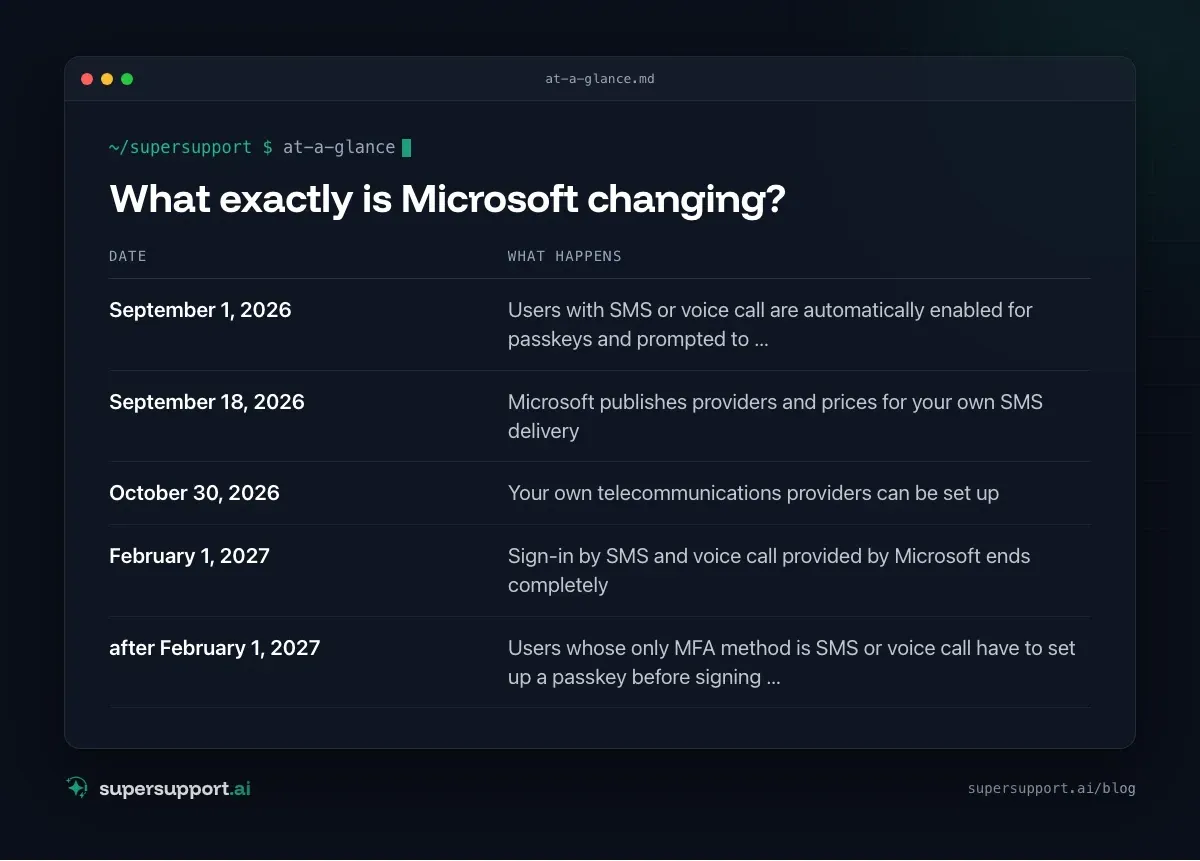
Microsoft is ending sign-in by SMS and voice call and making passkeys the default. According to the notice to all Entra ID tenants:
- September 1, 2026 – Users with SMS or voice call are automatically enabled for passkeys and prompted to register at their next MFA sign-in
- September 18, 2026 – Microsoft publishes providers and prices for your own SMS delivery
- October 30, 2026 – Your own telecommunications providers can be set up
- February 1, 2027 – Sign-in by SMS and voice call provided by Microsoft ends completely
- after February 1, 2027 – Users whose only MFA method is SMS or voice call have to set up a passkey before signing in, with no exception
If you have no users with SMS or voice call, you don't have to do anything.
Why is Microsoft abolishing SMS?
Because SMS and voice calls are among the least secure sign-in methods. Codes can be intercepted, captured through fake sign-in pages or redirected by SIM swapping. Passkeys, by contrast, only work on the genuine sign-in page, so a phishing link gets the attacker nothing.
What is a passkey?
A passkey replaces password and code with a key on the device. It is stored:
- in the Microsoft Authenticator app on the phone,
- on the PC (Windows Hello),
- or on a security key (FIDO2, e.g. as a USB stick).
It is released with a fingerprint, face recognition or PIN. For users this is usually easier than an SMS code: no typing, no waiting for the message.
Step 1: Find the affected users
In the Microsoft Entra admin center:
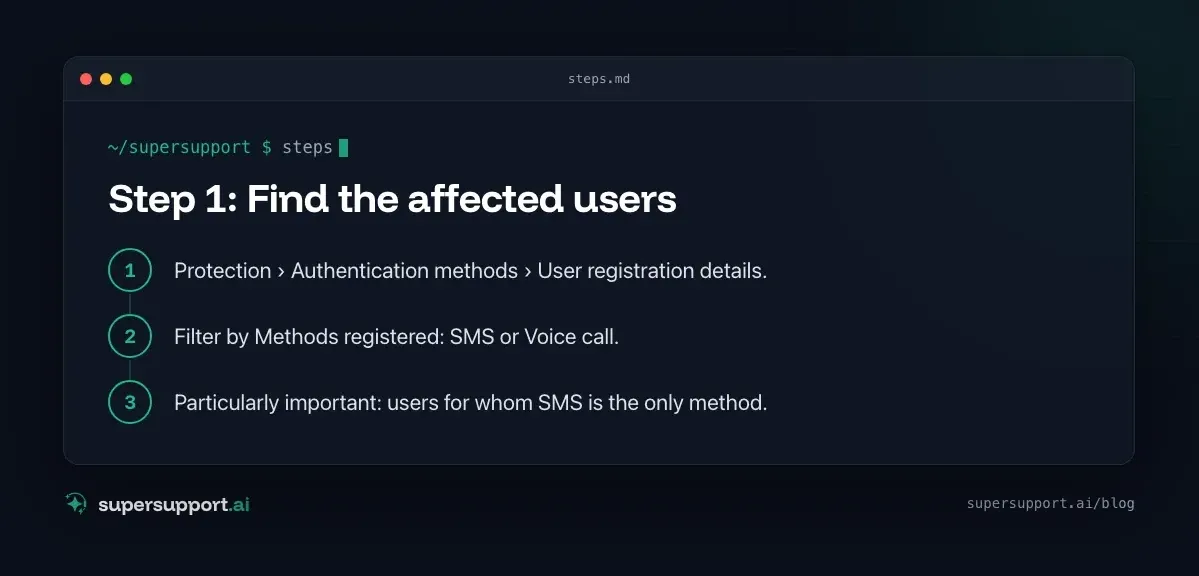
- Protection › Authentication methods › User registration details.
- Filter by Methods registered: SMS or Voice call.
- Particularly important: users for whom SMS is the only method.
With Microsoft Graph PowerShell:
Connect-MgGraph -Scopes "AuditLog.Read.All","UserAuthenticationMethod.Read.All"
Get-MgReportAuthenticationMethodUserRegistrationDetail -All |
  Where-Object { $_.MethodsRegistered -contains 'mobilePhone' } |
  Select-Object UserPrincipalName, MethodsRegistered
For MSPs: check this separately for each customer tenant, because the notice went to all tenants.
Step 2: Enable passkeys
- Protection › Authentication methods › Policies › enable Passkey (FIDO2).
- Define which groups it applies to, ideally a test group first.
- If needed, set which kinds of passkeys are allowed (Authenticator, security keys).

14 days free
IT support that fixes itself.
SuperSupport fixes IT problems right on the device, before they turn into tickets. Try it free for 14 days.
Start free trialMicrosoft Authenticator as a stopgap: if you don't want to set up a passkey yet, you can also move users to push notifications in the Authenticator app. That is much more secure than SMS, but not quite as phishing-resistant as a passkey.
Step 3: Kick off registration
Microsoft offers a registration campaign for this. Under Authentication methods › Settings › Registration campaign you can prompt users to set up a passkey at sign-in. Since September 1, 2026, this happens automatically for SMS users anyway. If you want to control when and how, start the campaign beforehand.
Add a short note for employees:
- What is changing: SMS codes go away, sign-in is by phone app or fingerprint instead.
- By when: before February 2027, ideally now.
- What to do: install the Authenticator app and choose “Set up a passkey” at the next prompt.
- Who to ask: IT or your MSP.
Step 4: Sort out special cases
- Employees without a company phone: security key (FIDO2) or Windows Hello at the workstation.
- Shared accounts: Ideally abolish them and replace them with personal accounts; otherwise security keys.
- Legal or operational reasons for SMS: Only then set up your own telecommunications provider, which according to Microsoft is possible from October 30, 2026.
- Emergency access: For admin accounts, register at least two methods so that losing a phone doesn't lock you out.
What happens if you do nothing?
From February 1, 2027, users with SMS as their only method are stopped at sign-in and have to set up a passkey first. That then happens under time pressure, without instructions, and lands as a wave of calls with IT. If you switch now, you decide the timing yourself.
More on sign-in and access: VPN: authentication failed and the IT checklist for new employees.
How does SuperSupport help with the switch?
Changes like this bring many similar questions: “How do I set up the passkey?”, “The app is asking for something, what should I do?” The SuperSupport agent answers them in the chat, guides you step by step through the setup and passes only the cases to IT that really need someone, such as a lost phone. What this looks like for internal IT teams and MSPs is described on the respective pages.
Frequently asked questions
When is Microsoft turning off SMS sign-in?
According to Microsoft, the SMS and voice call authentication provided by Microsoft in Entra ID will be discontinued completely on February 1, 2027. Since September 1, 2026, users with SMS or voice call have already been enabled for passkeys automatically and prompted to register at their next sign-in.
What happens to users who only have SMS as a second factor?
After February 1, 2027, they get a blocking prompt at sign-in to set up a passkey first. Only then can they continue working. According to Microsoft, there is no exception for this.
What is a passkey?
A passkey is a sign-in without a password and without a code: the secret key is stored on the phone, the PC or a security key and is released with a fingerprint, face or PIN. It only works on the genuine sign-in page and is therefore protected against phishing.
How do I find out who still uses SMS?
In the Microsoft Entra admin center under Protection › Authentication methods › User registration details, filter by the method SMS or voice call. Alternatively, use Microsoft Graph PowerShell.
Can I keep using SMS?
Only through your own telecommunications provider, which according to Microsoft you connect through the Microsoft Security Store. The SMS and voice call delivery provided by Microsoft ends for all tenants.
14 days free
IT support that fixes itself.
SuperSupport fixes IT problems right on the device, before they turn into tickets. Try it free for 14 days.
Start free trialNico Haslberger is Co-Founder & CEO of SuperSupport.ai. With years of experience as an IT technician, he knows the problems in IT support first-hand: from overloaded help desks to recurring tickets that slow teams down. That knowledge is built into every feature of the platform today. He makes sure SuperSupport.ai solves exactly the problems he experienced himself for years.
This article was created with AI assistance and editorially reviewed.
Related Articles
OTRS Alternative: Znuny, OTOBO, KIX or AI Support?
With the OTRS Community Edition discontinued, many seek an alternative. The forks at a glance – and when AI support on the device complements them better.

Shadow AI in the Workplace: Detect, Govern, Replace
Employees use AI tools IT doesn't know about, with customer data, contracts and code. How to detect shadow AI, set sensible rules and offer alternatives.

AI Agent in IT Support: Guardrails That Actually Hold
An AI agent on the computer needs limits outside the prompt: protected list, blocked actions, approvals that expire. This is how it looks in practice.