;}.cls-2{fill:url(%23Unbenannter_Verlauf_5-2);}.cls-3{fill:url(%23Unbenannter_Verlauf_5-5);}.cls-4{fill:url(%23Unbenannter_Verlauf_5-6);}.cls-5{fill:url(%23Unbenannter_Verlauf_5-3);}.cls-6{fill:url(%23Unbenannter_Verlauf_5-4);}%3c/style%3e%3clinearGradient%20id='Unbenannter_Verlauf_5'%20x1='1075.02'%20y1='943.06'%20x2='1201.78'%20y2='943.06'%20gradientUnits='userSpaceOnUse'%3e%3cstop%20offset='0'%20stop-color='%2322b88a'/%3e%3cstop%20offset='1'%20stop-color='%231a9e78'/%3e%3c/linearGradient%3e%3clinearGradient%20id='Unbenannter_Verlauf_5-2'%20x1='234.11'%20y1='663.43'%20x2='1058.29'%20y2='663.43'%20xlink:href='%23Unbenannter_Verlauf_5'/%3e%3clinearGradient%20id='Unbenannter_Verlauf_5-3'%20x1='843.79'%20y1='1064.84'%20x2='1096.04'%20y2='1064.84'%20xlink:href='%23Unbenannter_Verlauf_5'/%3e%3clinearGradient%20id='Unbenannter_Verlauf_5-4'%20x1='1120.37'%20y1='662.1'%20x2='1253'%20y2='662.1'%20xlink:href='%23Unbenannter_Verlauf_5'/%3e%3clinearGradient%20id='Unbenannter_Verlauf_5-5'%20x1='97.45'%20y1='265.53'%20x2='385.89'%20y2='265.53'%20xlink:href='%23Unbenannter_Verlauf_5'/%3e%3clinearGradient%20id='Unbenannter_Verlauf_5-6'%20x1='295.45'%20y1='255.64'%20x2='1213.95'%20y2='255.64'%20xlink:href='%23Unbenannter_Verlauf_5'/%3e%3c/defs%3e%3cpath%20class='cls-1'%20d='M1201.78,871c-.61,1.55-1.23,3.1-1.86,4.66-20.33,50.18-47.14,96.85-80.02,139.45-7.56-13.82-21.78-22.31-37.69-22.31h-7.19c29.82-37.26,54.46-78.02,73.61-121.8h53.15Z'/%3e%3cpath%20class='cls-2'%20d='M665.24,264.59l69.02,186.52c21.3,57.57,66.69,102.96,124.26,124.26l186.52,69.02c17.67,6.54,17.67,31.54,0,38.08l-186.52,69.02c-57.57,21.3-102.96,66.69-124.26,124.26l-69.02,186.52c-6.54,17.67-31.54,17.67-38.08,0l-69.02-186.52c-21.3-57.57-66.69-102.96-124.26-124.26l-186.52-69.02c-17.67-6.54-17.67-31.54,0-38.08l186.52-69.02c57.57-21.3,102.96-66.69,124.26-124.26l69.02-186.52c6.54-17.67,31.54-17.67,38.08,0Z'/%3e%3cpath%20class='cls-5'%20d='M1082.21,1021.98h-79.13c-1.7,0-2.97-1.56-2.62-3.23l22.72-109.35c2.94-14.16-15.11-22.74-24.23-11.51l-152.04,187.31c-7.32,9.02-.9,22.5,10.72,22.5h79.13c1.7,0,2.97,1.56,2.62,3.23l-22.72,109.35c-2.94,14.16,15.11,22.74,24.23,11.51l152.04-187.31c7.32-9.02.9-22.5-10.72-22.5Z'/%3e%3crect%20class='cls-6'%20x='1120.37'%20y='486.36'%20width='132.63'%20height='351.48'%20rx='19.58'%20ry='19.58'/%3e%3cpath%20class='cls-3'%20d='M250.58,128.27l13.88,55.81c7.19,28.91,29.76,51.47,58.66,58.66l55.81,13.88c9.29,2.31,9.29,15.51,0,17.82l-55.81,13.88c-28.91,7.19-51.47,29.76-58.66,58.66l-13.88,55.81c-2.31,9.29-15.51,9.29-17.82,0l-13.88-55.81c-7.19-28.91-29.76-51.47-58.66-58.66l-55.81-13.88c-9.29-2.31-9.29-15.51,0-17.82l55.81-13.88c28.91-7.19,51.47-29.76,58.66-58.66l13.88-55.81c2.31-9.29,15.51-9.29,17.82,0Z'/%3e%3cpath%20class='cls-4'%20d='M1213.95,453.21h-67.62c-1.23,0-2.47.04-3.67.12-27.03-63.89-65.84-121.36-115.42-170.94-51.54-51.54-111.61-91.44-178.55-118.59-64.67-26.22-133.03-39.52-203.16-39.52s-138.48,13.3-203.16,39.52c-33.73,13.67-65.72,30.61-95.75,50.63l-.19-.05c-23.62-5.88-42.51-22.85-51-45.24,37.87-26.86,78.65-49.21,122.01-66.79,72.63-29.44,149.37-44.38,228.08-44.38s155.45,14.93,228.08,44.38c75.2,30.51,142.67,75.31,200.53,133.15,57.84,57.85,102.65,125.33,133.15,200.53,2.31,5.7,4.54,11.43,6.66,17.19Z'/%3e%3c/svg%3e)
TeamViewer Alternative or Complement? Remote Support vs. AI
TeamViewer is the remote support standard, now with AI in the session window. When a TeamViewer alternative fits, and when AI support avoids the session.

TeamViewer is the fastest way to get onto someone else’s screen. Most cases do not need someone else’s screen at all.
Short verdict: TeamViewer from Göppingen is practically the standard for remote support in the German-speaking region – and by now much more: with AI in the session window (CoPilot), automatic summaries (Session Insights) and, since the acquisition of 1E, automated remediation on end devices. People who look for a TeamViewer alternative usually do so because of price or licensing model. But if you mainly want to get rid of the many small requests for which a session is set up at all, you need a different approach – or both.
What is TeamViewer?
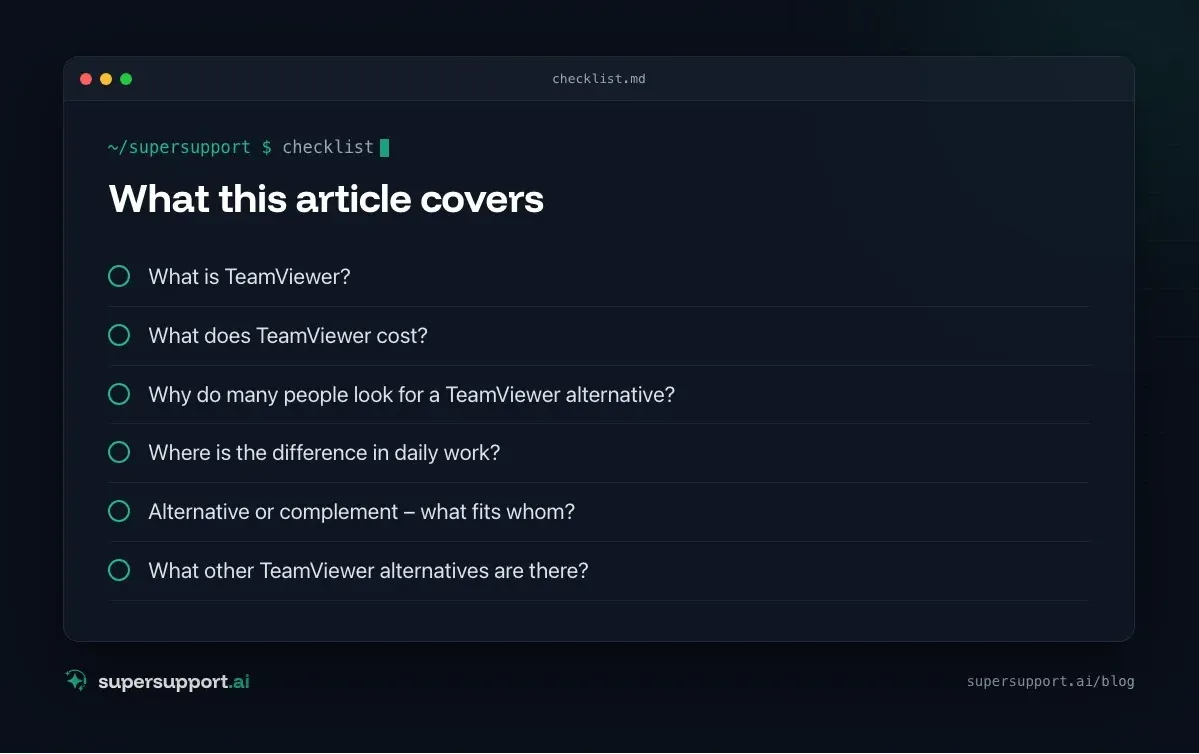
TeamViewer is a publicly listed software vendor from Germany. It is known for remote access and remote support, but the offering is broader:
- TeamViewer Remote: Remote access and remote support for Windows, macOS, Linux and mobile devices.
- TeamViewer Intelligence: AI features – Session Insights summarizes and analyzes sessions, the CoPilot helps technicians during the session with device data, diagnosis and solution steps.
- Tensor: the offering for large companies with central policies, SSO and conditional access.
- 1E: platform for Digital Employee Experience – detects problems on end devices and fixes them automatically. TeamViewer acquired 1E for 720 million US dollars.
What does TeamViewer cost?
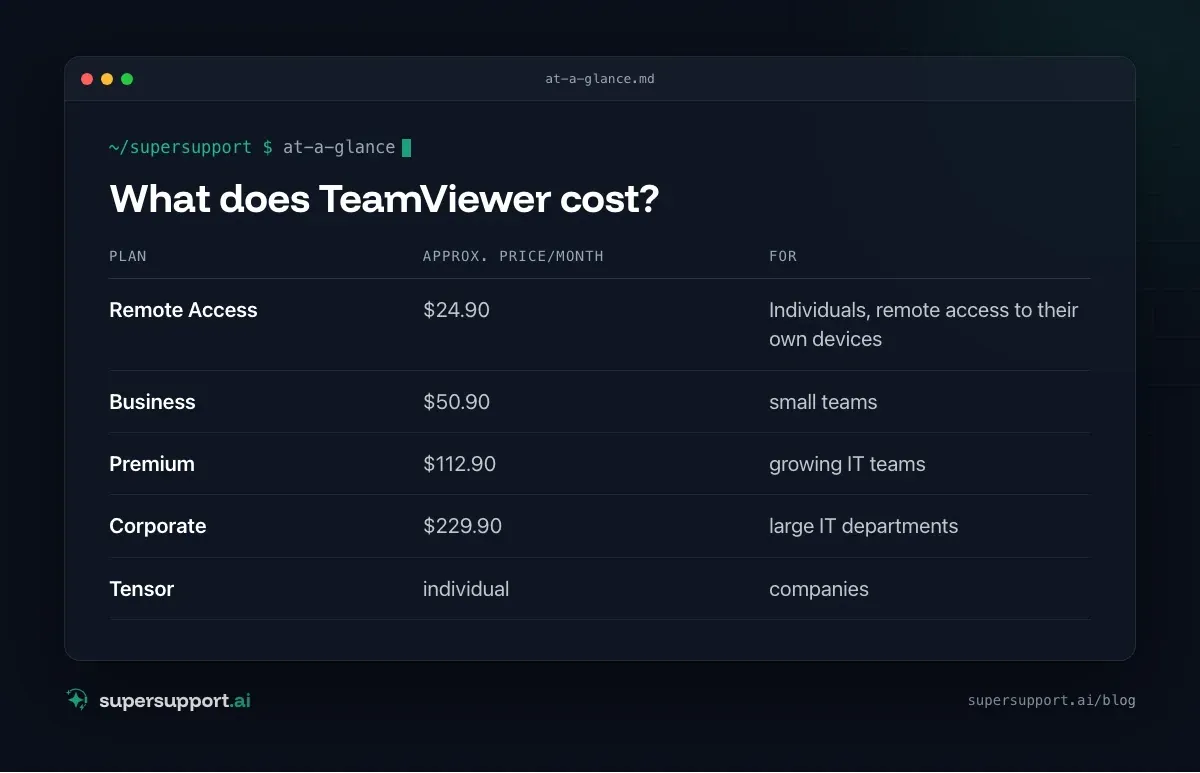
According to price overviews (as of 2026, monthly prices billed annually):
- Plan: Remote Access – Approx. price/month: $24.90; For: Individuals, remote access to their own devices
- Plan: Business – Approx. price/month: $50.90; For: small teams
- Plan: Premium – Approx. price/month: $112.90; For: growing IT teams
- Plan: Corporate – Approx. price/month: $229.90; For: large IT departments
- Plan: Tensor – Approx. price/month: individual; For: companies
AI sessions with the CoPilot are included in the plans with monthly quotas. Prices in euros, concurrent sessions and add-on modules depend on region and contract.
Why do many people look for a TeamViewer alternative?
- Price and licensing model: Annual contracts, concurrent sessions as a price driver, automatic renewal.
- Effort for simple cases: For “My Outlook is frozen”, agree an appointment, read out the ID, set up the session, watch – that costs both sides time.
- Waiting for the technician: The session requires a technician to be available.
- Security: Remote support tools are a popular target for scam calls (“This is Microsoft support, please install …”). Many companies want to limit their use tightly.
TeamViewer and SuperSupport compared
- Category – TeamViewer: Remote support + AI for technicians (+ DEX with 1E); SuperSupport: AI support for end users
- Origin – TeamViewer: Germany; SuperSupport: Austria
- Who does the work – TeamViewer: Technician in the session, CoPilot assists; SuperSupport: AI agent in the chat with the user
- Needs an available technician – TeamViewer: yes, for the session; SuperSupport: no, for Level 1
- Billing – TeamViewer: per plan/license, AI via quotas; SuperSupport: per workstation
- Diagnosis on the device – TeamViewer: in the session, AI-assisted; SuperSupport: by the agent in the conversation
- Resolution – TeamViewer: Technician; automated via 1E; SuperSupport: Harmless issues itself, sensitive ones after approval
- Takes over the screen – TeamViewer: yes, core function; SuperSupport: no
- Language – TeamViewer: German; SuperSupport: German
Both come from the DACH region and speak German. The difference: TeamViewer makes the technician in the session faster. SuperSupport resolves part of the requests before a session is needed.
Where is the difference in daily work?
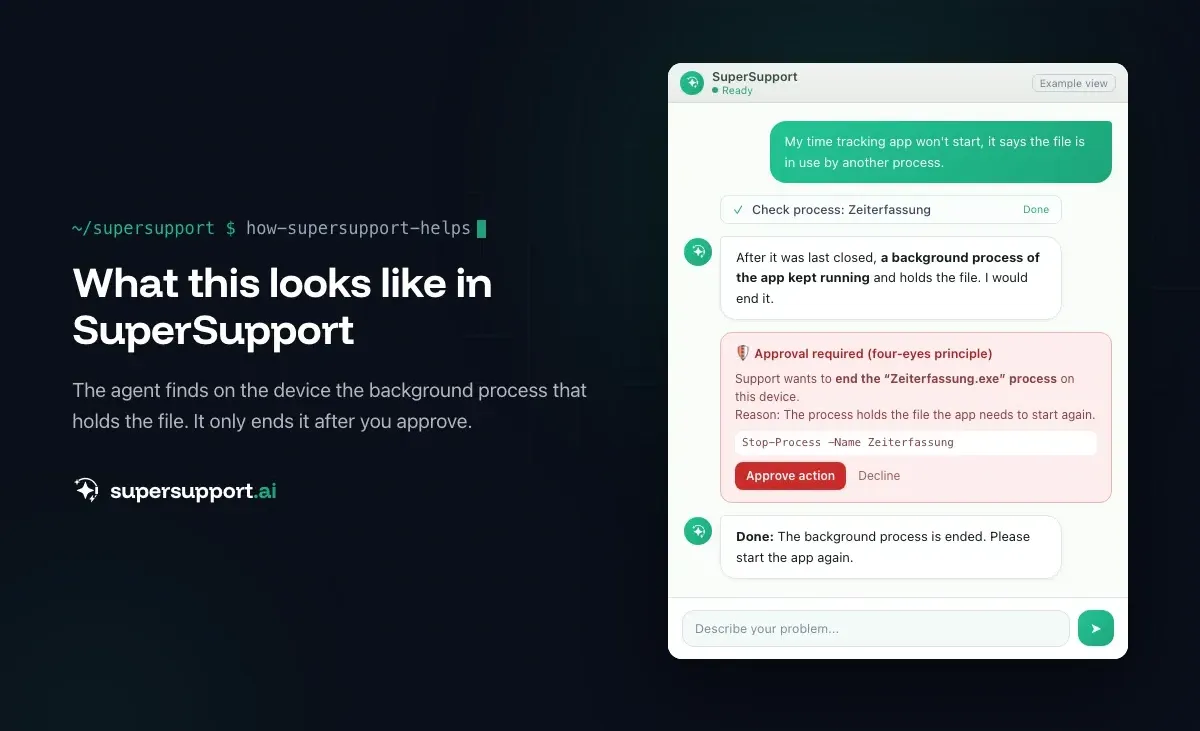
Example: “An app won’t start, file is in use by another process.” With TeamViewer, the user calls, the technician connects, the CoPilot suggests checking background processes. With SuperSupport, the user writes in the chat, the agent finds and ends the background processes – without a session and without waiting for a technician. See App won’t start: file in use by another process.
If someone really needs to be at the screen – for example for a complex setup – remote support remains the right tool.
Alternative or complement – what fits whom?
TeamViewer fits if …
- technicians regularly have to access screens themselves,
- you need remote support for many platforms,
- you want AI assistance directly in the session.

14 days free
IT support that fixes itself.
SuperSupport fixes IT problems right on the device, before they turn into tickets. Try it free for 14 days.
Start free trialSuperSupport in addition to TeamViewer fits if …
- TeamViewer stays for real remote support cases,
- but the many small requests should be resolved beforehand in the chat – without a session.
A different remote support tool instead of TeamViewer fits if …
- the price or licensing model does not suit you – such as AnyDesk, Splashtop, RustDesk (open source) or the remote access features in RMM tools such as NinjaOne or Atera.
SuperSupport instead of TeamViewer fits if …
- you mainly use remote support for simple user problems (AI relief for IT teams),
- as an MSP you want to reduce the number of sessions (AI support for MSPs).
What other TeamViewer alternatives are there?
For remote support: AnyDesk, Splashtop, RustDesk, Microsoft Remote Help/Quick Assist and the remote access features in RMMs such as NinjaOne, Atera, Pulseway and Syncro. For AnyDesk problems, see AnyDesk crashes.
What does SuperSupport offer?
SuperSupport handles Level 1 IT support via chat: the user describes their problem, the agent diagnoses directly on the Windows or Mac device, resolves harmless issues itself and submits everything sensitive to IT for approval. Every step is logged, every chat is also the case itself. Developed in Austria.
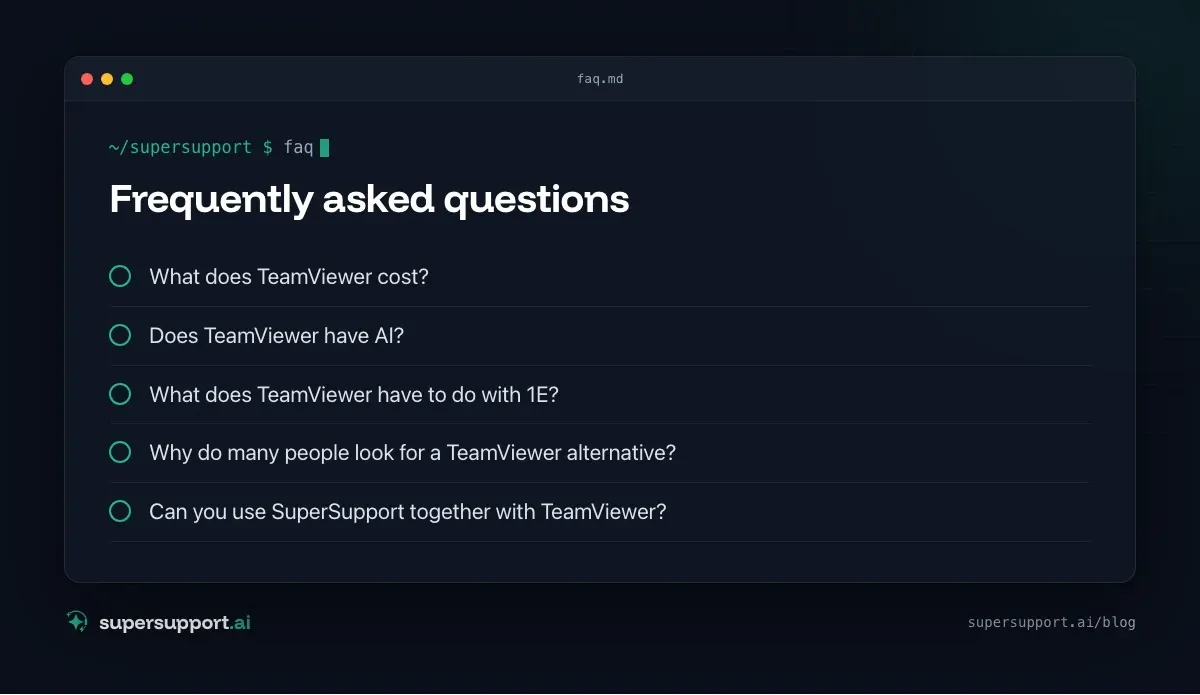
Frequently asked questions
What does TeamViewer cost?
According to price overviews (as of 2026), plans range from about $24.90 (Remote Access) to $229.90 per month (Corporate), with Business and Premium in between. Tensor is the offering for large companies with individual pricing. Prices in euros and the exact terms depend on region and term.
Does TeamViewer have AI?
Yes. Under the name TeamViewer Intelligence there are AI features for support: Session Insights summarizes remote support sessions, and the CoPilot assists technicians during a session with device data, diagnosis and suggested solutions. AI sessions are billed via quotas.
What does TeamViewer have to do with 1E?
TeamViewer acquired the vendor 1E, announced in December 2024 with an enterprise value of 720 million US dollars. 1E offers a platform for Digital Employee Experience that detects problems on end devices and fixes them automatically.
Why do many people look for a TeamViewer alternative?
Often because of prices and licensing terms, because of false alarms about commercial use for private users, or because a full remote support session is too much effort for simple cases.
Can you use SuperSupport together with TeamViewer?
Yes. TeamViewer remains the tool for remote support sessions when a technician has to get onto the screen themselves. SuperSupport resolves part of the requests beforehand in the chat on the device – without anyone having to set up a session.
14 days free
IT support that fixes itself.
SuperSupport fixes IT problems right on the device, before they turn into tickets. Try it free for 14 days.
Start free trialNico Haslberger is Co-Founder & CEO of SuperSupport.ai. With years of experience as an IT technician, he knows the problems in IT support first-hand: from overloaded help desks to recurring tickets that slow teams down. That knowledge is built into every feature of the platform today. He makes sure SuperSupport.ai solves exactly the problems he experienced himself for years.
This article was created with AI assistance and editorially reviewed.
Related Articles
What Employees Really Ask IT Support
We reviewed our AI agent's chats. The top topics are unspectacular, and almost all the answers are on the computer, not in the wiki.

Splashtop Alternative or Complement? Remote Support vs. AI
Splashtop is low-cost remote support with SOS for spontaneous help and AEM for endpoint management. When an alternative fits and when AI complements it.
Zammad Alternative or Add-On? Ticket System vs. AI
Zammad is an affordable open-source ticket system from Germany, from €7 per agent. When an alternative fits and when AI support on the device adds to it.