;}.cls-2{fill:url(%23Unbenannter_Verlauf_5-2);}.cls-3{fill:url(%23Unbenannter_Verlauf_5-5);}.cls-4{fill:url(%23Unbenannter_Verlauf_5-6);}.cls-5{fill:url(%23Unbenannter_Verlauf_5-3);}.cls-6{fill:url(%23Unbenannter_Verlauf_5-4);}%3c/style%3e%3clinearGradient%20id='Unbenannter_Verlauf_5'%20x1='1075.02'%20y1='943.06'%20x2='1201.78'%20y2='943.06'%20gradientUnits='userSpaceOnUse'%3e%3cstop%20offset='0'%20stop-color='%2322b88a'/%3e%3cstop%20offset='1'%20stop-color='%231a9e78'/%3e%3c/linearGradient%3e%3clinearGradient%20id='Unbenannter_Verlauf_5-2'%20x1='234.11'%20y1='663.43'%20x2='1058.29'%20y2='663.43'%20xlink:href='%23Unbenannter_Verlauf_5'/%3e%3clinearGradient%20id='Unbenannter_Verlauf_5-3'%20x1='843.79'%20y1='1064.84'%20x2='1096.04'%20y2='1064.84'%20xlink:href='%23Unbenannter_Verlauf_5'/%3e%3clinearGradient%20id='Unbenannter_Verlauf_5-4'%20x1='1120.37'%20y1='662.1'%20x2='1253'%20y2='662.1'%20xlink:href='%23Unbenannter_Verlauf_5'/%3e%3clinearGradient%20id='Unbenannter_Verlauf_5-5'%20x1='97.45'%20y1='265.53'%20x2='385.89'%20y2='265.53'%20xlink:href='%23Unbenannter_Verlauf_5'/%3e%3clinearGradient%20id='Unbenannter_Verlauf_5-6'%20x1='295.45'%20y1='255.64'%20x2='1213.95'%20y2='255.64'%20xlink:href='%23Unbenannter_Verlauf_5'/%3e%3c/defs%3e%3cpath%20class='cls-1'%20d='M1201.78,871c-.61,1.55-1.23,3.1-1.86,4.66-20.33,50.18-47.14,96.85-80.02,139.45-7.56-13.82-21.78-22.31-37.69-22.31h-7.19c29.82-37.26,54.46-78.02,73.61-121.8h53.15Z'/%3e%3cpath%20class='cls-2'%20d='M665.24,264.59l69.02,186.52c21.3,57.57,66.69,102.96,124.26,124.26l186.52,69.02c17.67,6.54,17.67,31.54,0,38.08l-186.52,69.02c-57.57,21.3-102.96,66.69-124.26,124.26l-69.02,186.52c-6.54,17.67-31.54,17.67-38.08,0l-69.02-186.52c-21.3-57.57-66.69-102.96-124.26-124.26l-186.52-69.02c-17.67-6.54-17.67-31.54,0-38.08l186.52-69.02c57.57-21.3,102.96-66.69,124.26-124.26l69.02-186.52c6.54-17.67,31.54-17.67,38.08,0Z'/%3e%3cpath%20class='cls-5'%20d='M1082.21,1021.98h-79.13c-1.7,0-2.97-1.56-2.62-3.23l22.72-109.35c2.94-14.16-15.11-22.74-24.23-11.51l-152.04,187.31c-7.32,9.02-.9,22.5,10.72,22.5h79.13c1.7,0,2.97,1.56,2.62,3.23l-22.72,109.35c-2.94,14.16,15.11,22.74,24.23,11.51l152.04-187.31c7.32-9.02.9-22.5-10.72-22.5Z'/%3e%3crect%20class='cls-6'%20x='1120.37'%20y='486.36'%20width='132.63'%20height='351.48'%20rx='19.58'%20ry='19.58'/%3e%3cpath%20class='cls-3'%20d='M250.58,128.27l13.88,55.81c7.19,28.91,29.76,51.47,58.66,58.66l55.81,13.88c9.29,2.31,9.29,15.51,0,17.82l-55.81,13.88c-28.91,7.19-51.47,29.76-58.66,58.66l-13.88,55.81c-2.31,9.29-15.51,9.29-17.82,0l-13.88-55.81c-7.19-28.91-29.76-51.47-58.66-58.66l-55.81-13.88c-9.29-2.31-9.29-15.51,0-17.82l55.81-13.88c28.91-7.19,51.47-29.76,58.66-58.66l13.88-55.81c2.31-9.29,15.51-9.29,17.82,0Z'/%3e%3cpath%20class='cls-4'%20d='M1213.95,453.21h-67.62c-1.23,0-2.47.04-3.67.12-27.03-63.89-65.84-121.36-115.42-170.94-51.54-51.54-111.61-91.44-178.55-118.59-64.67-26.22-133.03-39.52-203.16-39.52s-138.48,13.3-203.16,39.52c-33.73,13.67-65.72,30.61-95.75,50.63l-.19-.05c-23.62-5.88-42.51-22.85-51-45.24,37.87-26.86,78.65-49.21,122.01-66.79,72.63-29.44,149.37-44.38,228.08-44.38s155.45,14.93,228.08,44.38c75.2,30.51,142.67,75.31,200.53,133.15,57.84,57.85,102.65,125.33,133.15,200.53,2.31,5.7,4.54,11.43,6.66,17.19Z'/%3e%3c/svg%3e)
NinjaOne Alternative or Complement? The Honest Comparison
NinjaOne is a strong RMM for patches and devices but doesn't resolve user requests. When an alternative fits, and when AI support is the better complement.

NinjaOne patches your devices before you wake up. It still doesn't help the employee whose Teams is frozen.
Short verdict: NinjaOne is one of the most popular RMM tools: fast, clear, strong on patches and remote support. If you are looking for a NinjaOne alternative because the price or minimum quantity doesn't fit, you will find one among other RMM vendors. But if what you really want is to get rid of the many small user requests, you don't need a different RMM, you need something that talks to the user. Then SuperSupport is not an alternative but the complement.
What is NinjaOne?
NinjaOne (formerly NinjaRMM) is an endpoint management platform, mainly for MSPs and internal IT departments. The core is the RMM: monitoring, alerts, scripts, remote access and automatic patching for Windows, macOS and Linux, including updates for third-party software. On top of that come modules for backup, documentation, ticketing and mobile device management.
With AI, NinjaOne clearly focuses on the technician side:
- Patch Intelligence rates updates based on vendor notes, vulnerability data and feedback from the field, holds back risky patches and rolls out stable ones automatically.
- Vulnerability Management (March 2026) compares the devices' software inventories on the server side with vulnerability data and prioritizes by actual exploitation.
An assistant for users, such as “my Outlook won't start” or “the printer won't print,” is not part of it.
How much does NinjaOne cost?
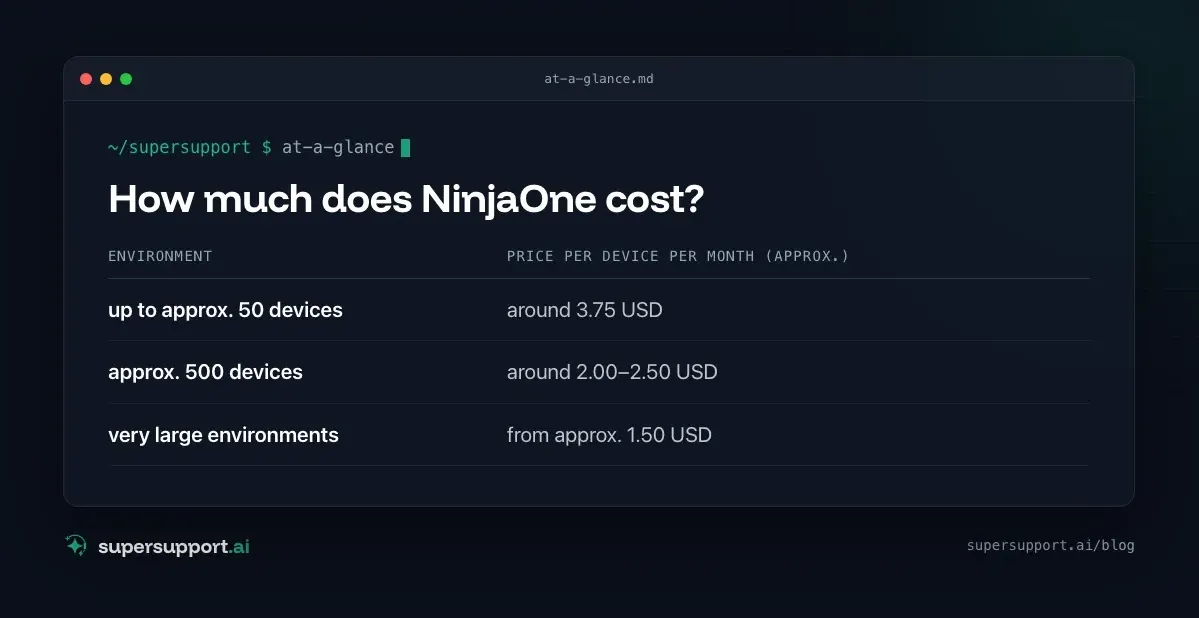
It is billed per managed device per month, annually, with no fee per technician. There are no public prices, and every quote is individual. According to current market overviews (as of 2026):
- up to approx. 50 devices – around 3.75 USD
- approx. 500 devices – around 2.00–2.50 USD
- very large environments – from approx. 1.50 USD
A minimum purchase of around 50 devices is common. Add-on modules such as backup or Vulnerability Management are billed separately. A two-week trial is possible.
Why do many people look for a NinjaOne alternative?
Usually for three reasons: entry size, additional costs, or because the actual problem lies elsewhere.
- Minimum quantity: For very small customers or offices with 10–20 devices, the entry threshold is high.
- Modules add up: RMM, backup, vulnerabilities, ticketing: every module costs extra.
- No public price list: If you want to compare, you first have to talk to sales.
- The phone rings anyway: The RMM keeps the devices up to date. But the question “Why isn't my Outlook working?” still lands with the technician.
The last point is the decisive one. A different RMM doesn't change that.
NinjaOne and SuperSupport compared
- Category – NinjaOne: RMM / endpoint management; SuperSupport: AI support for end users
- Target group – NinjaOne: Technicians in MSPs and IT teams; SuperSupport: Users, and the IT behind them
- Billing – NinjaOne: per device; SuperSupport: per seat
- Entry – NinjaOne: approx. 50 devices minimum; SuperSupport: also for small companies and MSPs
- Patches, monitoring, remote access – NinjaOne: yes, core feature; SuperSupport: no, the RMM stays for that
- User describes the problem in chat – NinjaOne: no; SuperSupport: yes, core feature
- Diagnosis on the device – NinjaOne: by script, run by the technician; SuperSupport: by the agent in conversation
- Resolution – NinjaOne: Technician or automation; SuperSupport: Harmless things itself, sensitive things after approval
- AI focus – NinjaOne: Patches, vulnerabilities; SuperSupport: User requests at first level
- Platforms – NinjaOne: Windows, macOS, Linux, mobile; SuperSupport: Windows, macOS
- Language – NinjaOne: Interface in German among others; SuperSupport: German throughout
Where is the difference in daily work?
NinjaOne makes sure devices are patched and monitored. SuperSupport takes care of what the user can't manage right now.
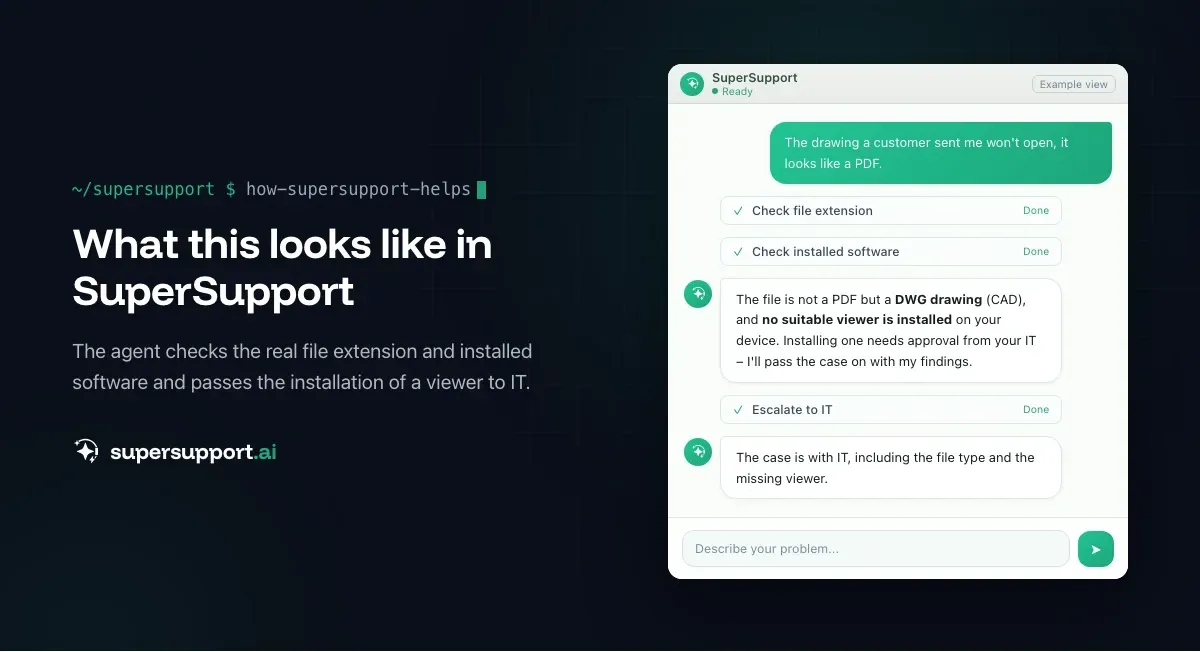
Example: A user reports that a drawing won't open because it “looks like a PDF.” In the RMM, the technician sees that the device is healthy and up to date, and the problem stays unresolved until someone calls back. The SuperSupport agent checks the real file extension in chat, recognizes that it is a CAD file and that no suitable viewer is installed, and submits the installation to IT for approval. See Open a DWG file without AutoCAD.
Other typical requests that show up in no RMM alert: Outlook is slow, Excel file locked by another user or Printer won't print.
Alternative or complement: what fits whom?

Beta
IT support that fixes itself.
supersupport.ai handles your 1st-level support fully automatically. Secure your spot on the waitlist now.
Join the WaitlistNinjaOne fits if …
- you want to patch, monitor and remotely support many devices centrally,
- as an MSP, you want a fast, clear RMM interface,
- the minimum quantity and the module prices fit your size.
SuperSupport in addition to NinjaOne fits if …
- NinjaOne is to stay as your RMM,
- but first level should no longer run through the technician's phone,
- users should get simple problems solved themselves in chat, and open cases go on as a ticket.
A different RMM solution instead of NinjaOne fits if …
- price, minimum quantity or the missing price list bother you most, for example Atera, which bills per technician instead of per device.
SuperSupport instead of an RMM fits if …
- you don't need a central patch and monitoring tool because updates run through built-in Microsoft or Apple tools,
- what matters most to you is user requests (AI relief for IT teams, AI support for MSPs).
What other NinjaOne alternatives are there?
In the RMM space, Atera, ConnectWise, N-able and Kaseya are the best known. If you also want a complete ITSM, look at HaloITSM, Freshservice or ServiceDesk Plus. European service management solutions are TOPdesk and Matrix42.
What does SuperSupport offer?
SuperSupport takes over first-level IT support through chat: the user describes their problem, the agent diagnoses directly on the Windows or Mac device, handles the harmless things itself and submits everything sensitive to IT for approval. Every step is logged, every chat is also the case and can be handed over as a ticket to an existing system. Developed in Austria.
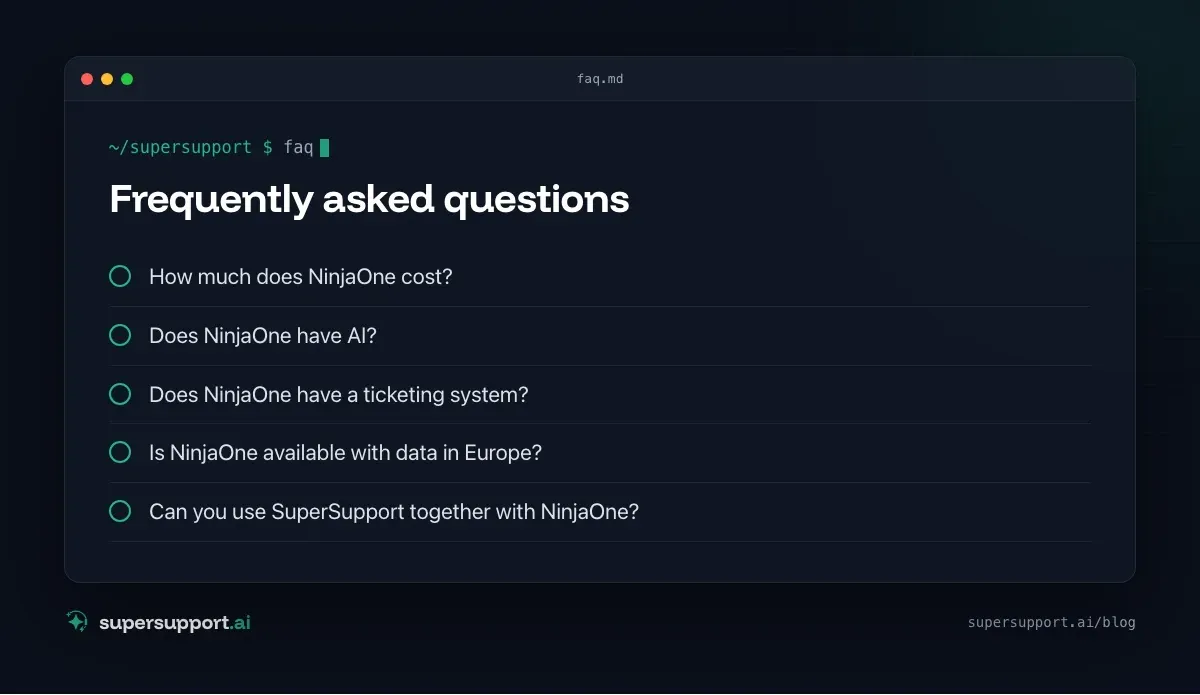
Frequently asked questions
How much does NinjaOne cost?
NinjaOne bills per managed device per month, on an annual term and with no technician fee. There are no public list prices; according to market overviews, prices in 2026 are roughly 1.50 to 3.75 US dollars per device, depending on volume and modules. Small environments pay the upper rate.
Does NinjaOne have AI?
Yes, mainly in patch and vulnerability management: Patch Intelligence rates the stability of updates and holds back risky patches, and Vulnerability Management, introduced in 2026, prioritizes vulnerabilities. An AI assistant that talks to users and resolves their requests is not part of it.
Does NinjaOne have a ticketing system?
Yes, NinjaOne offers its own ticketing module that is connected to the RMM. It is aimed at technicians who work on tickets, not at users who want to solve their problem themselves.
Is NinjaOne available with data in Europe?
Besides the US instance, NinjaOne also runs an EU instance. Which region applies is set during setup. For the AI features, it is worth asking separately where the data is processed.
Can you use SuperSupport together with NinjaOne?
Yes. NinjaOne stays responsible for patches, monitoring and remote support, while SuperSupport takes the users' requests in chat and resolves them on the device. Unresolved cases go to IT as a ticket.
Beta
IT support that fixes itself.
supersupport.ai handles your 1st-level support fully automatically. Secure your spot on the waitlist now.
Join the WaitlistNico Haslberger is Co-Founder & CEO of SuperSupport.ai. With years of experience as an IT technician, he knows the problems in IT support first-hand: from overloaded help desks to recurring tickets that slow teams down. That knowledge is built into every feature of the platform today. He makes sure SuperSupport.ai solves exactly the problems he experienced himself for years.
This article was created with AI assistance and editorially reviewed.
Related Articles

HaloITSM & HaloPSA Alternative or Add-On?
Halo is popular with IT teams and MSPs as a ticketing and PSA system. When an alternative fits and when AI support on the device is the add-on.

Moveworks Alternative for Mid-Sized Companies and MSPs
Moveworks now belongs to ServiceNow and only pays off at thousands of employees. What smaller companies and MSPs can use instead.
Intune Alternative or Add-On? Device Management vs. AI
Microsoft Intune manages devices, policies and apps, often already in Microsoft 365. When an Intune alternative makes sense and when AI support helps.