;}.cls-2{fill:url(%23Unbenannter_Verlauf_5-2);}.cls-3{fill:url(%23Unbenannter_Verlauf_5-5);}.cls-4{fill:url(%23Unbenannter_Verlauf_5-6);}.cls-5{fill:url(%23Unbenannter_Verlauf_5-3);}.cls-6{fill:url(%23Unbenannter_Verlauf_5-4);}%3c/style%3e%3clinearGradient%20id='Unbenannter_Verlauf_5'%20x1='1075.02'%20y1='943.06'%20x2='1201.78'%20y2='943.06'%20gradientUnits='userSpaceOnUse'%3e%3cstop%20offset='0'%20stop-color='%2322b88a'/%3e%3cstop%20offset='1'%20stop-color='%231a9e78'/%3e%3c/linearGradient%3e%3clinearGradient%20id='Unbenannter_Verlauf_5-2'%20x1='234.11'%20y1='663.43'%20x2='1058.29'%20y2='663.43'%20xlink:href='%23Unbenannter_Verlauf_5'/%3e%3clinearGradient%20id='Unbenannter_Verlauf_5-3'%20x1='843.79'%20y1='1064.84'%20x2='1096.04'%20y2='1064.84'%20xlink:href='%23Unbenannter_Verlauf_5'/%3e%3clinearGradient%20id='Unbenannter_Verlauf_5-4'%20x1='1120.37'%20y1='662.1'%20x2='1253'%20y2='662.1'%20xlink:href='%23Unbenannter_Verlauf_5'/%3e%3clinearGradient%20id='Unbenannter_Verlauf_5-5'%20x1='97.45'%20y1='265.53'%20x2='385.89'%20y2='265.53'%20xlink:href='%23Unbenannter_Verlauf_5'/%3e%3clinearGradient%20id='Unbenannter_Verlauf_5-6'%20x1='295.45'%20y1='255.64'%20x2='1213.95'%20y2='255.64'%20xlink:href='%23Unbenannter_Verlauf_5'/%3e%3c/defs%3e%3cpath%20class='cls-1'%20d='M1201.78,871c-.61,1.55-1.23,3.1-1.86,4.66-20.33,50.18-47.14,96.85-80.02,139.45-7.56-13.82-21.78-22.31-37.69-22.31h-7.19c29.82-37.26,54.46-78.02,73.61-121.8h53.15Z'/%3e%3cpath%20class='cls-2'%20d='M665.24,264.59l69.02,186.52c21.3,57.57,66.69,102.96,124.26,124.26l186.52,69.02c17.67,6.54,17.67,31.54,0,38.08l-186.52,69.02c-57.57,21.3-102.96,66.69-124.26,124.26l-69.02,186.52c-6.54,17.67-31.54,17.67-38.08,0l-69.02-186.52c-21.3-57.57-66.69-102.96-124.26-124.26l-186.52-69.02c-17.67-6.54-17.67-31.54,0-38.08l186.52-69.02c57.57-21.3,102.96-66.69,124.26-124.26l69.02-186.52c6.54-17.67,31.54-17.67,38.08,0Z'/%3e%3cpath%20class='cls-5'%20d='M1082.21,1021.98h-79.13c-1.7,0-2.97-1.56-2.62-3.23l22.72-109.35c2.94-14.16-15.11-22.74-24.23-11.51l-152.04,187.31c-7.32,9.02-.9,22.5,10.72,22.5h79.13c1.7,0,2.97,1.56,2.62,3.23l-22.72,109.35c-2.94,14.16,15.11,22.74,24.23,11.51l152.04-187.31c7.32-9.02.9-22.5-10.72-22.5Z'/%3e%3crect%20class='cls-6'%20x='1120.37'%20y='486.36'%20width='132.63'%20height='351.48'%20rx='19.58'%20ry='19.58'/%3e%3cpath%20class='cls-3'%20d='M250.58,128.27l13.88,55.81c7.19,28.91,29.76,51.47,58.66,58.66l55.81,13.88c9.29,2.31,9.29,15.51,0,17.82l-55.81,13.88c-28.91,7.19-51.47,29.76-58.66,58.66l-13.88,55.81c-2.31,9.29-15.51,9.29-17.82,0l-13.88-55.81c-7.19-28.91-29.76-51.47-58.66-58.66l-55.81-13.88c-9.29-2.31-9.29-15.51,0-17.82l55.81-13.88c28.91-7.19,51.47-29.76,58.66-58.66l13.88-55.81c2.31-9.29,15.51-9.29,17.82,0Z'/%3e%3cpath%20class='cls-4'%20d='M1213.95,453.21h-67.62c-1.23,0-2.47.04-3.67.12-27.03-63.89-65.84-121.36-115.42-170.94-51.54-51.54-111.61-91.44-178.55-118.59-64.67-26.22-133.03-39.52-203.16-39.52s-138.48,13.3-203.16,39.52c-33.73,13.67-65.72,30.61-95.75,50.63l-.19-.05c-23.62-5.88-42.51-22.85-51-45.24,37.87-26.86,78.65-49.21,122.01-66.79,72.63-29.44,149.37-44.38,228.08-44.38s155.45,14.93,228.08,44.38c75.2,30.51,142.67,75.31,200.53,133.15,57.84,57.85,102.65,125.33,133.15,200.53,2.31,5.7,4.54,11.43,6.66,17.19Z'/%3e%3c/svg%3e)
Atera Alternative or Complement? An Honest Comparison
Atera is a strong RMM for technicians. If you want to automate first-level support for end users, you often need something different, or something extra.


Atera is a good RMM. It still doesn't answer a single question from your employees.
Verdict in brief: Atera is a mature, fairly priced RMM with PSA for MSPs and internal IT, billed per technician, with an unlimited number of devices and a strong stack of certifications. But anyone searching for an "Atera alternative" often wants something different: to automate first-level support for end users. An RMM isn't built for that. In many cases the right answer is therefore not an alternative but a complement.
What is Atera?
Atera is a platform for remote monitoring and management (RMM), ticketing (PSA), and remote access, all in one tool for IT technicians. Atera is aimed at MSPs and at internal IT departments.
The feature set includes device monitoring with alerts, patch management, scripts, software distribution, remote access, ticketing with SLAs, billing functions, and reports. On top of that comes an AI assistant that supports technicians in handling tickets, as well as AI features for requests from end users.
On security, Atera is ahead: ISO 27001, ISO 27017, ISO 27018, ISO 42001 for AI management, and SOC 2 Type II, published in a Trust Center.
How much does Atera cost?
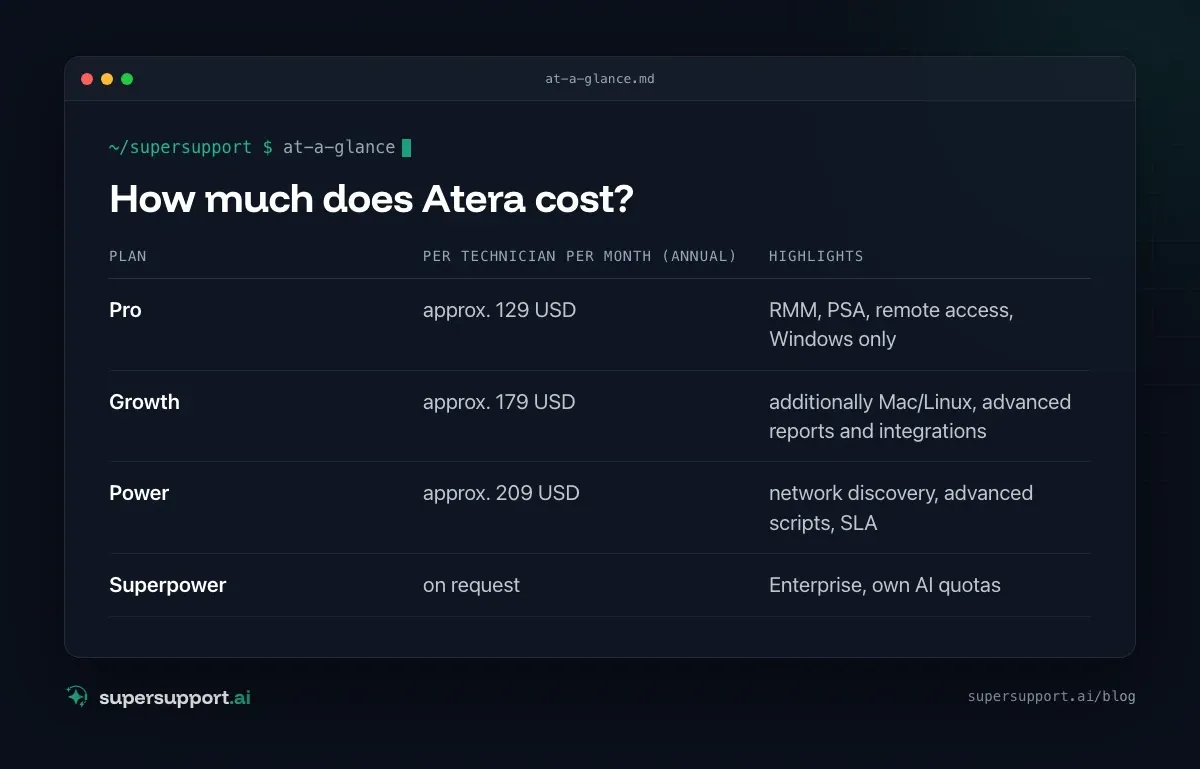
Atera bills per technician, not per device. According to current pricing overviews (as of 2026), the MSP plans with annual payment are at roughly:
- Plan: Pro – per technician per month (annual): approx. 129 USD; Highlights: RMM, PSA, remote access, Windows only
- Plan: Growth – per technician per month (annual): approx. 179 USD; Highlights: additionally Mac/Linux, advanced reports and integrations
- Plan: Power – per technician per month (annual): approx. 209 USD; Highlights: network discovery, advanced scripts, SLA
- Plan: Superpower – per technician per month (annual): on request; Highlights: Enterprise, own AI quotas
The number of managed devices is unlimited in all plans. The AI assistant for technicians has been included in all plans since mid- 2026; AI features that handle end-user requests are billed by usage. There are separate plans with different prices for internal IT departments.
Why do so many people look for an Atera alternative?
Usually not because Atera is bad, but because an RMM solves a different problem. Typical reasons:
- The bottleneck is first level, not device management. "Outlook is slow", "the printer won't print", "my internet connection is lagging": these requests still land with the technician, who then looks at it via remote access.
- End users shouldn't work with the RMM. An RMM is a tool for technicians. The user needs someone to talk to, not an agent in the background.
- German-speaking end users. The interface and AI dialogs should work in German, not just the technician interface.
- Data region. Atera runs its platform on Microsoft Azure and specifies the nearest data center for it. If you need guaranteed data storage in Germany and a European AI model, you keep looking.
- Cost per technician. With few technicians and many customers this is inexpensive. If the team grows because first level eats up too much time, costs rise with it.
Atera and SuperSupport compared
- Category – Atera: RMM + PSA for technicians; SuperSupport: AI support for end users
- Who works with it – Atera: IT technicians; SuperSupport: End users in chat, IT approves
- Billing – Atera: per technician, unlimited devices; SuperSupport: per seat
- Device monitoring, alerts, patching – Atera: yes, core feature; SuperSupport: no
- Remote access for technicians – Atera: yes; SuperSupport: no
- First-level dialog with end user – Atera: AI features, usage-based; SuperSupport: core feature
- Diagnosis and fix on the device – Atera: via scripts by technicians; SuperSupport: by the agent in conversation, anything sensitive after approval
- Platforms – Atera: Windows; Mac/Linux from Growth; SuperSupport: Windows and macOS
- Multi-tenant for MSPs – Atera: yes; SuperSupport: yes
- Certifications – Atera: ISO 27001/27017/27018/42001, SOC 2 Type II; SuperSupport: GDPR contract documents
- End-user language – Atera: mostly English; SuperSupport: German and English
Where is the biggest difference in daily work?
Atera helps the technician solve a problem faster. SuperSupport makes sure that many problems never land with the technician in the first place.
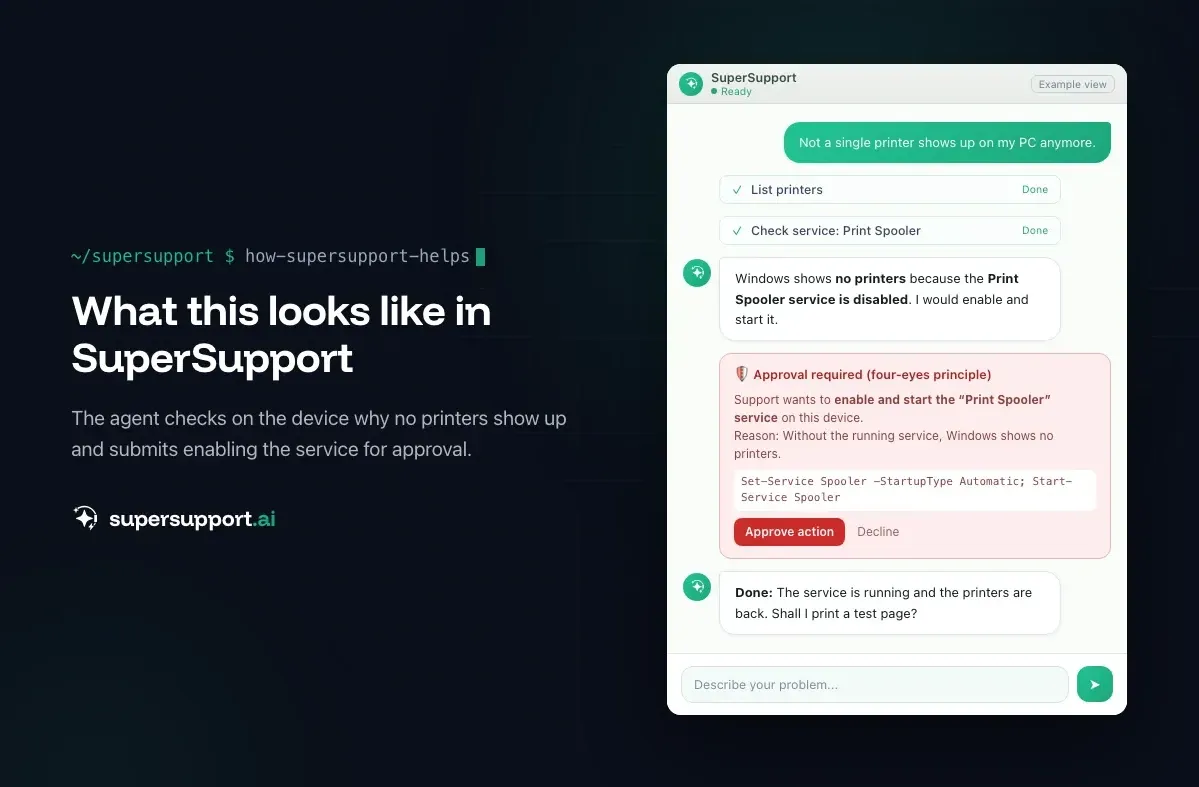
Example: A user reports that no printers are visible anymore. In day-to-day RMM work, a technician opens a ticket, connects via remote access, finds the disabled print spooler, and starts it. With SuperSupport, the user writes the problem in the chat, the agent checks the service, submits the activation for approval, starts it, and prints a test page. The technician only sees the log. The whole case is described in Printer not printing: Repair the print spooler.
Alternative or complement: what fits whom?

Beta
IT support that fixes itself.
supersupport.ai handles your 1st-level support fully automatically. Secure your spot on the waitlist now.
Join the WaitlistAtera alone fits if …
- you are looking for an RMM with PSA and remote access and the technician team handles the requests well,
- device management, patching, and alerts are the priority,
- US certifications and a detailed Trust Center are decisive for your procurement.
SuperSupport in addition to Atera fits if …
- your team spends a lot of time on recurring first-level requests,
- end users should talk to an assistant in German instead of writing a ticket,
- you want to keep monitoring and patching with Atera but work through fewer tickets by hand.
SuperSupport instead of an RMM fits if …
- as the internal IT of a smaller company you mainly want to resolve user requests and don't need a full RMM (AI relief for IT teams),
- data and AI model should demonstrably stay in the EU.
For MSPs with many customers, AI support for MSPs describes how the two work side by side.
What other Atera alternatives are there?
Among RMM vendors, NinjaOne, N-able, ConnectWise, and Kaseya are the best-known alternatives. They also start with the technician. For the end-user part, AI service desks compete more directly, in the enterprise segment for example Moveworks, Aisera, and rezolve.ai, which however only become economical at very large companies.
What does SuperSupport offer?
SuperSupport takes over first-level IT support via chat: The user describes their problem, the agent diagnoses directly on the Windows or Mac device, fixes anything harmless itself, and submits anything sensitive to IT for approval. Every step is logged, and every chat is at the same time the case record. Developed in Austria.
Frequently asked questions
How much does Atera cost?
Atera bills per technician. According to current pricing overviews, the MSP plans with annual payment cost around 129, 179, and 209 US dollars per technician per month, with unlimited endpoints. There are separate plans for internal IT departments.
Is SuperSupport a replacement for Atera?
Not in the sense of an RMM. Atera monitors, patches, and manages devices for technicians. SuperSupport talks to the end user and resolves first-level requests on the device. Many MSPs use both side by side.
Does Atera have AI?
Yes. The assistant for technicians has been included in all plans since mid-2026. There are also AI features that handle requests from end users and are billed by usage.
Which certifications does Atera have?
Atera is certified under ISO 27001, ISO 27017, ISO 27018, ISO 42001, and SOC 2 Type II, among others, and publishes this in its own Trust Center.
Beta
IT support that fixes itself.
supersupport.ai handles your 1st-level support fully automatically. Secure your spot on the waitlist now.
Join the WaitlistNico Haslberger is Co-Founder & CEO of SuperSupport.ai. With years of experience as an IT technician, he knows the problems in IT support first-hand: from overloaded help desks to recurring tickets that slow teams down. That knowledge is built into every feature of the platform today. He makes sure SuperSupport.ai solves exactly the problems he experienced himself for years.
This article was created with AI assistance and editorially reviewed.
Related Articles

HaloITSM & HaloPSA Alternative or Add-On?
Halo is popular with IT teams and MSPs as a ticketing and PSA system. When an alternative fits and when AI support on the device is the add-on.

Moveworks Alternative for Mid-Sized Companies and MSPs
Moveworks now belongs to ServiceNow and only pays off at thousands of employees. What smaller companies and MSPs can use instead.
Intune Alternative or Add-On? Device Management vs. AI
Microsoft Intune manages devices, policies and apps, often already in Microsoft 365. When an Intune alternative makes sense and when AI support helps.