;}.cls-2{fill:url(%23Unbenannter_Verlauf_5-2);}.cls-3{fill:url(%23Unbenannter_Verlauf_5-5);}.cls-4{fill:url(%23Unbenannter_Verlauf_5-6);}.cls-5{fill:url(%23Unbenannter_Verlauf_5-3);}.cls-6{fill:url(%23Unbenannter_Verlauf_5-4);}%3c/style%3e%3clinearGradient%20id='Unbenannter_Verlauf_5'%20x1='1075.02'%20y1='943.06'%20x2='1201.78'%20y2='943.06'%20gradientUnits='userSpaceOnUse'%3e%3cstop%20offset='0'%20stop-color='%2322b88a'/%3e%3cstop%20offset='1'%20stop-color='%231a9e78'/%3e%3c/linearGradient%3e%3clinearGradient%20id='Unbenannter_Verlauf_5-2'%20x1='234.11'%20y1='663.43'%20x2='1058.29'%20y2='663.43'%20xlink:href='%23Unbenannter_Verlauf_5'/%3e%3clinearGradient%20id='Unbenannter_Verlauf_5-3'%20x1='843.79'%20y1='1064.84'%20x2='1096.04'%20y2='1064.84'%20xlink:href='%23Unbenannter_Verlauf_5'/%3e%3clinearGradient%20id='Unbenannter_Verlauf_5-4'%20x1='1120.37'%20y1='662.1'%20x2='1253'%20y2='662.1'%20xlink:href='%23Unbenannter_Verlauf_5'/%3e%3clinearGradient%20id='Unbenannter_Verlauf_5-5'%20x1='97.45'%20y1='265.53'%20x2='385.89'%20y2='265.53'%20xlink:href='%23Unbenannter_Verlauf_5'/%3e%3clinearGradient%20id='Unbenannter_Verlauf_5-6'%20x1='295.45'%20y1='255.64'%20x2='1213.95'%20y2='255.64'%20xlink:href='%23Unbenannter_Verlauf_5'/%3e%3c/defs%3e%3cpath%20class='cls-1'%20d='M1201.78,871c-.61,1.55-1.23,3.1-1.86,4.66-20.33,50.18-47.14,96.85-80.02,139.45-7.56-13.82-21.78-22.31-37.69-22.31h-7.19c29.82-37.26,54.46-78.02,73.61-121.8h53.15Z'/%3e%3cpath%20class='cls-2'%20d='M665.24,264.59l69.02,186.52c21.3,57.57,66.69,102.96,124.26,124.26l186.52,69.02c17.67,6.54,17.67,31.54,0,38.08l-186.52,69.02c-57.57,21.3-102.96,66.69-124.26,124.26l-69.02,186.52c-6.54,17.67-31.54,17.67-38.08,0l-69.02-186.52c-21.3-57.57-66.69-102.96-124.26-124.26l-186.52-69.02c-17.67-6.54-17.67-31.54,0-38.08l186.52-69.02c57.57-21.3,102.96-66.69,124.26-124.26l69.02-186.52c6.54-17.67,31.54-17.67,38.08,0Z'/%3e%3cpath%20class='cls-5'%20d='M1082.21,1021.98h-79.13c-1.7,0-2.97-1.56-2.62-3.23l22.72-109.35c2.94-14.16-15.11-22.74-24.23-11.51l-152.04,187.31c-7.32,9.02-.9,22.5,10.72,22.5h79.13c1.7,0,2.97,1.56,2.62,3.23l-22.72,109.35c-2.94,14.16,15.11,22.74,24.23,11.51l152.04-187.31c7.32-9.02.9-22.5-10.72-22.5Z'/%3e%3crect%20class='cls-6'%20x='1120.37'%20y='486.36'%20width='132.63'%20height='351.48'%20rx='19.58'%20ry='19.58'/%3e%3cpath%20class='cls-3'%20d='M250.58,128.27l13.88,55.81c7.19,28.91,29.76,51.47,58.66,58.66l55.81,13.88c9.29,2.31,9.29,15.51,0,17.82l-55.81,13.88c-28.91,7.19-51.47,29.76-58.66,58.66l-13.88,55.81c-2.31,9.29-15.51,9.29-17.82,0l-13.88-55.81c-7.19-28.91-29.76-51.47-58.66-58.66l-55.81-13.88c-9.29-2.31-9.29-15.51,0-17.82l55.81-13.88c28.91-7.19,51.47-29.76,58.66-58.66l13.88-55.81c2.31-9.29,15.51-9.29,17.82,0Z'/%3e%3cpath%20class='cls-4'%20d='M1213.95,453.21h-67.62c-1.23,0-2.47.04-3.67.12-27.03-63.89-65.84-121.36-115.42-170.94-51.54-51.54-111.61-91.44-178.55-118.59-64.67-26.22-133.03-39.52-203.16-39.52s-138.48,13.3-203.16,39.52c-33.73,13.67-65.72,30.61-95.75,50.63l-.19-.05c-23.62-5.88-42.51-22.85-51-45.24,37.87-26.86,78.65-49.21,122.01-66.79,72.63-29.44,149.37-44.38,228.08-44.38s155.45,14.93,228.08,44.38c75.2,30.51,142.67,75.31,200.53,133.15,57.84,57.85,102.65,125.33,133.15,200.53,2.31,5.7,4.54,11.43,6.66,17.19Z'/%3e%3c/svg%3e)
Roll Back a Driver in Windows After a Bad Update
Screen flickering or sound gone since the driver update? How to roll back the driver, read the versions and stop it from being reinstalled.

An update came yesterday. Today the screen flickers and the headset crackles.
Drivers are the translators between Windows and the hardware – graphics, sound, Wi-Fi, touchpad, printer. New versions fix bugs, but sometimes bring new ones. When a device no longer works properly right after an update, the driver is an obvious suspect. Windows has a built-in reverse gear for this. Here is how to use it, how to recognize the culprit and how IT prevents the driver from coming straight back.
How do I recognize a driver problem?
By the timing. Typical signs that show up right after a Windows update or a driver installation:
- Graphics: flickering, wrong resolution, external monitor stays black – see Screen flickers.
- Sound: no sound, crackling, headset not detected – see No sound on laptop.
- Wi-Fi or LAN: dropped connections, adapter disappears.
- Touchpad: gestures no longer work – see Touchpad not working.
- Blue screens with a driver name in the message – see Blue screen – what to do?.
In Device Manager (right-click Start → Device Manager), devices with problems show a yellow warning triangle.
Which drivers were installed most recently?
The update history shows it. Settings → Windows Update → Update history → Driver updates lists which drivers came through Windows Update and when. In Device Manager, under Properties → Driver for the device, you see the Driver Date and the Driver Version.
With PowerShell you can list all drivers with version and date:
Get-CimInstance Win32_PnPSignedDriver | Where-Object DeviceName | Sort-Object DriverDate -Descending | Select-Object -First 15 DeviceName, DriverVersion, DriverDateThe drivers with the newest date are at the top. If one of them fits the problem, you have found the suspect. The driver date is the date the driver was created, not the day it was installed – the update history is therefore the more accurate source.
How do I roll back the driver?
With “Roll Back Driver”.
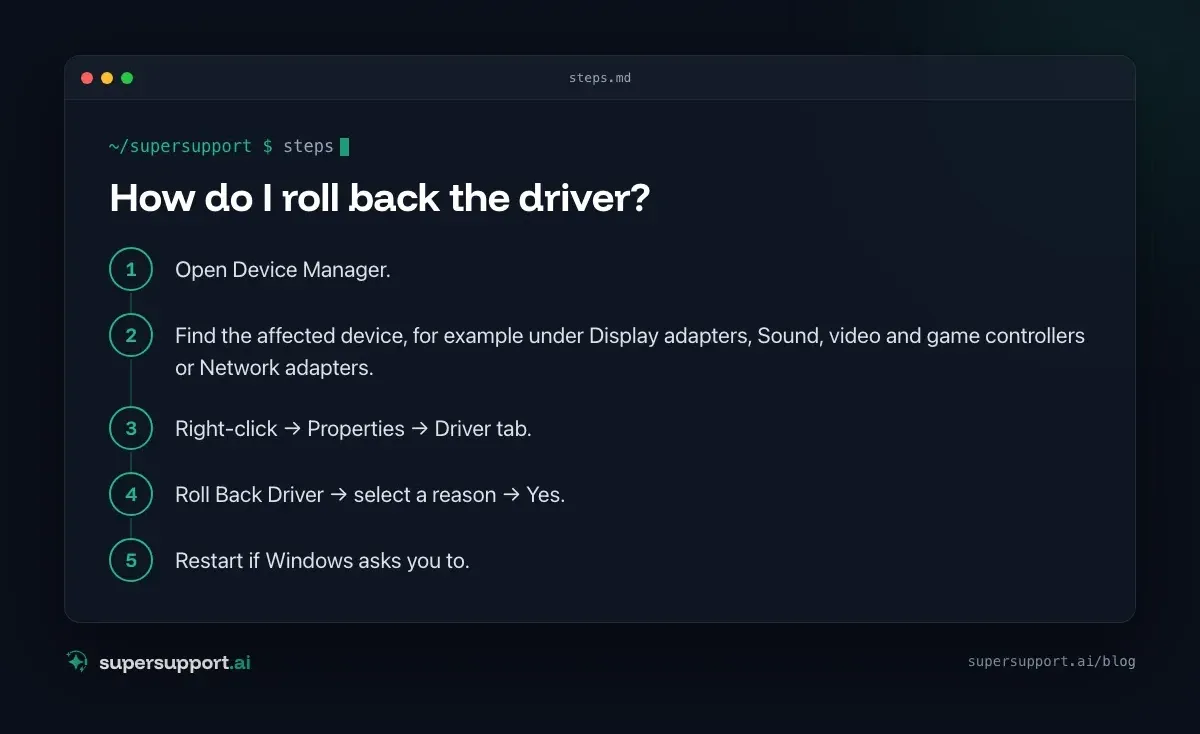
- Open Device Manager.
- Find the affected device, for example under Display adapters, Sound, video and game controllers or Network adapters.
- Right-click → Properties → Driver tab.
- Roll Back Driver → select a reason → Yes.
- Restart if Windows asks you to.
Windows installs the version that was used before. This requires administrator rights – on company devices IT takes care of it.
Why is “Roll Back Driver” grayed out?
Because no older version is saved. This happens if the driver was installed for the first time, if the old version was removed during the update or if a manufacturer program replaced the driver completely. Then there are three ways:
- Older version from the manufacturer: Many manufacturers offer earlier driver versions for download. Installing requires administrator rights.
- Uninstall the device and let it be detected again: In Device Manager, right-click → Uninstall device, then Action → Scan for hardware changes. Windows then often takes its own default driver.
- System Restore: If there is a restore point from before the update, it also rolls the driver back – see Windows System Restore.
How do I prevent the driver from coming back?
That is a matter for IT. Windows Update installs drivers automatically. If you roll back the old driver, you may get the new one again with the next update. IT has several options for this:
- Exclude drivers from Windows Update – through a policy for all devices or individual ones.
- Hide the affected driver update specifically on the individual computer.
- Specify driver versions centrally through device management – proven versions are distributed, new ones only after a test.
As a user, it is worth giving IT the device name, driver version before and after and the date. Often a faulty driver affects several computers of the same model.

14 days free
IT support that fixes itself.
SuperSupport fixes IT problems right on the device, before they turn into tickets. Try it free for 14 days.
Start free trialAnd with printers?
There, the driver often comes from the print server. If the printer is connected through a server, Windows loads the driver from there. Rolling back on your own computer then helps little, because the server delivers its version again the next time you connect. If everything prints wrong or not at all after a driver change, IT checks the driver on the server. More steps are in No connection to the printer.
Should I use driver tools from the internet?
No. Programs that “update all drivers automatically” often install unsuitable versions, bring advertising or are unwanted software themselves. Drivers are best obtained through Windows Update, the laptop manufacturer's tool or IT. How to update a graphics driver cleanly is shown in Update graphics driver.
What if a driver blocks memory integrity?
Then it is too old, not too new. If Windows Security reports that an incompatible driver is preventing memory integrity, a newer driver is more likely to help – see Memory integrity turned off.
And on a Mac?
There is no driver rollback there. macOS ships many drivers with the system and updates them through system updates. If accessories cause problems after an update, an update of the manufacturer's program helps, as does a look at System Settings under Privacy & Security (some system extensions have to be allowed there) or IT.
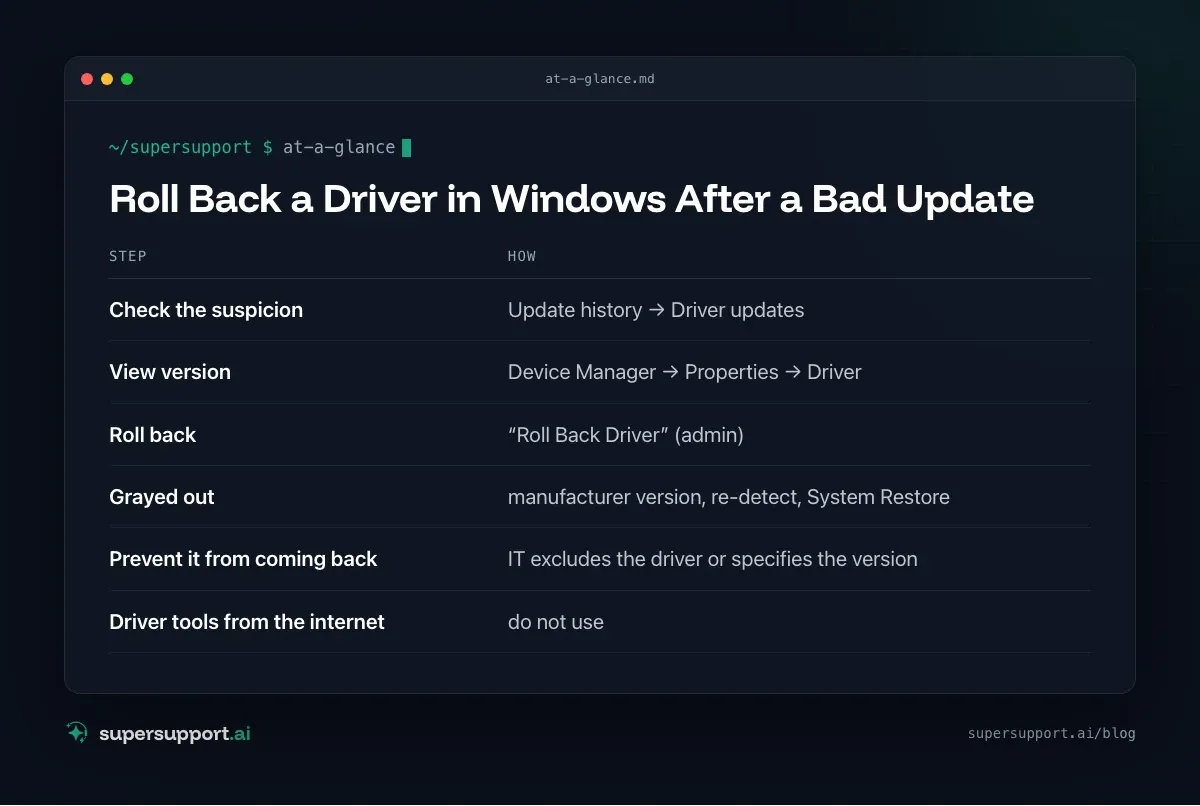
At a glance: roll back a driver
- Check the suspicion – Update history → Driver updates
- View version – Device Manager → Properties → Driver
- Roll back – “Roll Back Driver” (admin)
- Grayed out – manufacturer version, re-detect, System Restore
- Prevent it from coming back – IT excludes the driver or specifies the version
- Driver tools from the internet – do not use
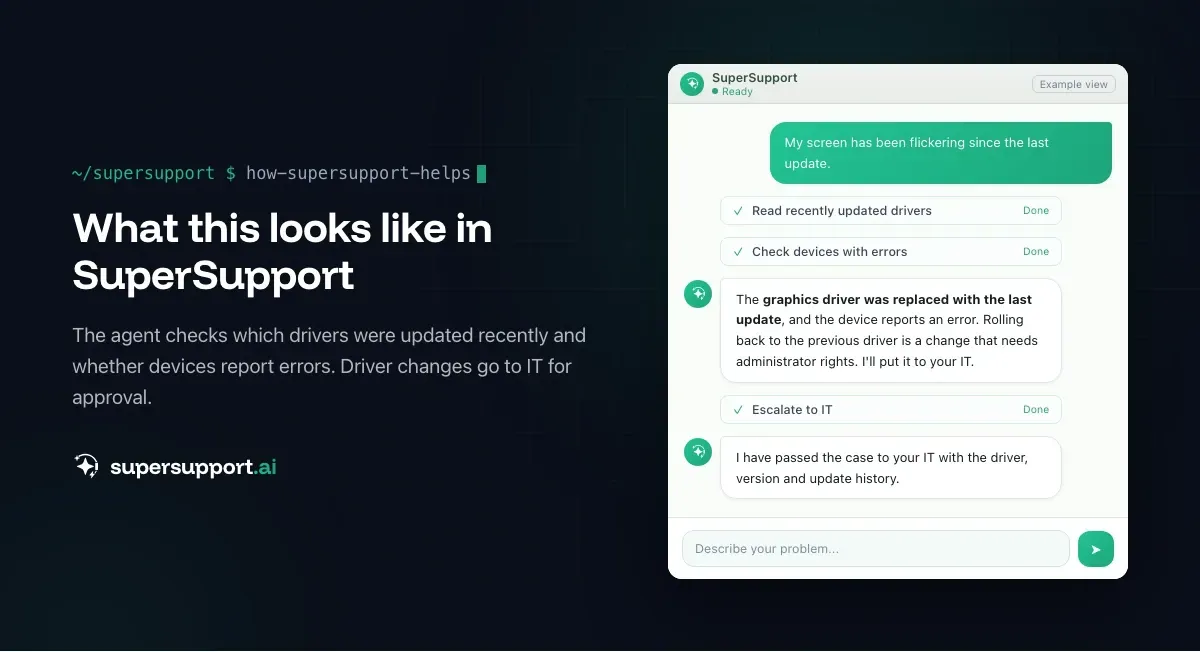
How does SuperSupport help?
The SuperSupport agent checks on the device which drivers were updated recently, which versions are installed and whether devices report errors – and explains the steps. It submits driver changes that need administrator rights to IT for approval. For IT teams and MSPs.
Frequently asked questions
How do I roll back a driver?
Open the affected device in Device Manager, Driver tab → “Roll Back Driver”. Windows then installs the version that was used before. This requires administrator rights.
Why is “Roll Back Driver” grayed out?
Because Windows has not saved an older version – for example because the driver was installed for the first time or the old version was removed. Then an older version from the manufacturer or System Restore helps.
How do I prevent Windows from updating the driver again?
In companies, IT uses a policy to decide whether Windows Update may install drivers, or specifies certain driver versions centrally. On individual computers, IT can hide the affected driver update specifically.
How do I find out which driver is currently installed?
In Device Manager under Properties → Driver you can see the provider, date and version. With PowerShell you can list all drivers with version and date.
Can SuperSupport roll back a driver?
The agent checks on the device which drivers were updated recently, which versions are installed and whether devices report errors, and explains the steps. It submits driver changes that need administrator rights to IT for approval.
14 days free
IT support that fixes itself.
SuperSupport fixes IT problems right on the device, before they turn into tickets. Try it free for 14 days.
Start free trialNico Haslberger is Co-Founder & CEO of SuperSupport.ai. With years of experience as an IT technician, he knows the problems in IT support first-hand: from overloaded help desks to recurring tickets that slow teams down. That knowledge is built into every feature of the platform today. He makes sure SuperSupport.ai solves exactly the problems he experienced himself for years.
This article was created with AI assistance and editorially reviewed.
Related Articles

Restart a Windows Service Automatically If It Stops
A program feature suddenly stops working because a background service stopped? Find the service and have Windows restart it automatically from now on.


Microsoft 365 Quarantine: How to Release an Email
An important email is stuck in Microsoft 365 quarantine? Here is how to check it, release it, and keep it from happening again.

Remove Local Admin Rights: How to Do It Without Chaos
Admin rights are a security risk, but removing them floods the helpdesk. How SMBs remove local admin rights: preparation, LAPS, Intune, GPO, exceptions.