;}.cls-2{fill:url(%23Unbenannter_Verlauf_5-2);}.cls-3{fill:url(%23Unbenannter_Verlauf_5-5);}.cls-4{fill:url(%23Unbenannter_Verlauf_5-6);}.cls-5{fill:url(%23Unbenannter_Verlauf_5-3);}.cls-6{fill:url(%23Unbenannter_Verlauf_5-4);}%3c/style%3e%3clinearGradient%20id='Unbenannter_Verlauf_5'%20x1='1075.02'%20y1='943.06'%20x2='1201.78'%20y2='943.06'%20gradientUnits='userSpaceOnUse'%3e%3cstop%20offset='0'%20stop-color='%2322b88a'/%3e%3cstop%20offset='1'%20stop-color='%231a9e78'/%3e%3c/linearGradient%3e%3clinearGradient%20id='Unbenannter_Verlauf_5-2'%20x1='234.11'%20y1='663.43'%20x2='1058.29'%20y2='663.43'%20xlink:href='%23Unbenannter_Verlauf_5'/%3e%3clinearGradient%20id='Unbenannter_Verlauf_5-3'%20x1='843.79'%20y1='1064.84'%20x2='1096.04'%20y2='1064.84'%20xlink:href='%23Unbenannter_Verlauf_5'/%3e%3clinearGradient%20id='Unbenannter_Verlauf_5-4'%20x1='1120.37'%20y1='662.1'%20x2='1253'%20y2='662.1'%20xlink:href='%23Unbenannter_Verlauf_5'/%3e%3clinearGradient%20id='Unbenannter_Verlauf_5-5'%20x1='97.45'%20y1='265.53'%20x2='385.89'%20y2='265.53'%20xlink:href='%23Unbenannter_Verlauf_5'/%3e%3clinearGradient%20id='Unbenannter_Verlauf_5-6'%20x1='295.45'%20y1='255.64'%20x2='1213.95'%20y2='255.64'%20xlink:href='%23Unbenannter_Verlauf_5'/%3e%3c/defs%3e%3cpath%20class='cls-1'%20d='M1201.78,871c-.61,1.55-1.23,3.1-1.86,4.66-20.33,50.18-47.14,96.85-80.02,139.45-7.56-13.82-21.78-22.31-37.69-22.31h-7.19c29.82-37.26,54.46-78.02,73.61-121.8h53.15Z'/%3e%3cpath%20class='cls-2'%20d='M665.24,264.59l69.02,186.52c21.3,57.57,66.69,102.96,124.26,124.26l186.52,69.02c17.67,6.54,17.67,31.54,0,38.08l-186.52,69.02c-57.57,21.3-102.96,66.69-124.26,124.26l-69.02,186.52c-6.54,17.67-31.54,17.67-38.08,0l-69.02-186.52c-21.3-57.57-66.69-102.96-124.26-124.26l-186.52-69.02c-17.67-6.54-17.67-31.54,0-38.08l186.52-69.02c57.57-21.3,102.96-66.69,124.26-124.26l69.02-186.52c6.54-17.67,31.54-17.67,38.08,0Z'/%3e%3cpath%20class='cls-5'%20d='M1082.21,1021.98h-79.13c-1.7,0-2.97-1.56-2.62-3.23l22.72-109.35c2.94-14.16-15.11-22.74-24.23-11.51l-152.04,187.31c-7.32,9.02-.9,22.5,10.72,22.5h79.13c1.7,0,2.97,1.56,2.62,3.23l-22.72,109.35c-2.94,14.16,15.11,22.74,24.23,11.51l152.04-187.31c7.32-9.02.9-22.5-10.72-22.5Z'/%3e%3crect%20class='cls-6'%20x='1120.37'%20y='486.36'%20width='132.63'%20height='351.48'%20rx='19.58'%20ry='19.58'/%3e%3cpath%20class='cls-3'%20d='M250.58,128.27l13.88,55.81c7.19,28.91,29.76,51.47,58.66,58.66l55.81,13.88c9.29,2.31,9.29,15.51,0,17.82l-55.81,13.88c-28.91,7.19-51.47,29.76-58.66,58.66l-13.88,55.81c-2.31,9.29-15.51,9.29-17.82,0l-13.88-55.81c-7.19-28.91-29.76-51.47-58.66-58.66l-55.81-13.88c-9.29-2.31-9.29-15.51,0-17.82l55.81-13.88c28.91-7.19,51.47-29.76,58.66-58.66l13.88-55.81c2.31-9.29,15.51-9.29,17.82,0Z'/%3e%3cpath%20class='cls-4'%20d='M1213.95,453.21h-67.62c-1.23,0-2.47.04-3.67.12-27.03-63.89-65.84-121.36-115.42-170.94-51.54-51.54-111.61-91.44-178.55-118.59-64.67-26.22-133.03-39.52-203.16-39.52s-138.48,13.3-203.16,39.52c-33.73,13.67-65.72,30.61-95.75,50.63l-.19-.05c-23.62-5.88-42.51-22.85-51-45.24,37.87-26.86,78.65-49.21,122.01-66.79,72.63-29.44,149.37-44.38,228.08-44.38s155.45,14.93,228.08,44.38c75.2,30.51,142.67,75.31,200.53,133.15,57.84,57.85,102.65,125.33,133.15,200.53,2.31,5.7,4.54,11.43,6.66,17.19Z'/%3e%3c/svg%3e)
IT Support in Mechanical Engineering: Beyond Office IT
PLC programmers, CAD and electrical design, locked design files, ERP: what IT support in mechanical engineering and manufacturing really has to deliver.

In the office, standard IT is enough. In design and at the PLC, it is not.
A machine builder has two IT worlds: the office with email, Office and ERP – and engineering with design, electrical design and PLC programming. The second world constantly breaks standard rules: it needs specialist software, admin rights, different networks and huge files. Real tickets from an MSP that looks after a machine builder show clearly what really comes up there.
Case 1: "But I always need the permission"
A PLC programmer wanted to install engineering software and asked for it to be enabled. After the installation came: "But I always need the permission. I have to install things fairly often and be able to change the IP address range of my interfaces at any time, otherwise I can't connect to the plants."
Both can be solved without permanent full admin:
- Changing IP addresses: the Windows group "Network Configuration Operators" allows exactly that – see Change an IP address without admin rights.
- Installations: time-limited rights or a separate admin account – see Developers without admin rights.
Management in the same environment asked for a permission group so that programmers can work "as independently as possible". That is exactly the right direction.
Case 2: The file is locked – by someone who is no longer there
"Various files are locked by users who no longer work for us at all." A real ticket from design. Programs set a lock when they open a file; if a program crashes or a colleague leaves the company, it sometimes stays in place. How to release it is described in Excel file locked by another user.
Case 3: The PDF that wasn't one
An electrical planner could not open many "PDFs" on the drive. Repairing the PDF reader was already being considered – until he noticed himself: they were drawing files, and the file extension was hidden. See Show file extensions and Open a DWG file without AutoCAD.
Case 4: New version of the planning software – and the database is read-only
After the update to a new version, the electrical design software reported a read-only database. The read-only flag kept coming back after being removed. The trail led to an old database server that nobody in the company knew anymore. On read-only protection in general: Read-only attribute on a folder keeps coming back.
Lesson: Specialist software often has its own servers, databases and license services. If you do not document them, you start searching from scratch at the next update.
Case 5: The ERP does not send orders
"Orders cannot be sent" – and the question: "Is this the same problem as last time again?" That very question shows that a known procedure is missing. Recurring errors should be documented – see Recurring IT problems.
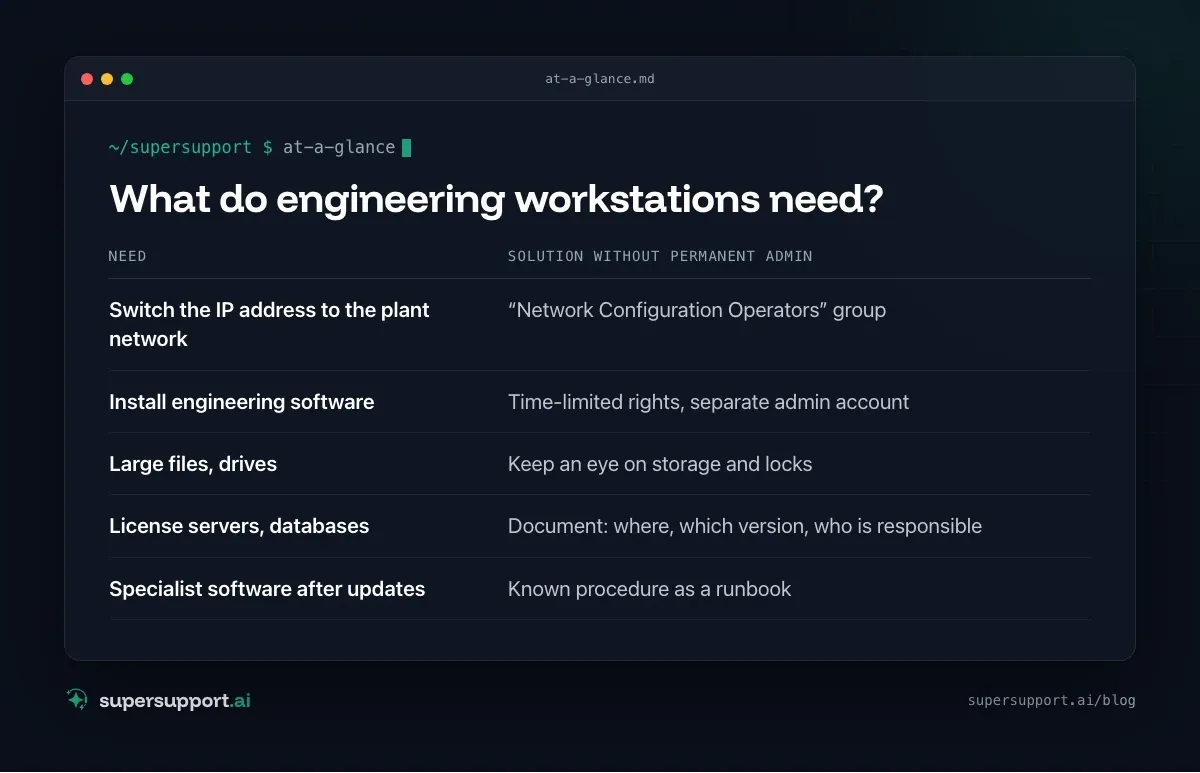
What do engineering workstations need?

14 days free
IT support that fixes itself.
SuperSupport fixes IT problems right on the device, before they turn into tickets. Try it free for 14 days.
Start free trial- Switch the IP address to the plant network – “Network Configuration Operators” group
- Install engineering software – Time-limited rights, separate admin account
- Large files, drives – Keep an eye on storage and locks
- License servers, databases – Document: where, which version, who is responsible
- Specialist software after updates – Known procedure as a runbook
How do you support specialist software?
With runbooks. Which services does the software need, where are the database and license server, what helps with the known errors? Once written down, a technician or an agent can walk through the steps on the device – see Runbooks in IT support. How programs run without a sign-in is described in Run a program as a service.
More industries: Law firms, Medical practices.
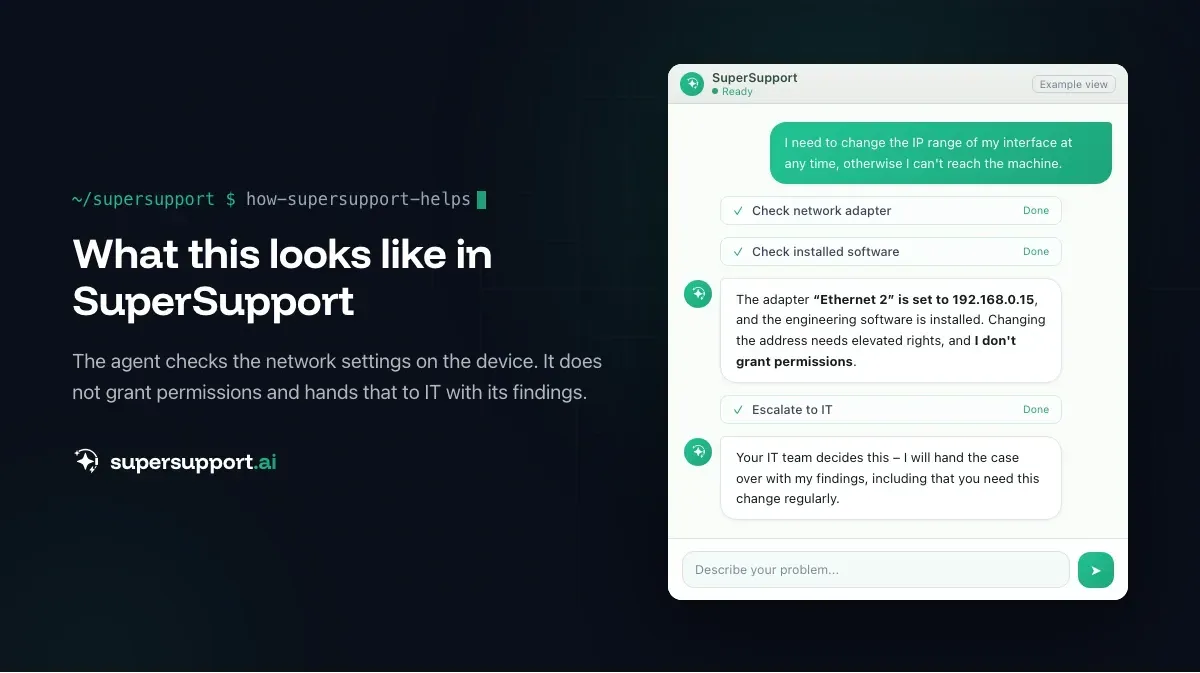
How does SuperSupport help with this?
The SuperSupport agent checks software, services, network, storage and logs on the device and submits changes for approval. For specialist software such as CAD, electrical design or ERP, IT can store runbooks. It does not grant permissions – that stays with IT. For IT teams and MSPs that look after industrial customers.
Frequently asked questions
What is different about IT support in mechanical engineering?
Besides office IT, there are design, electrical design and PLC programming. These workstations need specialist software, often admin rights for installations and network changes, large files and license servers. Standard rules from the office rarely fit there.
Do PLC programmers need admin rights?
For individual tasks – for example to install engineering software or to switch the IP address of the network interface to the plant network. Permanent full admin rights are not necessary, though: the “Network Configuration Operators” group is enough for IP changes, and for installations there are time-limited rights.
Why are design files often locked?
Because CAD and Office programs set a lock when they open a file. If a program crashes or a colleague leaves the company, the lock sometimes stays in place. It can be released on the server once it is clear that nobody is working on the file anymore.
What should I do when the ERP system does not send documents?
First check whether it affects one workstation or all of them. Then check email sending, print queue or the ERP's export path. Recurring errors should be documented as a known procedure – as a runbook.
How does SuperSupport help in mechanical engineering?
The agent checks software, services, network, storage and logs on the device and submits changes for approval. For specialist software such as CAD, electrical design or ERP, IT can store runbooks. It does not grant permissions.
14 days free
IT support that fixes itself.
SuperSupport fixes IT problems right on the device, before they turn into tickets. Try it free for 14 days.
Start free trialNico Haslberger is Co-Founder & CEO of SuperSupport.ai. With years of experience as an IT technician, he knows the problems in IT support first-hand: from overloaded help desks to recurring tickets that slow teams down. That knowledge is built into every feature of the platform today. He makes sure SuperSupport.ai solves exactly the problems he experienced himself for years.
This article was created with AI assistance and editorially reviewed.
Related Articles
OTRS Alternative: Znuny, OTOBO, KIX or AI Support?
With the OTRS Community Edition discontinued, many seek an alternative. The forks at a glance – and when AI support on the device complements them better.

Shadow AI in the Workplace: Detect, Govern, Replace
Employees use AI tools IT doesn't know about, with customer data, contracts and code. How to detect shadow AI, set sensible rules and offer alternatives.

AI Agent in IT Support: Guardrails That Actually Hold
An AI agent on the computer needs limits outside the prompt: protected list, blocked actions, approvals that expire. This is how it looks in practice.