;}.cls-2{fill:url(%23Unbenannter_Verlauf_5-2);}.cls-3{fill:url(%23Unbenannter_Verlauf_5-5);}.cls-4{fill:url(%23Unbenannter_Verlauf_5-6);}.cls-5{fill:url(%23Unbenannter_Verlauf_5-3);}.cls-6{fill:url(%23Unbenannter_Verlauf_5-4);}%3c/style%3e%3clinearGradient%20id='Unbenannter_Verlauf_5'%20x1='1075.02'%20y1='943.06'%20x2='1201.78'%20y2='943.06'%20gradientUnits='userSpaceOnUse'%3e%3cstop%20offset='0'%20stop-color='%2322b88a'/%3e%3cstop%20offset='1'%20stop-color='%231a9e78'/%3e%3c/linearGradient%3e%3clinearGradient%20id='Unbenannter_Verlauf_5-2'%20x1='234.11'%20y1='663.43'%20x2='1058.29'%20y2='663.43'%20xlink:href='%23Unbenannter_Verlauf_5'/%3e%3clinearGradient%20id='Unbenannter_Verlauf_5-3'%20x1='843.79'%20y1='1064.84'%20x2='1096.04'%20y2='1064.84'%20xlink:href='%23Unbenannter_Verlauf_5'/%3e%3clinearGradient%20id='Unbenannter_Verlauf_5-4'%20x1='1120.37'%20y1='662.1'%20x2='1253'%20y2='662.1'%20xlink:href='%23Unbenannter_Verlauf_5'/%3e%3clinearGradient%20id='Unbenannter_Verlauf_5-5'%20x1='97.45'%20y1='265.53'%20x2='385.89'%20y2='265.53'%20xlink:href='%23Unbenannter_Verlauf_5'/%3e%3clinearGradient%20id='Unbenannter_Verlauf_5-6'%20x1='295.45'%20y1='255.64'%20x2='1213.95'%20y2='255.64'%20xlink:href='%23Unbenannter_Verlauf_5'/%3e%3c/defs%3e%3cpath%20class='cls-1'%20d='M1201.78,871c-.61,1.55-1.23,3.1-1.86,4.66-20.33,50.18-47.14,96.85-80.02,139.45-7.56-13.82-21.78-22.31-37.69-22.31h-7.19c29.82-37.26,54.46-78.02,73.61-121.8h53.15Z'/%3e%3cpath%20class='cls-2'%20d='M665.24,264.59l69.02,186.52c21.3,57.57,66.69,102.96,124.26,124.26l186.52,69.02c17.67,6.54,17.67,31.54,0,38.08l-186.52,69.02c-57.57,21.3-102.96,66.69-124.26,124.26l-69.02,186.52c-6.54,17.67-31.54,17.67-38.08,0l-69.02-186.52c-21.3-57.57-66.69-102.96-124.26-124.26l-186.52-69.02c-17.67-6.54-17.67-31.54,0-38.08l186.52-69.02c57.57-21.3,102.96-66.69,124.26-124.26l69.02-186.52c6.54-17.67,31.54-17.67,38.08,0Z'/%3e%3cpath%20class='cls-5'%20d='M1082.21,1021.98h-79.13c-1.7,0-2.97-1.56-2.62-3.23l22.72-109.35c2.94-14.16-15.11-22.74-24.23-11.51l-152.04,187.31c-7.32,9.02-.9,22.5,10.72,22.5h79.13c1.7,0,2.97,1.56,2.62,3.23l-22.72,109.35c-2.94,14.16,15.11,22.74,24.23,11.51l152.04-187.31c7.32-9.02.9-22.5-10.72-22.5Z'/%3e%3crect%20class='cls-6'%20x='1120.37'%20y='486.36'%20width='132.63'%20height='351.48'%20rx='19.58'%20ry='19.58'/%3e%3cpath%20class='cls-3'%20d='M250.58,128.27l13.88,55.81c7.19,28.91,29.76,51.47,58.66,58.66l55.81,13.88c9.29,2.31,9.29,15.51,0,17.82l-55.81,13.88c-28.91,7.19-51.47,29.76-58.66,58.66l-13.88,55.81c-2.31,9.29-15.51,9.29-17.82,0l-13.88-55.81c-7.19-28.91-29.76-51.47-58.66-58.66l-55.81-13.88c-9.29-2.31-9.29-15.51,0-17.82l55.81-13.88c28.91-7.19,51.47-29.76,58.66-58.66l13.88-55.81c2.31-9.29,15.51-9.29,17.82,0Z'/%3e%3cpath%20class='cls-4'%20d='M1213.95,453.21h-67.62c-1.23,0-2.47.04-3.67.12-27.03-63.89-65.84-121.36-115.42-170.94-51.54-51.54-111.61-91.44-178.55-118.59-64.67-26.22-133.03-39.52-203.16-39.52s-138.48,13.3-203.16,39.52c-33.73,13.67-65.72,30.61-95.75,50.63l-.19-.05c-23.62-5.88-42.51-22.85-51-45.24,37.87-26.86,78.65-49.21,122.01-66.79,72.63-29.44,149.37-44.38,228.08-44.38s155.45,14.93,228.08,44.38c75.2,30.51,142.67,75.31,200.53,133.15,57.84,57.85,102.65,125.33,133.15,200.53,2.31,5.7,4.54,11.43,6.66,17.19Z'/%3e%3c/svg%3e)
IT Support for Law Firms: What Really Comes Up Day to Day
Law firm software unreachable, scan folder missing, certificate expired: what IT support for law firms really has to deliver – from real tickets.

In a law firm, an unreachable server is not an IT problem. It is a deadline problem.
"I can't get into the law firm software anymore. Neither at the firm nor via VPN. Please fix this quickly." That is how a real ticket reached an MSP – from a partner at a law firm. Law firms have the same IT problems as other offices, just with two differences: it often depends on deadlines, and everything is subject to confidentiality. Here is what really comes up day to day – from real tickets.
Case 1: The law firm software is unreachable
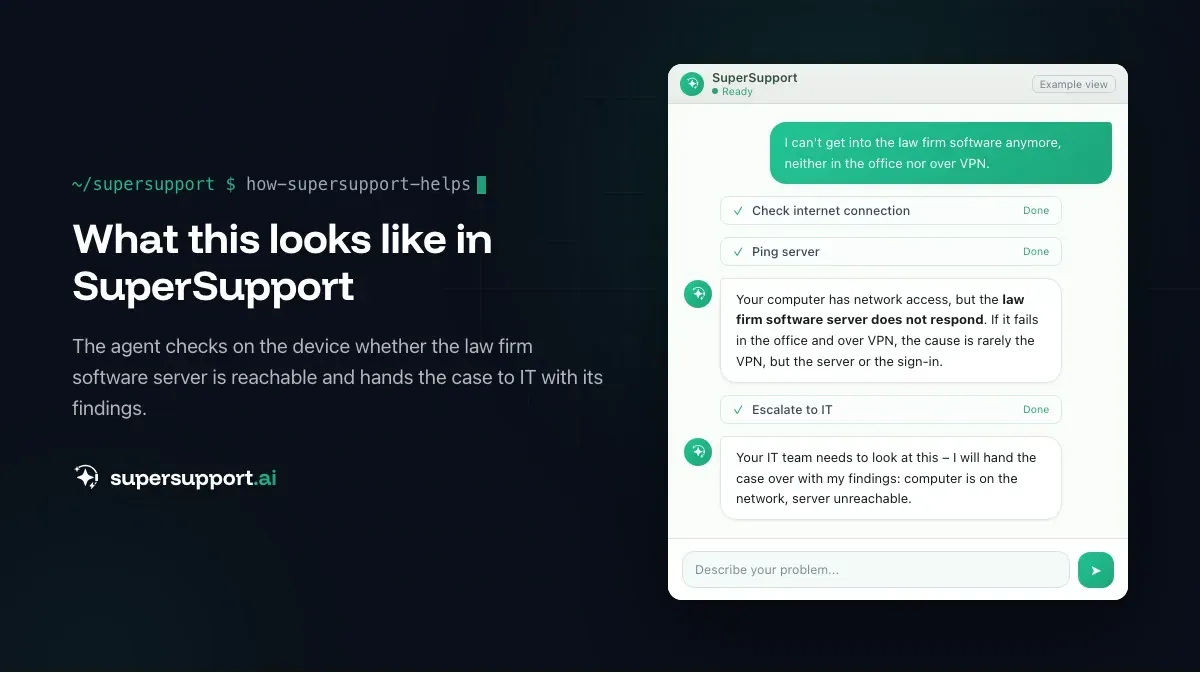
The classic – and the most urgent. In the real case, the partner could not get into the software either in the office or over VPN. That already narrows down the cause:
- If it does not work in the office or over VPN, the VPN is rarely at fault; it is the server or the sign-in itself.
- If it does not work only over VPN, it is the VPN connection – see VPN authentication failed.
- If it does not work for one employee only, it is their computer or account.
Whoever has the finding from the device – is the connection to the server up, is the service running, does an error message appear – saves the first round of follow-up questions. See Escalation in IT support: what belongs in the handover ticket.
Case 2: The scan folder is missing
"Everyone in the firm should have access to the scan folder." Also a real ticket. According to the technician, the permission had been set – if the folder still does not show up in File Explorer, often only the shortcut to OneDrive is missing. See Show SharePoint folders in File Explorer. How scanners send directly to email or folders is described in Scan to email with Microsoft 365.
Case 3: The certificate is not trusted
Signature, electronic legal communication, law firm software – everything depends on certificates. If one expires or an intermediate certificate is missing, the software reports "not trusted". That happens exactly when a court filing has to go out. See Signature certificate not trusted.
Tip: Put the expiry dates of all certificates in a list with a reminder four weeks ahead.
Case 4: Emails that do not arrive – or arrive too well
- Emails end up in quarantine and have to be released – see Microsoft 365: release a quarantined email.
- Fake invoices and account changes target law firms too, especially where client funds are involved – see Invoice fraud and CEO fraud.
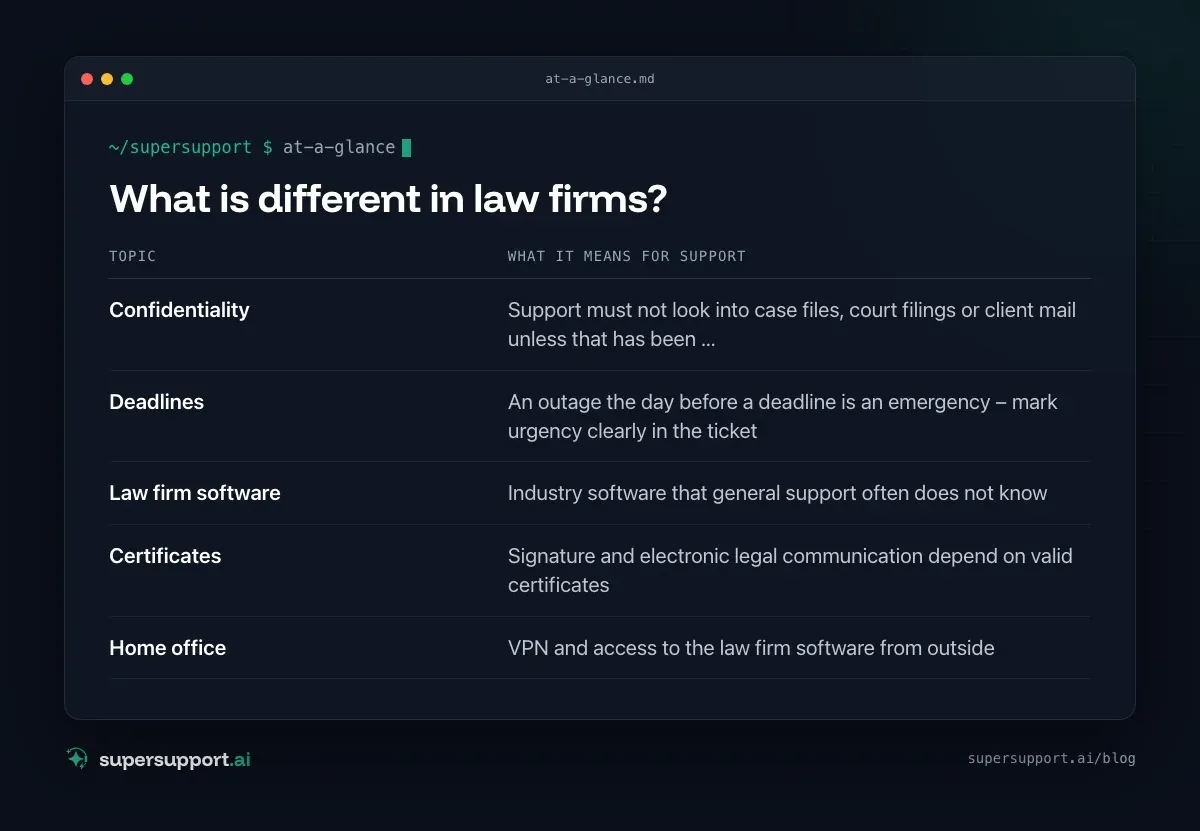
What is different in law firms?
Confidentiality and deadlines.
- Confidentiality – Support must not look into case files, court filings or client mail unless that has been regulated
- Deadlines – An outage the day before a deadline is an emergency – mark urgency clearly in the ticket
- Law firm software – Industry software that general support often does not know
- Certificates – Signature and electronic legal communication depend on valid certificates
- Home office – VPN and access to the law firm software from outside
How do you support law firm software that nobody knows?

14 days free
IT support that fixes itself.
SuperSupport fixes IT problems right on the device, before they turn into tickets. Try it free for 14 days.
Start free trialWith a defined process. Which services does the software need, where is the database, which ports, which known errors, and what helps? You write that down once – as a runbook that technicians or an agent work through step by step on the device. See Runbooks in IT support.
May an AI agent be used in a law firm?
That depends on what it sees. An agent that checks technical data on the device – services, connections, storage, printers – and whose access IT limits through a permission profile has to be assessed differently from a chatbot that is shown court filings. The legal review comes before introduction – see GDPR and AI in support. And employees should know beforehand who can see the chat – see Acceptance of AI in IT support.
How does SuperSupport help with this?
The SuperSupport agent checks connections, services, printers and storage on the device and submits changes for approval. Which folders and programs are off limits – such as case file storage and email – is set by IT in the permission profile. For the law firm software, IT can store a runbook so that the agent walks through the known steps directly on the device. For IT teams and MSPs that look after law firms.
Frequently asked questions
Which IT problems are typical in law firms?
The law firm software is unreachable, in the office or over VPN. Access to shared folders such as the scan folder is missing. Certificates for electronic signatures or electronic legal communication expire. On top of that come the usual topics: printers, Outlook, updates.
What is special about IT support in law firms?
Confidentiality. Whoever provides support must not look into case files, court filings or client mail unless that has been regulated. In addition, a lot depends on deadlines – an unreachable system the day before a deadline is an emergency.
May an AI agent be used in a law firm?
That depends on what it sees and where the data is processed. An agent that checks technical data on the device – services, connections, storage – with its access to folders and programs set by IT has to be assessed differently from a chatbot that is shown case files. The legal review comes before introduction.
How do you support law firm software that nobody in support knows?
With a defined process: which services and connections does the software need, where is the database, what helps with the known errors? That can be stored as a runbook that technicians or an agent work through on the device.
How does SuperSupport help in law firms?
The agent checks connections, services, printers and storage on the device and submits changes for approval. Which folders and programs are off limits is set by IT in the permission profile. For the law firm software, IT can store a runbook.
14 days free
IT support that fixes itself.
SuperSupport fixes IT problems right on the device, before they turn into tickets. Try it free for 14 days.
Start free trialNico Haslberger is Co-Founder & CEO of SuperSupport.ai. With years of experience as an IT technician, he knows the problems in IT support first-hand: from overloaded help desks to recurring tickets that slow teams down. That knowledge is built into every feature of the platform today. He makes sure SuperSupport.ai solves exactly the problems he experienced himself for years.
This article was created with AI assistance and editorially reviewed.
Related Articles
OTRS Alternative: Znuny, OTOBO, KIX or AI Support?
With the OTRS Community Edition discontinued, many seek an alternative. The forks at a glance – and when AI support on the device complements them better.

Shadow AI in the Workplace: Detect, Govern, Replace
Employees use AI tools IT doesn't know about, with customer data, contracts and code. How to detect shadow AI, set sensible rules and offer alternatives.

AI Agent in IT Support: Guardrails That Actually Hold
An AI agent on the computer needs limits outside the prompt: protected list, blocked actions, approvals that expire. This is how it looks in practice.