;}.cls-2{fill:url(%23Unbenannter_Verlauf_5-2);}.cls-3{fill:url(%23Unbenannter_Verlauf_5-5);}.cls-4{fill:url(%23Unbenannter_Verlauf_5-6);}.cls-5{fill:url(%23Unbenannter_Verlauf_5-3);}.cls-6{fill:url(%23Unbenannter_Verlauf_5-4);}%3c/style%3e%3clinearGradient%20id='Unbenannter_Verlauf_5'%20x1='1075.02'%20y1='943.06'%20x2='1201.78'%20y2='943.06'%20gradientUnits='userSpaceOnUse'%3e%3cstop%20offset='0'%20stop-color='%2322b88a'/%3e%3cstop%20offset='1'%20stop-color='%231a9e78'/%3e%3c/linearGradient%3e%3clinearGradient%20id='Unbenannter_Verlauf_5-2'%20x1='234.11'%20y1='663.43'%20x2='1058.29'%20y2='663.43'%20xlink:href='%23Unbenannter_Verlauf_5'/%3e%3clinearGradient%20id='Unbenannter_Verlauf_5-3'%20x1='843.79'%20y1='1064.84'%20x2='1096.04'%20y2='1064.84'%20xlink:href='%23Unbenannter_Verlauf_5'/%3e%3clinearGradient%20id='Unbenannter_Verlauf_5-4'%20x1='1120.37'%20y1='662.1'%20x2='1253'%20y2='662.1'%20xlink:href='%23Unbenannter_Verlauf_5'/%3e%3clinearGradient%20id='Unbenannter_Verlauf_5-5'%20x1='97.45'%20y1='265.53'%20x2='385.89'%20y2='265.53'%20xlink:href='%23Unbenannter_Verlauf_5'/%3e%3clinearGradient%20id='Unbenannter_Verlauf_5-6'%20x1='295.45'%20y1='255.64'%20x2='1213.95'%20y2='255.64'%20xlink:href='%23Unbenannter_Verlauf_5'/%3e%3c/defs%3e%3cpath%20class='cls-1'%20d='M1201.78,871c-.61,1.55-1.23,3.1-1.86,4.66-20.33,50.18-47.14,96.85-80.02,139.45-7.56-13.82-21.78-22.31-37.69-22.31h-7.19c29.82-37.26,54.46-78.02,73.61-121.8h53.15Z'/%3e%3cpath%20class='cls-2'%20d='M665.24,264.59l69.02,186.52c21.3,57.57,66.69,102.96,124.26,124.26l186.52,69.02c17.67,6.54,17.67,31.54,0,38.08l-186.52,69.02c-57.57,21.3-102.96,66.69-124.26,124.26l-69.02,186.52c-6.54,17.67-31.54,17.67-38.08,0l-69.02-186.52c-21.3-57.57-66.69-102.96-124.26-124.26l-186.52-69.02c-17.67-6.54-17.67-31.54,0-38.08l186.52-69.02c57.57-21.3,102.96-66.69,124.26-124.26l69.02-186.52c6.54-17.67,31.54-17.67,38.08,0Z'/%3e%3cpath%20class='cls-5'%20d='M1082.21,1021.98h-79.13c-1.7,0-2.97-1.56-2.62-3.23l22.72-109.35c2.94-14.16-15.11-22.74-24.23-11.51l-152.04,187.31c-7.32,9.02-.9,22.5,10.72,22.5h79.13c1.7,0,2.97,1.56,2.62,3.23l-22.72,109.35c-2.94,14.16,15.11,22.74,24.23,11.51l152.04-187.31c7.32-9.02.9-22.5-10.72-22.5Z'/%3e%3crect%20class='cls-6'%20x='1120.37'%20y='486.36'%20width='132.63'%20height='351.48'%20rx='19.58'%20ry='19.58'/%3e%3cpath%20class='cls-3'%20d='M250.58,128.27l13.88,55.81c7.19,28.91,29.76,51.47,58.66,58.66l55.81,13.88c9.29,2.31,9.29,15.51,0,17.82l-55.81,13.88c-28.91,7.19-51.47,29.76-58.66,58.66l-13.88,55.81c-2.31,9.29-15.51,9.29-17.82,0l-13.88-55.81c-7.19-28.91-29.76-51.47-58.66-58.66l-55.81-13.88c-9.29-2.31-9.29-15.51,0-17.82l55.81-13.88c28.91-7.19,51.47-29.76,58.66-58.66l13.88-55.81c2.31-9.29,15.51-9.29,17.82,0Z'/%3e%3cpath%20class='cls-4'%20d='M1213.95,453.21h-67.62c-1.23,0-2.47.04-3.67.12-27.03-63.89-65.84-121.36-115.42-170.94-51.54-51.54-111.61-91.44-178.55-118.59-64.67-26.22-133.03-39.52-203.16-39.52s-138.48,13.3-203.16,39.52c-33.73,13.67-65.72,30.61-95.75,50.63l-.19-.05c-23.62-5.88-42.51-22.85-51-45.24,37.87-26.86,78.65-49.21,122.01-66.79,72.63-29.44,149.37-44.38,228.08-44.38s155.45,14.93,228.08,44.38c75.2,30.51,142.67,75.31,200.53,133.15,57.84,57.85,102.65,125.33,133.15,200.53,2.31,5.7,4.54,11.43,6.66,17.19Z'/%3e%3c/svg%3e)
IT Support Escalation: What Belongs in the Handover Ticket
A case moves to 2nd level – and everything starts over there. What a good handover ticket contains, with real examples from escalations.

The most expensive minute in support is the one in which 2nd level asks the same question again.
Escalation is not the problem. Some cases belong with 2nd level, with a specialist or with the vendor. The problem is what travels with the case. If the ticket only says “Printer doesn't work”, the next level starts from scratch – with the same questions and the same checks. In our agent's escalations, you can clearly see what makes a usable handover. And what doesn't.
What does a bad handover cost?
Time on both sides and one more level. MetricNet puts the full cost per ticket in North America at around 22 US dollars at 1st level and around 70 US dollars at 2nd level (2020). Anyone who escalates pays more anyway – and every repeated follow-up question comes on top. More on this in What does an IT ticket cost?.
What does a good handover look like?
Real example, only the printer name is left out:
Printer does not print although it is reachable on the network (ping successful). The printer is at “error”, and the queue was already cleared. The print spooler was restarted, but the problem persists. The driver is installed …
The 2nd level knows right away: It's not the network, it's not the queue, it's not the spooler. What remains is the driver, the device, the print server. Nobody has to call the employee again.
Second real example:
Chrome cannot open Wikipedia (ERR_CONNECTION_REFUSED) while other websites and browsers work. Ping, DNS and port 443 to Wikipedia are successful. Proxy and DNS cache reset in Chrome brought no improvement.
Symptom, delimitation, checks, attempts – in three sentences. The next level looks at Chrome extensions, policies or security software, not at the network anymore.
And what does a weak one look like?
Also from real escalations:
- “Printer makes unusual noises but still prints.” – Correct, but it's missing what was already checked: queue, test page.
- “Connection test failed, logs blocked, no stuck print jobs. Cause unclear.” – Honest, and the delimitation is in there. What's missing: which target was tested and what “blocked” means.
Even an agent doesn't write every handover equally well. The difference is whether the checks and their results are in the text.
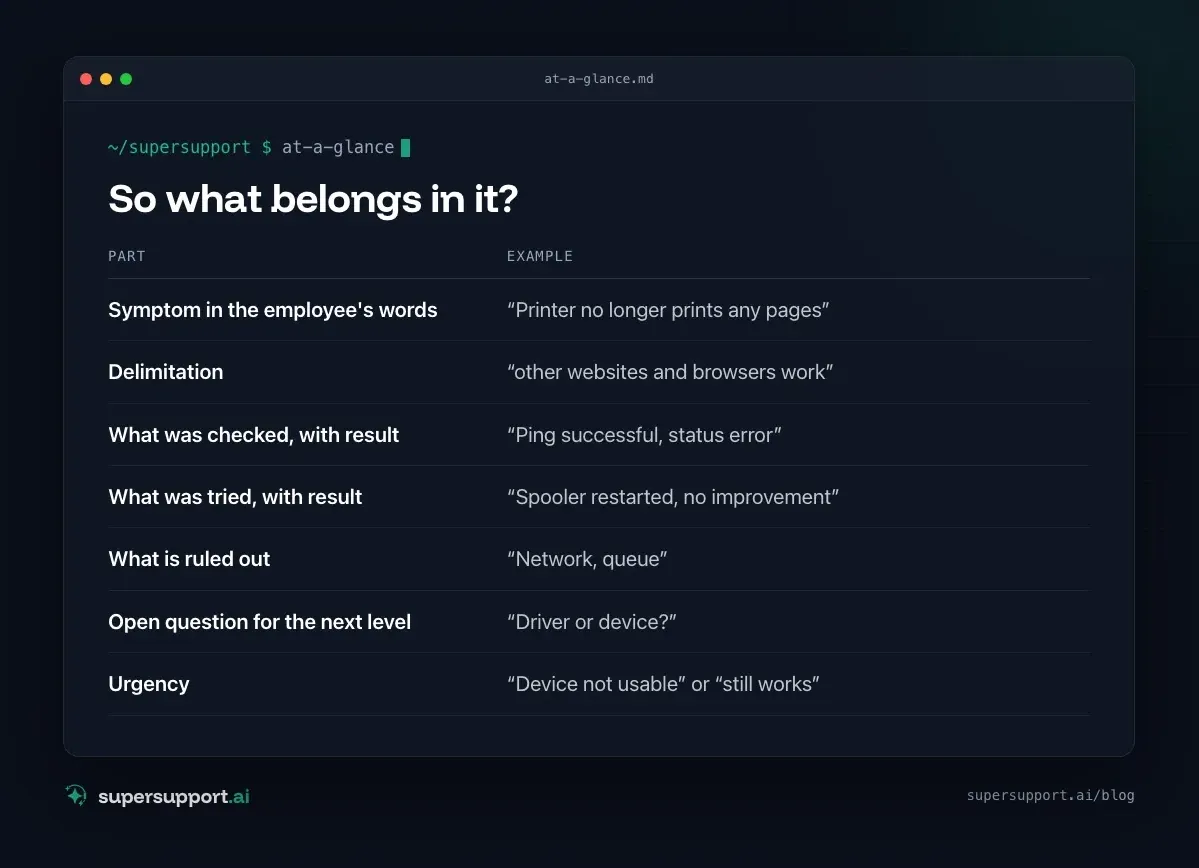
So what belongs in it?
- Symptom in the employee's words – “Printer no longer prints any pages”
- Delimitation – “other websites and browsers work”
- What was checked, with result – “Ping successful, status error”
- What was tried, with result – “Spooler restarted, no improvement”
- What is ruled out – “Network, queue”
- Open question for the next level – “Driver or device?”
- Urgency – “Device not usable” or “still works”
When should you escalate at all?
When knowledge, permissions or hands are missing – not because the finding is missing.

14 days free
IT support that fixes itself.
SuperSupport fixes IT problems right on the device, before they turn into tickets. Try it free for 14 days.
Start free trial- Knowledge: line-of-business software, servers, network infrastructure.
- Permissions: passwords, user accounts, firewall – with SuperSupport, a person deliberately does that, see 1st-level AI: What it can do – and what it can't.
- Hands: mechanics, hardware replacement – see Printer makes noises.
- Urgency: A device that no longer starts belongs with a person immediately.
What can be solved via approval at first contact doesn't have to move on in the first place – see Increasing the first-contact resolution rate in IT support.
What does an agent on the device change about escalation?
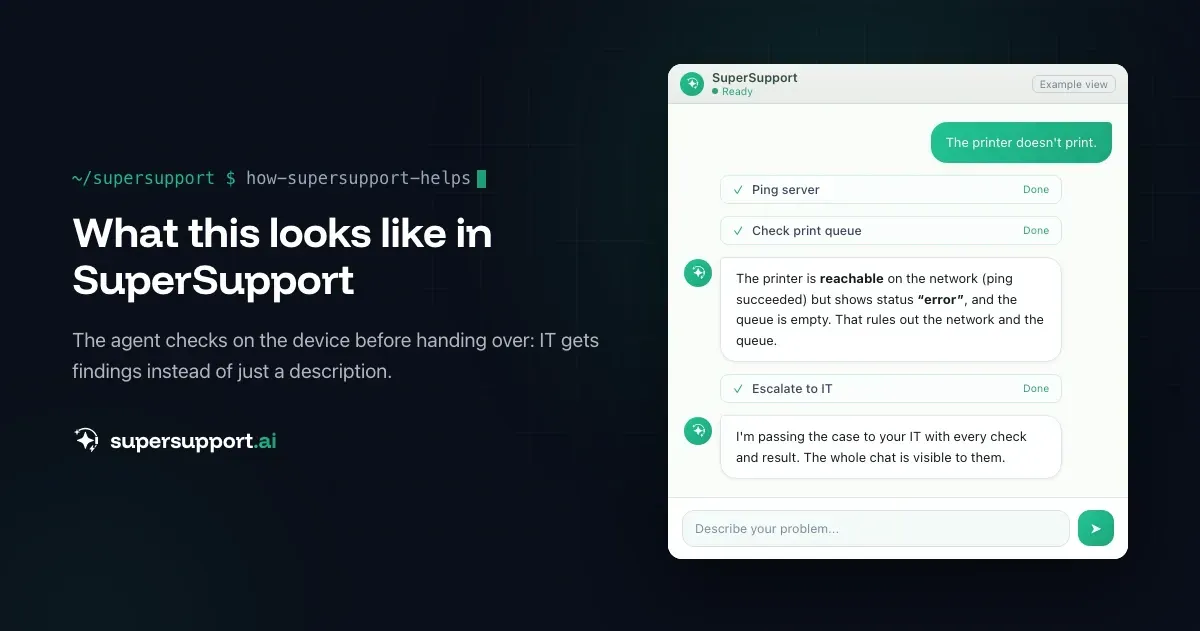
The handover starts with a finding instead of a description. The agent checked on the device before escalating: reachability, queue, services, logs. That ends up in the handover. With SuperSupport, the whole chat is also the case itself – the next level sees every check and every result, not just the summary. See Poorly documented IT tickets.
And if 2nd level uses a different system, an existing bot can query the finding directly from the agent on the PC – see AI agents in IT support: When the bot can ask the PC.
Try it yourself
Take the last ten escalated tickets and count how many contain the checks and their results. You can try SuperSupport for free and without a credit card – for internal IT teams and MSPs.
Frequently asked questions
What is an escalation in IT support?
The handover of a case to a higher level, usually from 1st to 2nd level or to specialists, because knowledge, permissions or time are missing. A functional escalation goes to specialists, a hierarchical one to the people in charge.
What belongs in a handover ticket?
The symptom in the employee's words, the affected device, what was checked and with what result, what has already been tried and what it achieved, and the open question for the next level.
Why do escalated tickets often start over from scratch?
Because the ticket only says “Printer doesn't work”. The 2nd level then has to ask the same questions and repeat the same checks that were already done – or maybe not, nobody knows.
What does “cause unclear” mean in an escalation?
On its own, little. It only becomes helpful with what was ruled out: network reachable, queue empty, service restarted. Then the next level knows where it no longer has to look.
How does an AI agent help with escalations?
It passes the case on with the finding it collected on the device: checks, results, steps tried. With SuperSupport, the whole chat is also the case itself – the next level sees what happened instead of asking for it.
14 days free
IT support that fixes itself.
SuperSupport fixes IT problems right on the device, before they turn into tickets. Try it free for 14 days.
Start free trialNico Haslberger is Co-Founder & CEO of SuperSupport.ai. With years of experience as an IT technician, he knows the problems in IT support first-hand: from overloaded help desks to recurring tickets that slow teams down. That knowledge is built into every feature of the platform today. He makes sure SuperSupport.ai solves exactly the problems he experienced himself for years.
This article was created with AI assistance and editorially reviewed.
Related Articles
OTRS Alternative: Znuny, OTOBO, KIX or AI Support?
With the OTRS Community Edition discontinued, many seek an alternative. The forks at a glance – and when AI support on the device complements them better.

Shadow AI in the Workplace: Detect, Govern, Replace
Employees use AI tools IT doesn't know about, with customer data, contracts and code. How to detect shadow AI, set sensible rules and offer alternatives.

AI Agent in IT Support: Guardrails That Actually Hold
An AI agent on the computer needs limits outside the prompt: protected list, blocked actions, approvals that expire. This is how it looks in practice.