;}.cls-2{fill:url(%23Unbenannter_Verlauf_5-2);}.cls-3{fill:url(%23Unbenannter_Verlauf_5-5);}.cls-4{fill:url(%23Unbenannter_Verlauf_5-6);}.cls-5{fill:url(%23Unbenannter_Verlauf_5-3);}.cls-6{fill:url(%23Unbenannter_Verlauf_5-4);}%3c/style%3e%3clinearGradient%20id='Unbenannter_Verlauf_5'%20x1='1075.02'%20y1='943.06'%20x2='1201.78'%20y2='943.06'%20gradientUnits='userSpaceOnUse'%3e%3cstop%20offset='0'%20stop-color='%2322b88a'/%3e%3cstop%20offset='1'%20stop-color='%231a9e78'/%3e%3c/linearGradient%3e%3clinearGradient%20id='Unbenannter_Verlauf_5-2'%20x1='234.11'%20y1='663.43'%20x2='1058.29'%20y2='663.43'%20xlink:href='%23Unbenannter_Verlauf_5'/%3e%3clinearGradient%20id='Unbenannter_Verlauf_5-3'%20x1='843.79'%20y1='1064.84'%20x2='1096.04'%20y2='1064.84'%20xlink:href='%23Unbenannter_Verlauf_5'/%3e%3clinearGradient%20id='Unbenannter_Verlauf_5-4'%20x1='1120.37'%20y1='662.1'%20x2='1253'%20y2='662.1'%20xlink:href='%23Unbenannter_Verlauf_5'/%3e%3clinearGradient%20id='Unbenannter_Verlauf_5-5'%20x1='97.45'%20y1='265.53'%20x2='385.89'%20y2='265.53'%20xlink:href='%23Unbenannter_Verlauf_5'/%3e%3clinearGradient%20id='Unbenannter_Verlauf_5-6'%20x1='295.45'%20y1='255.64'%20x2='1213.95'%20y2='255.64'%20xlink:href='%23Unbenannter_Verlauf_5'/%3e%3c/defs%3e%3cpath%20class='cls-1'%20d='M1201.78,871c-.61,1.55-1.23,3.1-1.86,4.66-20.33,50.18-47.14,96.85-80.02,139.45-7.56-13.82-21.78-22.31-37.69-22.31h-7.19c29.82-37.26,54.46-78.02,73.61-121.8h53.15Z'/%3e%3cpath%20class='cls-2'%20d='M665.24,264.59l69.02,186.52c21.3,57.57,66.69,102.96,124.26,124.26l186.52,69.02c17.67,6.54,17.67,31.54,0,38.08l-186.52,69.02c-57.57,21.3-102.96,66.69-124.26,124.26l-69.02,186.52c-6.54,17.67-31.54,17.67-38.08,0l-69.02-186.52c-21.3-57.57-66.69-102.96-124.26-124.26l-186.52-69.02c-17.67-6.54-17.67-31.54,0-38.08l186.52-69.02c57.57-21.3,102.96-66.69,124.26-124.26l69.02-186.52c6.54-17.67,31.54-17.67,38.08,0Z'/%3e%3cpath%20class='cls-5'%20d='M1082.21,1021.98h-79.13c-1.7,0-2.97-1.56-2.62-3.23l22.72-109.35c2.94-14.16-15.11-22.74-24.23-11.51l-152.04,187.31c-7.32,9.02-.9,22.5,10.72,22.5h79.13c1.7,0,2.97,1.56,2.62,3.23l-22.72,109.35c-2.94,14.16,15.11,22.74,24.23,11.51l152.04-187.31c7.32-9.02.9-22.5-10.72-22.5Z'/%3e%3crect%20class='cls-6'%20x='1120.37'%20y='486.36'%20width='132.63'%20height='351.48'%20rx='19.58'%20ry='19.58'/%3e%3cpath%20class='cls-3'%20d='M250.58,128.27l13.88,55.81c7.19,28.91,29.76,51.47,58.66,58.66l55.81,13.88c9.29,2.31,9.29,15.51,0,17.82l-55.81,13.88c-28.91,7.19-51.47,29.76-58.66,58.66l-13.88,55.81c-2.31,9.29-15.51,9.29-17.82,0l-13.88-55.81c-7.19-28.91-29.76-51.47-58.66-58.66l-55.81-13.88c-9.29-2.31-9.29-15.51,0-17.82l55.81-13.88c28.91-7.19,51.47-29.76,58.66-58.66l13.88-55.81c2.31-9.29,15.51-9.29,17.82,0Z'/%3e%3cpath%20class='cls-4'%20d='M1213.95,453.21h-67.62c-1.23,0-2.47.04-3.67.12-27.03-63.89-65.84-121.36-115.42-170.94-51.54-51.54-111.61-91.44-178.55-118.59-64.67-26.22-133.03-39.52-203.16-39.52s-138.48,13.3-203.16,39.52c-33.73,13.67-65.72,30.61-95.75,50.63l-.19-.05c-23.62-5.88-42.51-22.85-51-45.24,37.87-26.86,78.65-49.21,122.01-66.79,72.63-29.44,149.37-44.38,228.08-44.38s155.45,14.93,228.08,44.38c75.2,30.51,142.67,75.31,200.53,133.15,57.84,57.85,102.65,125.33,133.15,200.53,2.31,5.7,4.54,11.43,6.66,17.19Z'/%3e%3c/svg%3e)
Windows “This App Has Been Blocked”: What It Means
Windows blocks a program “for your protection” or for your organization? How to tell the messages apart and who can approve the program.

You double-click the program, and instead of the program a warning window appears.
Windows has several blocks for programs, and each shows a different message: "blocked for your protection", "Your organization has blocked this app", "Windows protected your PC" or "This app can't run on your PC". They sound similar but have different causes, and different solutions. Here is how to classify the message and who can approve the program.
Which message is it?
The wording reveals the block.
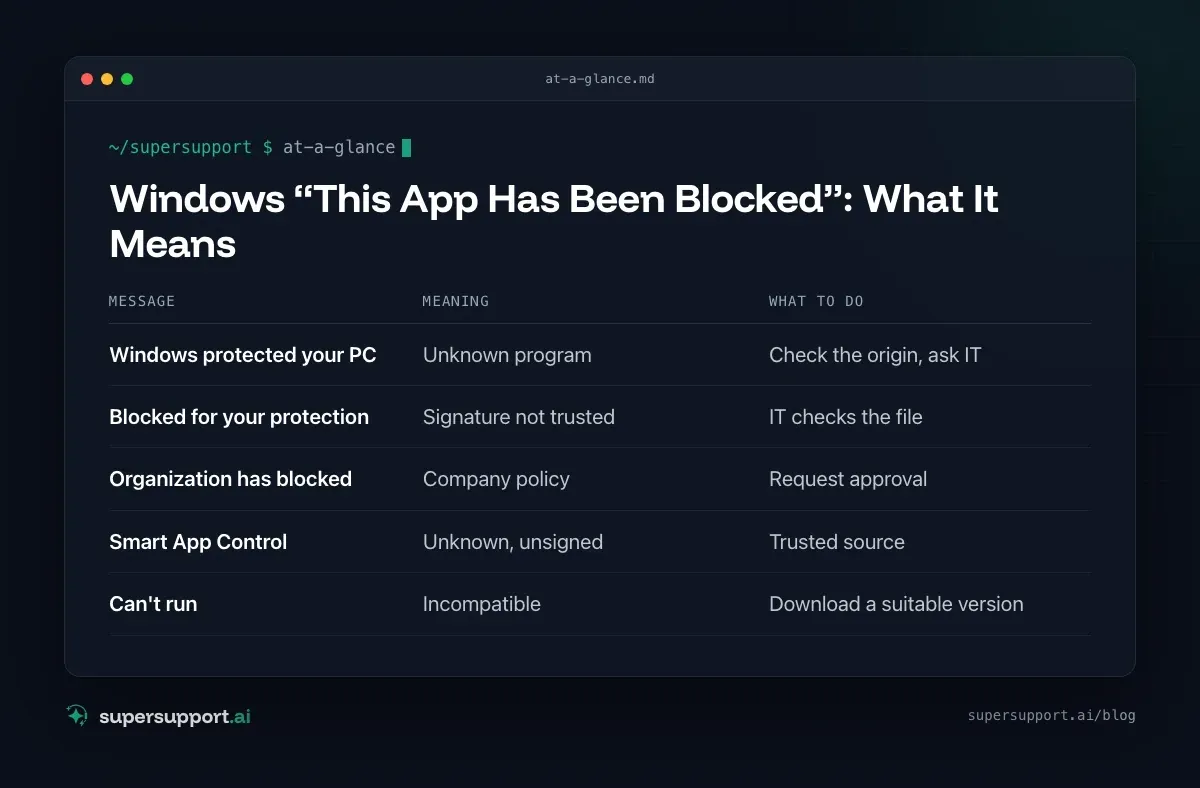
- Message: “Windows protected your PC” – Who is blocking: SmartScreen: unknown program from the internet; Next step: Check the origin, ask IT
- Message: “This app has been blocked for your protection” – Who is blocking: User Account Control: signature not trusted; Next step: IT checks the file
- Message: “Your organization has blocked this app” / “blocked by your administrator” – Who is blocking: Company policy; Next step: Request approval from IT
- Message: “Smart App Control blocked an app” – Who is blocking: Windows protection for unknown programs; Next step: Use a trusted source
- Message: “This app can't run on your PC” – Who is blocking: Compatibility; Next step: Get a suitable version
Take a screenshot of the message. It saves IT follow-up questions. How to do that is shown in Take a screenshot.
“Windows protected your PC”: now what?
That is SmartScreen. The message appears for programs from the internet that Windows doesn't know yet or that have no known publisher. Via More info you could still start the program, but you should only do that if the origin is beyond doubt. The details are in Windows protected your PC: SmartScreen.
“Blocked for your protection”: what does that mean?
The signature of the file is not trusted. Programs that need administrator rights are usually digitally signed. The vendor confirms with that that the file comes from them and hasn't been changed. If the signature is missing, has expired, or the certificate has been revoked, Windows blocks starting with administrator rights entirely.
That can be harmless, for example an old tool whose certificate has expired. But it can also be a tampered file. That is why the rule is: don't bypass it yourself, have IT check it. IT can obtain a current, correctly signed version.
“Your organization has blocked this app”
The company only allows approved programs. Many companies use application control: only programs on an allowlist may start, everything else is blocked, whether it is harmful or not. This protects effectively against malware disguised as a harmless program and against software that is problematic under licensing or data protection law.
What to do: Request approval from IT, with the program name, purpose, and source. IT checks and adds the program to the list or suggests an alternative. How installations otherwise work in companies is described in Install a program without admin rights.
What is Smart App Control?
A protection in Windows 11 for unknown programs. Smart App Control blocks programs that are neither signed nor known to be trustworthy. It is mainly active on newly set up personal devices. The status is shown under Windows Security → App & browser control → Smart App Control. On company devices, IT's application control often takes over this job.
“Can't run on your PC”
The program doesn't fit the computer. This message is not a security block but a compatibility problem. Typical causes:
- The program is very old and built for an earlier Windows version.
- It is meant for a different processor, such as a version for ARM devices on a regular PC or the other way around.
- The file is corrupted, for example by an interrupted download.
Remedy: download the current version from the vendor that matches your Windows version. Which system and which processor are in the computer is shown in Which PC do I have?.
Where does IT see what was blocked?

14 days free
IT support that fixes itself.
SuperSupport fixes IT problems right on the device, before they turn into tickets. Try it free for 14 days.
Start free trialIn the event logs. Blocks by policies are logged, depending on the technology in use, for example in Event Viewer under Applications and Services Logs → Microsoft → Windows → AppLocker or CodeIntegrity → Operational. They show the program path, the time, and the rule that applied. This helps IT set up a targeted exception instead of weakening the rule. How to read Event Viewer is shown in Event Viewer: Find errors.
And if the antivirus blocks the program?
That is a separate message. If the antivirus detects a threat in the program, a warning with a threat name appears. In that case: don't allow it, inform IT. See Antivirus reports a threat.
And on the Mac?
There it says “cannot be opened”. macOS blocks programs from unknown sources with messages like “cannot be opened because the developer cannot be verified”. That is Gatekeeper. In companies, IT decides which programs are allowed; you shouldn't bypass the block.
At a glance: app blocked
- Message: Windows protected your PC – Meaning: Unknown program; What to do: Check the origin, ask IT
- Message: Blocked for your protection – Meaning: Signature not trusted; What to do: IT checks the file
- Message: Organization has blocked – Meaning: Company policy; What to do: Request approval
- Message: Smart App Control – Meaning: Unknown, unsigned; What to do: Trusted source
- Message: Can't run – Meaning: Incompatible; What to do: Download a suitable version
How does SuperSupport help?
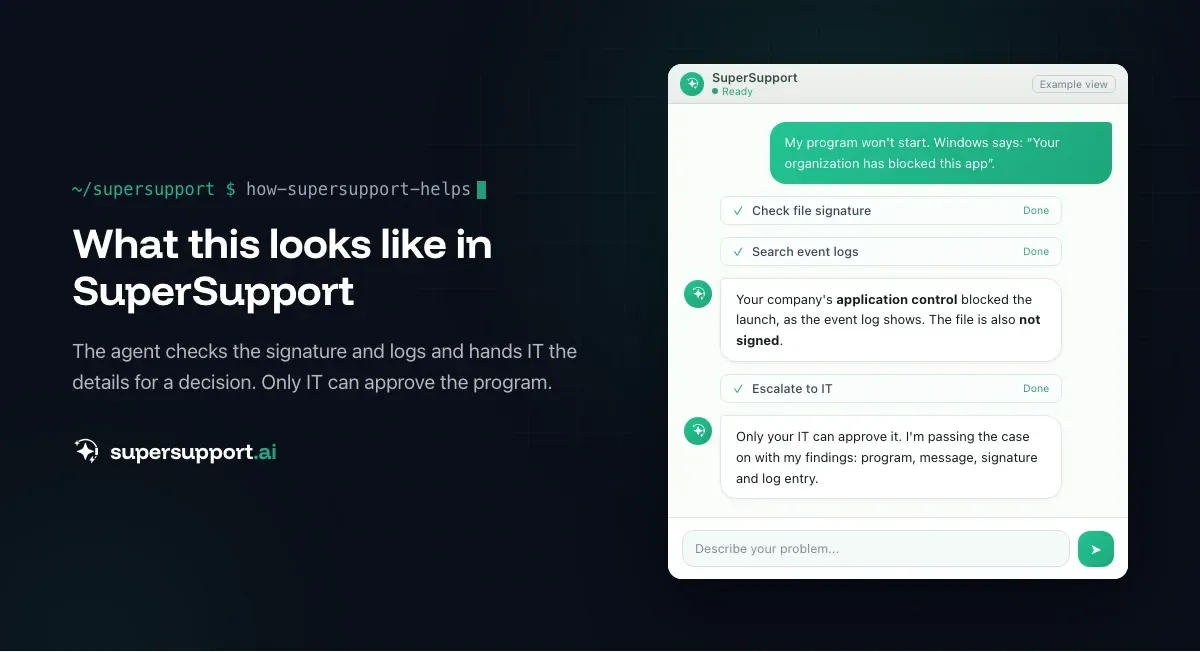
The SuperSupport agent checks on the device which protection feature blocked the program, whether it is signed, and what the event logs report, and passes the details to IT for a decision. IT sets up approvals. For IT teams and MSPs.
Frequently asked questions
What does “This app has been blocked for your protection” mean?
Windows considers the file untrustworthy, often because its digital signature is missing, expired, or revoked. The message appears when starting with administrator rights. Whether the program is safe anyway is for IT to check.
What does “Your organization has blocked this app” mean?
The company only allows approved programs. A policy prevents all others from starting. This is intentional; only IT can set up an exception.
Can I bypass the block?
No, and you shouldn't try. The blocks protect against malware and unwanted software. If you need a program for work, request approval from IT.
What if the app can't run on the PC?
The message “This app can't run on your PC” usually means the program doesn't match the Windows version or the processor, such as a 16-bit program from the old days or a version for different hardware. A suitable version from the vendor helps then.
Can SuperSupport approve a blocked program?
No. The agent checks on the device which protection feature blocked the program, whether it is signed, and what the event logs report, and passes the details to IT for a decision.
14 days free
IT support that fixes itself.
SuperSupport fixes IT problems right on the device, before they turn into tickets. Try it free for 14 days.
Start free trialNico Haslberger is Co-Founder & CEO of SuperSupport.ai. With years of experience as an IT technician, he knows the problems in IT support first-hand: from overloaded help desks to recurring tickets that slow teams down. That knowledge is built into every feature of the platform today. He makes sure SuperSupport.ai solves exactly the problems he experienced himself for years.
This article was created with AI assistance and editorially reviewed.
Related Articles
Outlook Slow and Laggy: What Helps
Outlook Classic freezes, types with a delay and takes forever to open? The most common slowdowns – and what you lose if you disable individual add-ins.

Word or Excel Keeps Crashing: How to Find the Cause
Word or Excel suddenly closes, freezes or reports “has stopped working”? Find the cause: add-ins, corrupted files, Safe Mode and Office repair.
Laptop Won't Connect to Wi-Fi: Windows and Mac
Wi-Fi isn't shown, the connection fails or it says “No internet, secured”? Here is how to find the cause on Windows and macOS.