;}.cls-2{fill:url(%23Unbenannter_Verlauf_5-2);}.cls-3{fill:url(%23Unbenannter_Verlauf_5-5);}.cls-4{fill:url(%23Unbenannter_Verlauf_5-6);}.cls-5{fill:url(%23Unbenannter_Verlauf_5-3);}.cls-6{fill:url(%23Unbenannter_Verlauf_5-4);}%3c/style%3e%3clinearGradient%20id='Unbenannter_Verlauf_5'%20x1='1075.02'%20y1='943.06'%20x2='1201.78'%20y2='943.06'%20gradientUnits='userSpaceOnUse'%3e%3cstop%20offset='0'%20stop-color='%2322b88a'/%3e%3cstop%20offset='1'%20stop-color='%231a9e78'/%3e%3c/linearGradient%3e%3clinearGradient%20id='Unbenannter_Verlauf_5-2'%20x1='234.11'%20y1='663.43'%20x2='1058.29'%20y2='663.43'%20xlink:href='%23Unbenannter_Verlauf_5'/%3e%3clinearGradient%20id='Unbenannter_Verlauf_5-3'%20x1='843.79'%20y1='1064.84'%20x2='1096.04'%20y2='1064.84'%20xlink:href='%23Unbenannter_Verlauf_5'/%3e%3clinearGradient%20id='Unbenannter_Verlauf_5-4'%20x1='1120.37'%20y1='662.1'%20x2='1253'%20y2='662.1'%20xlink:href='%23Unbenannter_Verlauf_5'/%3e%3clinearGradient%20id='Unbenannter_Verlauf_5-5'%20x1='97.45'%20y1='265.53'%20x2='385.89'%20y2='265.53'%20xlink:href='%23Unbenannter_Verlauf_5'/%3e%3clinearGradient%20id='Unbenannter_Verlauf_5-6'%20x1='295.45'%20y1='255.64'%20x2='1213.95'%20y2='255.64'%20xlink:href='%23Unbenannter_Verlauf_5'/%3e%3c/defs%3e%3cpath%20class='cls-1'%20d='M1201.78,871c-.61,1.55-1.23,3.1-1.86,4.66-20.33,50.18-47.14,96.85-80.02,139.45-7.56-13.82-21.78-22.31-37.69-22.31h-7.19c29.82-37.26,54.46-78.02,73.61-121.8h53.15Z'/%3e%3cpath%20class='cls-2'%20d='M665.24,264.59l69.02,186.52c21.3,57.57,66.69,102.96,124.26,124.26l186.52,69.02c17.67,6.54,17.67,31.54,0,38.08l-186.52,69.02c-57.57,21.3-102.96,66.69-124.26,124.26l-69.02,186.52c-6.54,17.67-31.54,17.67-38.08,0l-69.02-186.52c-21.3-57.57-66.69-102.96-124.26-124.26l-186.52-69.02c-17.67-6.54-17.67-31.54,0-38.08l186.52-69.02c57.57-21.3,102.96-66.69,124.26-124.26l69.02-186.52c6.54-17.67,31.54-17.67,38.08,0Z'/%3e%3cpath%20class='cls-5'%20d='M1082.21,1021.98h-79.13c-1.7,0-2.97-1.56-2.62-3.23l22.72-109.35c2.94-14.16-15.11-22.74-24.23-11.51l-152.04,187.31c-7.32,9.02-.9,22.5,10.72,22.5h79.13c1.7,0,2.97,1.56,2.62,3.23l-22.72,109.35c-2.94,14.16,15.11,22.74,24.23,11.51l152.04-187.31c7.32-9.02.9-22.5-10.72-22.5Z'/%3e%3crect%20class='cls-6'%20x='1120.37'%20y='486.36'%20width='132.63'%20height='351.48'%20rx='19.58'%20ry='19.58'/%3e%3cpath%20class='cls-3'%20d='M250.58,128.27l13.88,55.81c7.19,28.91,29.76,51.47,58.66,58.66l55.81,13.88c9.29,2.31,9.29,15.51,0,17.82l-55.81,13.88c-28.91,7.19-51.47,29.76-58.66,58.66l-13.88,55.81c-2.31,9.29-15.51,9.29-17.82,0l-13.88-55.81c-7.19-28.91-29.76-51.47-58.66-58.66l-55.81-13.88c-9.29-2.31-9.29-15.51,0-17.82l55.81-13.88c28.91-7.19,51.47-29.76,58.66-58.66l13.88-55.81c2.31-9.29,15.51-9.29,17.82,0Z'/%3e%3cpath%20class='cls-4'%20d='M1213.95,453.21h-67.62c-1.23,0-2.47.04-3.67.12-27.03-63.89-65.84-121.36-115.42-170.94-51.54-51.54-111.61-91.44-178.55-118.59-64.67-26.22-133.03-39.52-203.16-39.52s-138.48,13.3-203.16,39.52c-33.73,13.67-65.72,30.61-95.75,50.63l-.19-.05c-23.62-5.88-42.51-22.85-51-45.24,37.87-26.86,78.65-49.21,122.01-66.79,72.63-29.44,149.37-44.38,228.08-44.38s155.45,14.93,228.08,44.38c75.2,30.51,142.67,75.31,200.53,133.15,57.84,57.85,102.65,125.33,133.15,200.53,2.31,5.7,4.54,11.43,6.66,17.19Z'/%3e%3c/svg%3e)
Is My Mac Secure? Check 6 Settings in 5 Minutes
Firewall, FileVault, Gatekeeper, SIP, updates, login items: how to check your Mac's most important protections, with click path and Terminal command.

A Mac is not automatically secure. It is only automatically quieter when something is set up wrong.
“Is the device secure?” – a short question that rarely has a short answer. On the Mac, “secure” depends on several switches, each in a different place. Some of them are off from the factory.
In the concrete case, a MacBook at an advertising agency, the check showed a typical picture: drive encrypted, Gatekeeper and System Integrity Protection active, login items unremarkable – but the firewall was off. The user then turned it on themselves and wanted to know: How can I tell that it is really running now? Here are the six points you should check – each with a click path and the matching Terminal command.
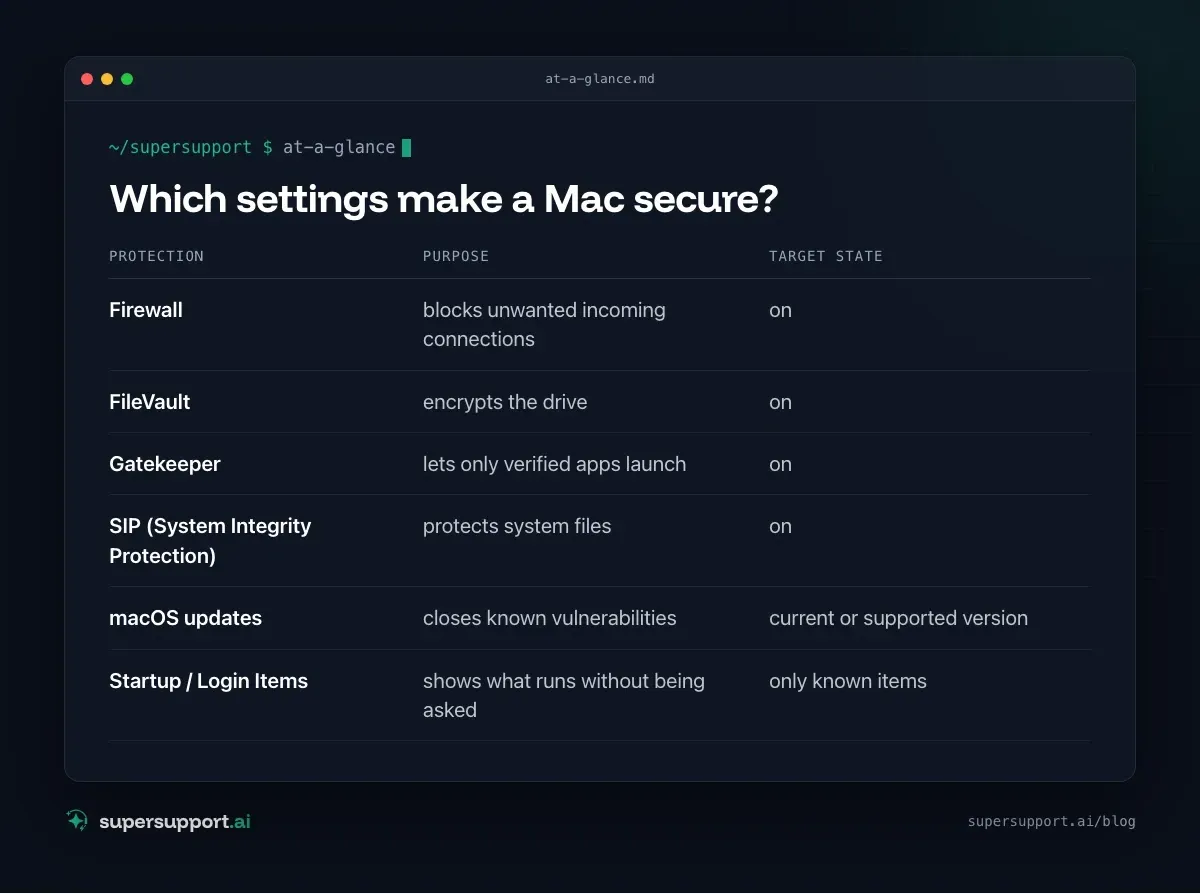
Which settings make a Mac secure?
Six points cover the essentials: firewall, FileVault, Gatekeeper, SIP, updates and login items.
- Protection: Firewall – Purpose: blocks unwanted incoming connections; Target state: on
- Protection: FileVault – Purpose: encrypts the drive; Target state: on
- Protection: Gatekeeper – Purpose: lets only verified apps launch; Target state: on
- Protection: SIP (System Integrity Protection) – Purpose: protects system files; Target state: on
- Protection: macOS updates – Purpose: closes known vulnerabilities; Target state: current or supported version
- Protection: Startup / Login Items – Purpose: shows what runs without being asked; Target state: only known items
1. Is the firewall turned on?
The macOS firewall is off from the factory on many devices – and that was exactly the finding in the real-world case.
Click path:
- from macOS Ventura: System Settings › Network › Firewall
- older versions: System Preferences › Security & Privacy › Firewall
Set the switch to On. To turn it on, macOS asks for the administrator password.
Check that it is really running – in Terminal, without administrator rights:
/usr/libexec/ApplicationFirewall/socketfilterfw --getglobalstateThe answer Firewall is enabled means: active. With --getstealthmode you can also see whether stealth mode is on – then the Mac does not respond to ping requests from the network, which makes sense on public Wi-Fi.
2. Is the drive encrypted with FileVault?
FileVault protects the data if the Mac is lost or stolen. Without encryption, anyone who removes the drive or boots the Mac into another mode can read the files.
Click path: System Settings › Privacy & Security › FileVault.
Terminal:
fdesetup statusFileVault is On. – all good. When turning it on, keep the recovery key safe; on company devices, IT ideally manages it.
3. Is Gatekeeper active?
Gatekeeper checks apps before their first launch and blocks unsigned or tampered programs.
Click path: System Settings › Privacy & Security › the setting for which apps are allowed – App Store and identified developers.
Terminal:
spctl --statusassessments enabled means active.
4. Is System Integrity Protection (SIP) on?
SIP prevents system files from being changed – even with administrator rights. It is active from the factory and should be turned off only in exceptional cases and only temporarily.
Terminal:
csrutil status
14 days free
IT support that fixes itself.
SuperSupport fixes IT problems right on the device, before they turn into tickets. Try it free for 14 days.
Start free trialSystem Integrity Protection status: enabled. is the target state. If it says disabled, IT should find out why.
5. Is macOS up to date?
Apple generally provides security updates only for the current and the two previous macOS versions. If a Mac is still running a much older version, known vulnerabilities are open – no matter how good all the other settings are.
Click path: Apple menu › About This Mac shows the version, System Settings › General › Software Update the available updates.
Terminal:
sw_vers
softwareupdate --list
In the real-world case, the update history showed a macOS version that was already several generations behind – a point that belongs on the list for the next maintenance.
6. What starts automatically?
Login items and background processes show what runs without you doing anything.
Click path: System Settings › General › Login Items (from Ventura including “Allow in the Background”).
Known programs – cloud storage, design tools, the IT provider's remote support – are fine. Unknown entries without a recognizable vendor are worth checking. What to look out for is described in the Windows guide PC starts slowly – the warning signs are the same on the Mac.
What about antivirus on the Mac?
macOS comes with XProtect, a built-in protection against known malware that is updated automatically. For personal devices, that together with Gatekeeper is usually enough. In companies, a centrally managed security solution (EDR) is often added – IT or the icon in the menu bar will show you whether it is running.
Quick check for all points at once
In Terminal – all commands work without administrator rights:
/usr/libexec/ApplicationFirewall/socketfilterfw --getglobalstate
fdesetup status
spctl --status
csrutil status
sw_vers -productVersion
The names are different on the Windows side: the counterparts there are Windows Firewall, BitLocker, SmartScreen and Microsoft Defender.
How does SuperSupport help with the question “Is my device secure?”
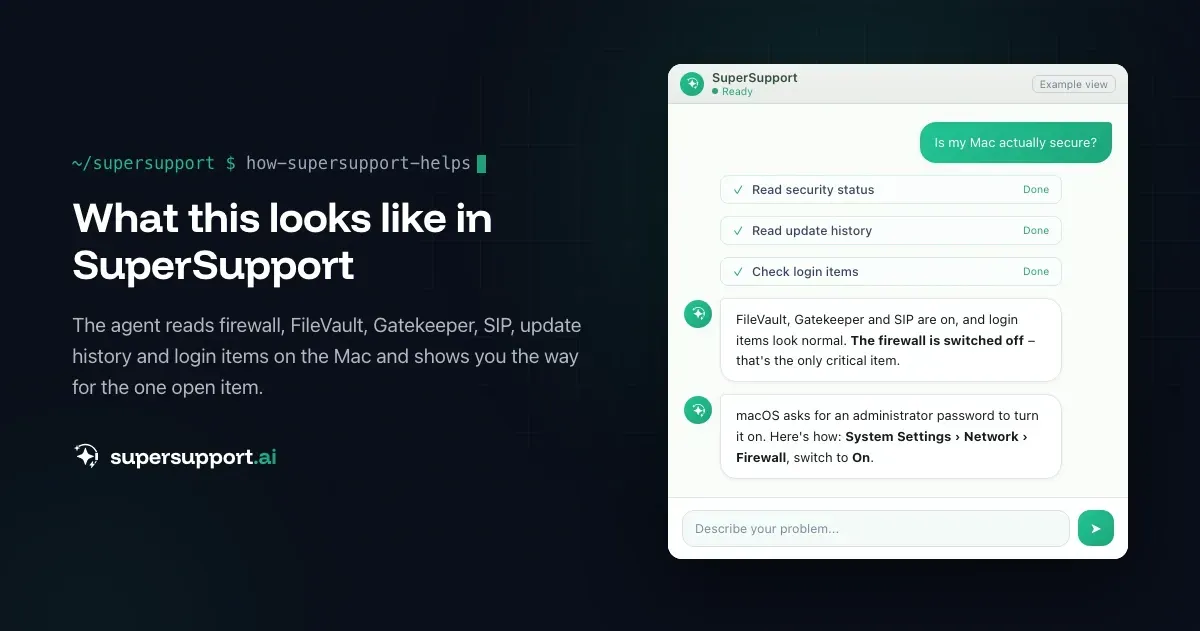
In the case described, the SuperSupport agent read the firewall, FileVault, Gatekeeper, SIP, update history and login items in a single pass and named the disabled firewall as the only critical point. Because turning it on requires an administrator password on the Mac, it showed the user the click path. What this looks like for internal IT teams and IT service providers who have to keep an eye on many devices is described on the respective pages.
Frequently asked questions
How do I check whether the firewall is active on my Mac?
Under System Settings › Network › Firewall (from macOS Ventura) or System Preferences › Security & Privacy › Firewall (older versions). In Terminal, /usr/libexec/ApplicationFirewall/socketfilterfw --getglobalstate shows the state – without administrator rights.
Is the Mac firewall turned on by default?
No. On many Macs, the built-in firewall is off from the factory. For devices used in offices, hotels or public Wi-Fi, it should be turned on.
What is FileVault and do I need it?
FileVault encrypts the entire drive. If the Mac is lost or stolen, nobody can access the data without signing in. For company devices, FileVault is mandatory.
What do Gatekeeper and SIP mean?
Gatekeeper checks whether apps come from identified developers before they launch. SIP (System Integrity Protection) prevents system files from being changed – even with administrator rights. Both should always be active.
How do I see whether my Mac still gets security updates?
The macOS version is shown under Apple menu › About This Mac. Apple generally provides security updates only for the current version and the two previous ones. Older versions should be updated.
14 days free
IT support that fixes itself.
SuperSupport fixes IT problems right on the device, before they turn into tickets. Try it free for 14 days.
Start free trialNico Haslberger is Co-Founder & CEO of SuperSupport.ai. With years of experience as an IT technician, he knows the problems in IT support first-hand: from overloaded help desks to recurring tickets that slow teams down. That knowledge is built into every feature of the platform today. He makes sure SuperSupport.ai solves exactly the problems he experienced himself for years.
This article was created with AI assistance and editorially reviewed.
Related Articles
Recover a Deleted File: All the Ways at Work
File deleted, overwritten or unsaved? Recover it via Recycle Bin, OneDrive and SharePoint, version history, AutoRecover, Previous Versions or Time Machine.

Find Your BitLocker Recovery Key: All the Ways
Windows asks for the BitLocker recovery key? Where to find the 48-digit key (Microsoft account, Entra ID, Intune, AD) and why it is requested.

Windows Server Shuts Down Every Hour? Check the License
Server shuts itself down after about an hour – taking VMs and printers with it? Usually the evaluation license has expired. How to spot and fix it.