;}.cls-2{fill:url(%23Unbenannter_Verlauf_5-2);}.cls-3{fill:url(%23Unbenannter_Verlauf_5-5);}.cls-4{fill:url(%23Unbenannter_Verlauf_5-6);}.cls-5{fill:url(%23Unbenannter_Verlauf_5-3);}.cls-6{fill:url(%23Unbenannter_Verlauf_5-4);}%3c/style%3e%3clinearGradient%20id='Unbenannter_Verlauf_5'%20x1='1075.02'%20y1='943.06'%20x2='1201.78'%20y2='943.06'%20gradientUnits='userSpaceOnUse'%3e%3cstop%20offset='0'%20stop-color='%2322b88a'/%3e%3cstop%20offset='1'%20stop-color='%231a9e78'/%3e%3c/linearGradient%3e%3clinearGradient%20id='Unbenannter_Verlauf_5-2'%20x1='234.11'%20y1='663.43'%20x2='1058.29'%20y2='663.43'%20xlink:href='%23Unbenannter_Verlauf_5'/%3e%3clinearGradient%20id='Unbenannter_Verlauf_5-3'%20x1='843.79'%20y1='1064.84'%20x2='1096.04'%20y2='1064.84'%20xlink:href='%23Unbenannter_Verlauf_5'/%3e%3clinearGradient%20id='Unbenannter_Verlauf_5-4'%20x1='1120.37'%20y1='662.1'%20x2='1253'%20y2='662.1'%20xlink:href='%23Unbenannter_Verlauf_5'/%3e%3clinearGradient%20id='Unbenannter_Verlauf_5-5'%20x1='97.45'%20y1='265.53'%20x2='385.89'%20y2='265.53'%20xlink:href='%23Unbenannter_Verlauf_5'/%3e%3clinearGradient%20id='Unbenannter_Verlauf_5-6'%20x1='295.45'%20y1='255.64'%20x2='1213.95'%20y2='255.64'%20xlink:href='%23Unbenannter_Verlauf_5'/%3e%3c/defs%3e%3cpath%20class='cls-1'%20d='M1201.78,871c-.61,1.55-1.23,3.1-1.86,4.66-20.33,50.18-47.14,96.85-80.02,139.45-7.56-13.82-21.78-22.31-37.69-22.31h-7.19c29.82-37.26,54.46-78.02,73.61-121.8h53.15Z'/%3e%3cpath%20class='cls-2'%20d='M665.24,264.59l69.02,186.52c21.3,57.57,66.69,102.96,124.26,124.26l186.52,69.02c17.67,6.54,17.67,31.54,0,38.08l-186.52,69.02c-57.57,21.3-102.96,66.69-124.26,124.26l-69.02,186.52c-6.54,17.67-31.54,17.67-38.08,0l-69.02-186.52c-21.3-57.57-66.69-102.96-124.26-124.26l-186.52-69.02c-17.67-6.54-17.67-31.54,0-38.08l186.52-69.02c57.57-21.3,102.96-66.69,124.26-124.26l69.02-186.52c6.54-17.67,31.54-17.67,38.08,0Z'/%3e%3cpath%20class='cls-5'%20d='M1082.21,1021.98h-79.13c-1.7,0-2.97-1.56-2.62-3.23l22.72-109.35c2.94-14.16-15.11-22.74-24.23-11.51l-152.04,187.31c-7.32,9.02-.9,22.5,10.72,22.5h79.13c1.7,0,2.97,1.56,2.62,3.23l-22.72,109.35c-2.94,14.16,15.11,22.74,24.23,11.51l152.04-187.31c7.32-9.02.9-22.5-10.72-22.5Z'/%3e%3crect%20class='cls-6'%20x='1120.37'%20y='486.36'%20width='132.63'%20height='351.48'%20rx='19.58'%20ry='19.58'/%3e%3cpath%20class='cls-3'%20d='M250.58,128.27l13.88,55.81c7.19,28.91,29.76,51.47,58.66,58.66l55.81,13.88c9.29,2.31,9.29,15.51,0,17.82l-55.81,13.88c-28.91,7.19-51.47,29.76-58.66,58.66l-13.88,55.81c-2.31,9.29-15.51,9.29-17.82,0l-13.88-55.81c-7.19-28.91-29.76-51.47-58.66-58.66l-55.81-13.88c-9.29-2.31-9.29-15.51,0-17.82l55.81-13.88c28.91-7.19,51.47-29.76,58.66-58.66l13.88-55.81c2.31-9.29,15.51-9.29,17.82,0Z'/%3e%3cpath%20class='cls-4'%20d='M1213.95,453.21h-67.62c-1.23,0-2.47.04-3.67.12-27.03-63.89-65.84-121.36-115.42-170.94-51.54-51.54-111.61-91.44-178.55-118.59-64.67-26.22-133.03-39.52-203.16-39.52s-138.48,13.3-203.16,39.52c-33.73,13.67-65.72,30.61-95.75,50.63l-.19-.05c-23.62-5.88-42.51-22.85-51-45.24,37.87-26.86,78.65-49.21,122.01-66.79,72.63-29.44,149.37-44.38,228.08-44.38s155.45,14.93,228.08,44.38c75.2,30.51,142.67,75.31,200.53,133.15,57.84,57.85,102.65,125.33,133.15,200.53,2.31,5.7,4.54,11.43,6.66,17.19Z'/%3e%3c/svg%3e)
IT Monitoring for SMBs: Alerts That Someone Acts On
Monitoring reports full disks, silent backups and devices that dropped out. Why alerts without an owner don't help – with real alerts from practice.

An alert that comes every day is background noise after a week. Even if it has been correct for 54 days.
IT monitoring sounds like safety: something keeps watch, and when something goes wrong, an alert comes in. In practice, everything hinges on one question – does anyone read the alert and act? The monitoring alerts of an MSP show clearly what is worth monitoring and where alerts fizzle out.
What does monitoring actually report?
Real alerts from monitoring, anonymized:
- "Disk usage (C:) 86.54% exceeds the threshold of 86%." – the point-of-sale PC at a store. See IT support in retail.
- "Machine status unknown – agent has not established communication within the expected interval." – a backup server stopped reporting.
- "Value of OID … doesn't equal Ready." – the volume status of a NAS is no longer "ready".
- "Job is in the disabled state (54 days) for more than 1 day." – a backup job, disabled for 54 days, reported in the daily digest email.
Every one of these alerts is justified. The last one shows the problem: it sat in a summary day after day for weeks.
What should an SMB monitor?
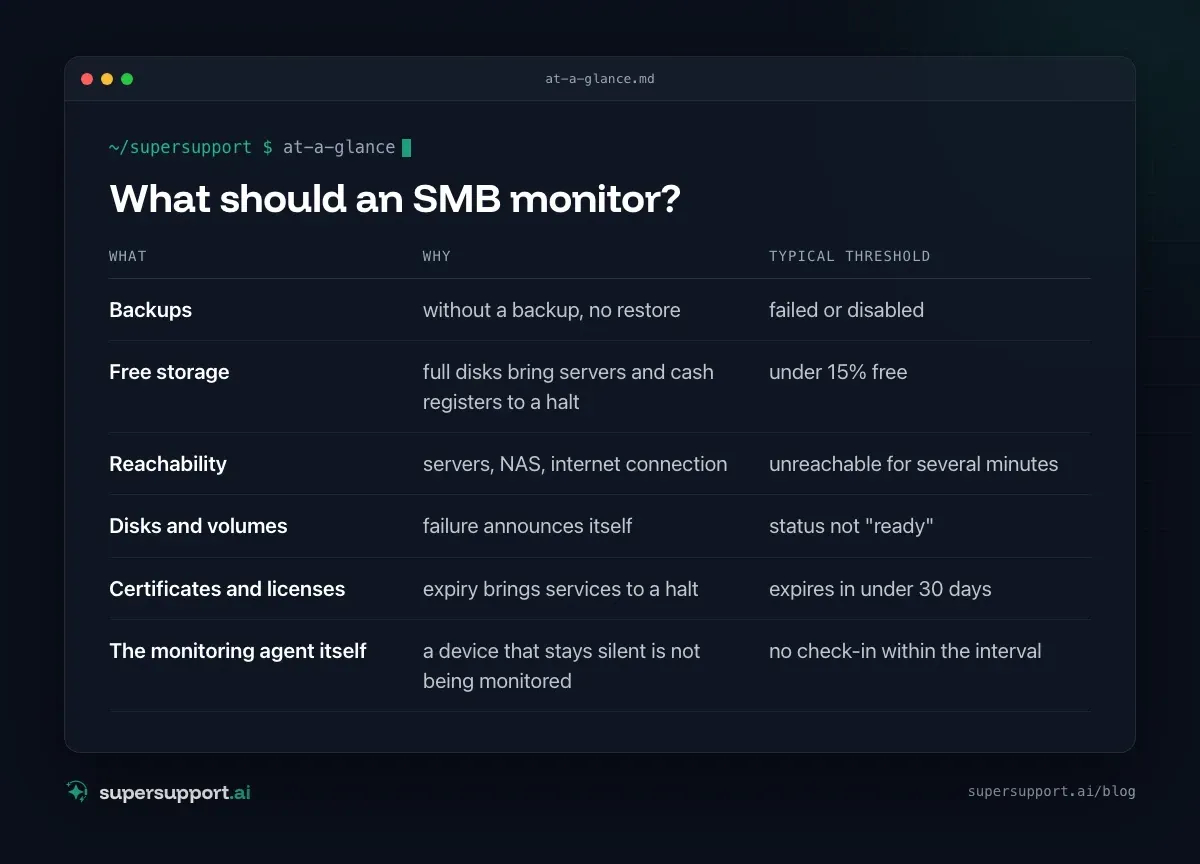
- What: Backups – Why: without a backup, no restore; Typical threshold: failed or disabled
- What: Free storage – Why: full disks bring servers and cash registers to a halt; Typical threshold: under 15% free
- What: Reachability – Why: servers, NAS, internet connection; Typical threshold: unreachable for several minutes
- What: Disks and volumes – Why: failure announces itself; Typical threshold: status not "ready"
- What: Certificates and licenses – Why: expiry brings services to a halt; Typical threshold: expires in under 30 days
- What: The monitoring agent itself – Why: a device that stays silent is not being monitored; Typical threshold: no check-in within the interval
More on backups in Backup strategy for SMBs. For NAS devices, see also Synology DSM: automatic updates.
Why do alerts fizzle out?
- No owner: the alert goes to a mailbox that everyone and no one reads.
- Too many alerts: if you get twenty emails a day, you overlook the one that matters.
- Digest emails: a daily summary is practical – and turns every alert into one line among many.
- No escalation: an alert that comes for the tenth time looks exactly like it did the first time.
What helps?
- Few, clear thresholds. Better five alerts that count than fifty nobody reads.
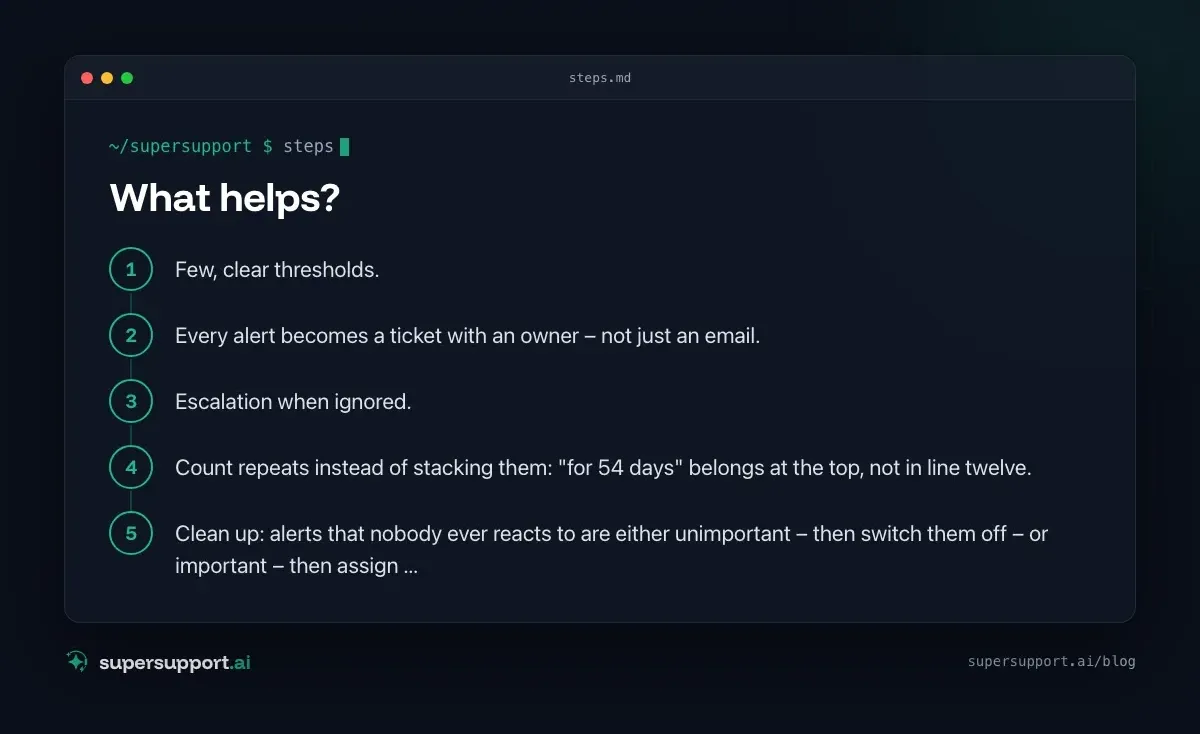
- Every alert becomes a ticket with an owner – not just an email.
- Escalation when ignored. In the MSP's helpdesk, the system sends a reminder after 60 minutes if a new ticket has not been picked up. The same principle belongs on alerts.
- Count repeats instead of stacking them: "for 54 days" belongs at the top, not in line twelve.
- Clean up: alerts that nobody ever reacts to are either unimportant – then switch them off – or important – then assign an owner.
Recurring alerts are often recurring problems – see Recurring IT problems.
And when the alert comes in?
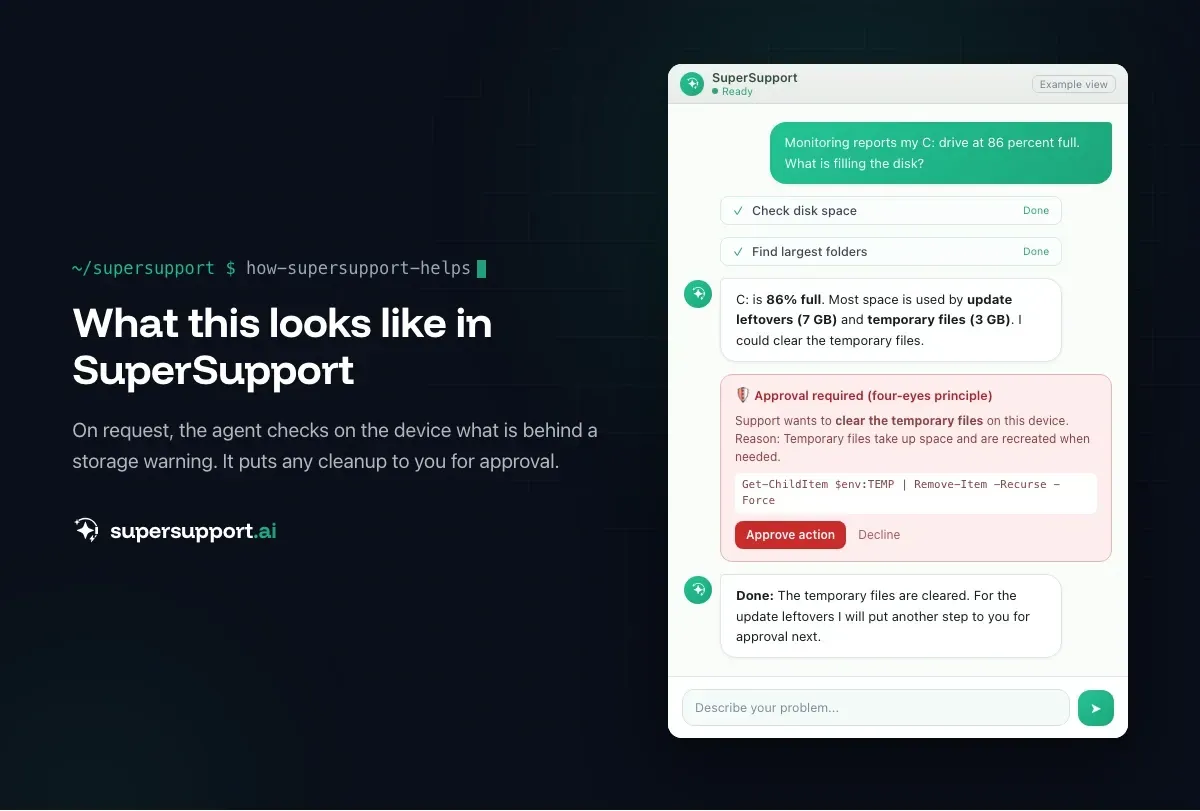
Then you need a finding. An alert is the start of a case, not its end. "Disk 86 percent full" says that something needs doing – not what. What is filling the disk? What can go? Why is it growing? See Disk full: what can go?. And if the case is passed on, the finding belongs in the ticket – see Escalation in IT support: what belongs in the handover ticket.

14 days free
IT support that fixes itself.
SuperSupport fixes IT problems right on the device, before they turn into tickets. Try it free for 14 days.
Start free trialWhich metrics show whether monitoring works?
- Time from alert to reaction.
- Share of alerts that lead to a ticket.
- Number of outages that came without a prior alert.
More in Helpdesk metrics.
How does SuperSupport help with this?
SuperSupport is not a monitoring tool. On request, though, the agent checks on the Windows or Mac device what is behind an alert – for example what is filling the disk or whether a service is hanging – and submits cleanup steps for approval. That turns "86 percent full" into a finding. For IT teams and MSPs.
Frequently asked questions
What is IT monitoring?
The automatic monitoring of servers, workstations, network devices and services. When thresholds are exceeded – for example disk too full, device unreachable, backup failed – an alert is raised.
What should an SMB monitor?
At a minimum: backups, free storage on servers and important workstations, reachability of servers, NAS and the internet connection, expiry dates of certificates and licenses. Plus the state of disks and volumes.
Why are alerts often useless?
Because nobody is responsible or too many alerts come in. An alert that sits in a digest email every day eventually stops being read – even if it is important.
How do you prevent alert fatigue?
Few, clear thresholds; alerts with an owner and a deadline; escalate repeats instead of stacking them; switch off alerts nobody needs.
How does SuperSupport help with this?
SuperSupport is not a monitoring tool. On request, though, the agent checks on the device what an alert means – for example what is filling the disk – and submits cleanup steps for approval.
14 days free
IT support that fixes itself.
SuperSupport fixes IT problems right on the device, before they turn into tickets. Try it free for 14 days.
Start free trialNico Haslberger is Co-Founder & CEO of SuperSupport.ai. With years of experience as an IT technician, he knows the problems in IT support first-hand: from overloaded help desks to recurring tickets that slow teams down. That knowledge is built into every feature of the platform today. He makes sure SuperSupport.ai solves exactly the problems he experienced himself for years.
This article was created with AI assistance and editorially reviewed.
Related Articles
What Employees Really Ask IT Support
We reviewed our AI agent's chats. The top topics are unspectacular, and almost all the answers are on the computer, not in the wiki.

Splashtop Alternative or Complement? Remote Support vs. AI
Splashtop is low-cost remote support with SOS for spontaneous help and AEM for endpoint management. When an alternative fits and when AI complements it.
Zammad Alternative or Add-On? Ticket System vs. AI
Zammad is an affordable open-source ticket system from Germany, from €7 per agent. When an alternative fits and when AI support on the device adds to it.